Adding PCIe NVME adaptor to X570 TUF Gaming?

Associate
Joined
6 Jan 2003
Posts
745
Hi

I have an Asus X570 TUF Gaming WiFi with 5800X3D and RTX5080. Both NVME slots are used and I wanted to add a 3rd. As it'll be used for image processing, can I use the 2nd PCIe big slot to add an adaptor? Would this affect the 5080 performance? Or should I just stick to a SATA drive for the extra storage? Did some googling and the the 2nd x16 slot is actually only x4 and runs off the chipset, not the CPU like the main slot? If that's the case and my GPU won't be affected, are there any recommendations for adaptors?

Thanks

Andy

 
Hi

I have an Asus X570 TUF Gaming WiFi with 5800X3D and RTX5080. Both NVME slots are used and I wanted to add a 3rd. As it'll be used for image processing, can I use the 2nd PCIe big slot to add an adaptor? Would this affect the 5080 performance? Or should I just stick to a SATA drive for the extra storage? Did some googling and the the 2nd x16 slot is actually only x4 and runs off the chipset, not the CPU like the main slot? If that's the case and my GPU won't be affected, are there any recommendations for adaptors?

Thanks

Andy
Just to say I checked the user manual and agree with your findings. It would run the (second) PCIEx16_2 slot at x4. :)
 
thats the same board im using and yes that slot is x4 which is actually exactly what you want for a nvme drive
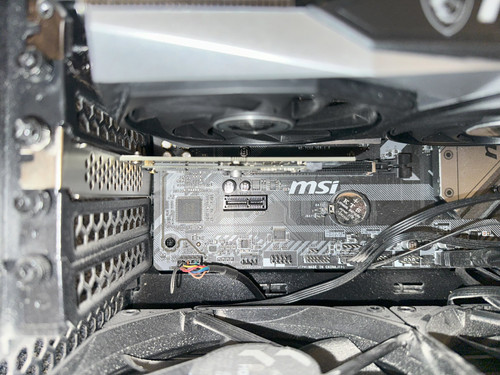
one thing though is at least in my build that slot would put the drive right in front of the gpu fans and possibly compromise the gpu cooling so if i was going to do it [which i very much was about to but decided im going to go am5 instead] id use a riser cable to move the nvme adapter out of the way of the gpu intake fans but thats more me being uber para about airflow in my pc probably wont be an issue tbh
but yes that slot is pretty much ideal to stick a m.2 on
have you got hte wifi or non wifi version? [just out of interest no particular reason nmine is the wifi model and thus has one less pcie x1 slot not that this is remotely relevant lol]
 
thats the same board im using and yes that slot is x4 which is actually exactly what you want for a nvme drive
one thing though is at least in my build that slot would put the drive right in front of the gpu fans and possibly compromise the gpu cooling so if i was going to do it [which i very much was about to but decided im going to go am5 instead] id use a riser cable to move the nvme adapter out of the way of the gpu intake fans but thats more me being uber para about airflow in my pc probably wont be an issue tbh
but yes that slot is pretty much ideal to stick a m.2 on
have you got hte wifi or non wifi version? [just out of interest no particular reason nmine is the wifi model and thus has one less pcie x1 slot not that this is remotely relevant lol]

Thanks! I’ve ordered the Sabrent adaptor which is really short. Not much taller than the NVME.

Mine doesn’t have WiFi, I dont need it as my PC is always wired directly to my Unifi switch.
 
I run 4x NVMe drives (yes 4 drives not 4 lanes) in a similar 4x slot using QNAP QM2-4P-384 great way to utilise old NVMe drives into a cheap array for storage, sure they are running a lot slower than max but still faster than HDD or SATA SSDs.

Its price has gone up a bit since I bought mine a few years back used to be little over 100, but you can get the older 284 for a slow slot if you just want to use more NVMe and don't care about max performance.
 
Last edited:
I run 4x NVMe drives (yes 4 drives not 4 lanes) in a similar 4x slot using QNAP QM2-4P-384
That's a lot of money, even at the price you paid for it. The Asus Hyper M.2 card, which I use, is much better value.

It seems on an X570 chipset PCIE slot 2 is connected the the chipset at x4 and doesn't support bifurcation, so using an adapter which supports more than one M.2 drive would be pointless as only one NVMe would be useable.
 
Last edited:
That's a lot of money, even at the price you paid for it. The Asus Hyper M.2 card, which I use, is much better value.

I also have one of those in my threadripper, works great but is a terrible bit of hardware so noisy, only works because TR has all the lanes.

You don't use that in a x570 on 4 lanes as you would only drive 1 drive, the one I posted can because it has a PCie mux switch so can run 4 NVMe drives, that is 16 lanes, on 2, 4 or 8 lanes from the low spec desktop mobo, no bifurcation needed and of course why it would be slower and of course why it cost more because it is more than just some physical connections like the Hyper M2, so its value is of course far greater because one works in a crappy desktop the other does not :D

When I updated the M2 drives in my big machine I was able to move them down to my games machine without sacrificing PCie lanes on the GPU, I also have one of these on my x570 NAS so it has 6x NVME in fact so does my desktop, still 2 more to use :D Speed does not matter as I only have a 20Gb network but having more quiet lower power storage does.

EDIT - just realized that the slot I have got this card in with my old 1Tb NVMEs in on my mobo is only a Gen4 x2. so the QNAP card will be running gen 3 x2 :D getting similar speeds to what was posted above, plenty, still faster than Sata SSDs.
 
Last edited:
You don't use that in a x570 on 4 lanes as you would only drive 1 drive
So lets just ignore the thread title and post about your big machine with its big card.

Can you explain the second paragraph? Are you saying the Asus card can't handle 4 NVME drives at their full speed vs the QNAP card?
Edit: Read again and the QNAP card allows you to connect 4 drives to x4 slot without needing bifurcation. Can Windows see them without needing additional drivers?

I also have one of those in my threadripper, works great but is a terrible bit of hardware so noisy

The small fan can be turned off if you have good cooling.
 
Last edited:
My post is entirely relevant to the thread title of adding NVMe to an x570? I was just posting an alternative option that people may not have heard of, I appreciate it is not the cheap option but that doesn't take away from its utility if it is something you want/need.

The Asus card can handle full speed if you have 16 lanes to feed it, typically in a desktop gaming rig on mainstream platforms you don't have that luxury unless you game on HEDT.

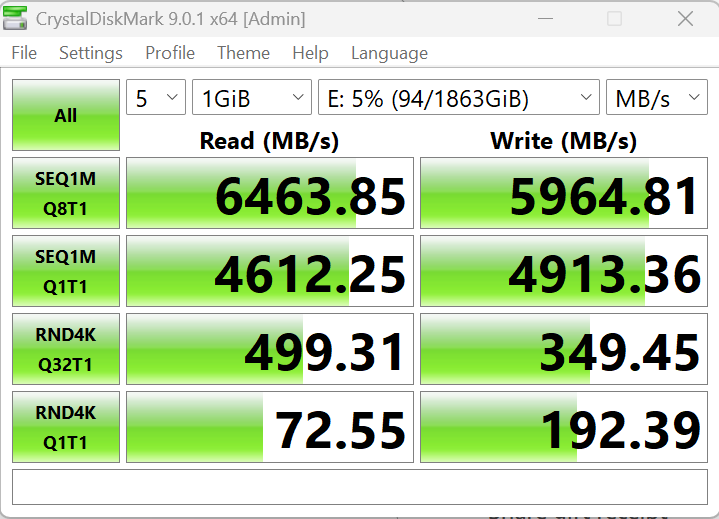
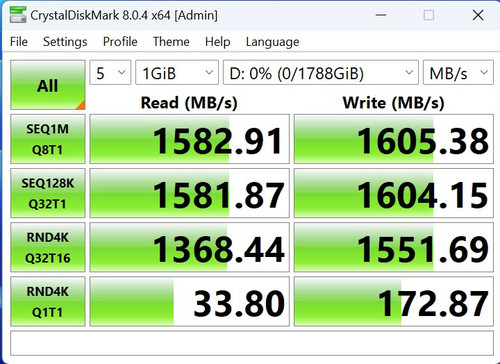
The QNAP can do full speed up to its Gen 3 x8 interface (bought years ago, there will likely be faster ones, not something I need or could use TBH) if you are using the drives independently they will obviously only be Gen3 x4, when you put 4 drives in it, regardless of the number of lanes in your motherboard they show up as 4 independent drives, no drivers required, you can do what you wish with them at this point, for my games and temp storage I just use a stripe with storage spaces to turn 4 drives into 1 big drive for example, I don't get any more performance out of this like you would with a Hyper M2 that has all the lanes as I am limited by my mobo or the cards physical interface but it is still decent.

A picture may help

IQR9mi_6M6R9TpLNfJrzoK6YAdu8Xca-Y0Ya4sx8M7bhHqk
 
Last edited:
Loads more about starting from much lower prices that qnap, from 60quid, looking for cards with the following chips for example there are other from the likes of asmedia too.

PEX8749/8747 for gen 3
PEX88048 for gen 4

There are even 8 drive cards.
 
Last edited:
Back
Top Bottom