Microsofts new native NVME driver - IO improvements

Associate
Joined
3 Oct 2014
Posts
1,786
EDIT : Microsoft have since stopped the update.

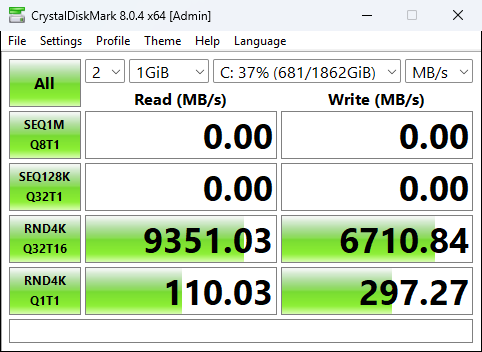
Just tried this and so far I have seen quite good improvements with 4K on the benchmarks.

** I would create a restore point / backup first just in case ! **
Just note, when rebooting before running a benchmark, I had to wait around 8 minutes for Windows Search Indexer to finish what its doing. I waited for a fair benchmark.

It requires KB5066835 to be installed. But this was released several months ago, and most people should have it.
It also requires Windows 11 24H2 or 25H2.


I have a 2TB SN8100 PCIe 5.0 drive.

Before.
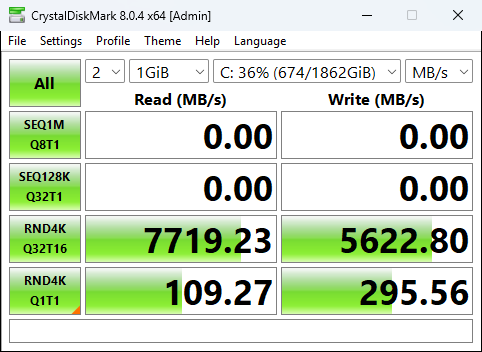
before2.png


After

after2.png


Using the script from below @aaronyuri this always ensures Safe Boot works afterwards, thanks !
** Make sure you run the PowerShell Console as Administrator **

I wrote a dirty PowerShell script that does everything for you. Save it as nvme.ps1 - usage below:

To enable the NVMe driver.
nvme.ps1 -EnableNvmeDriver
Run this once, reboot, and then run it again. It's not possible to obtain the GUIDs for safeboot until you have rebooted to utilise the native NVMe driver

To disable the NVMe driver, run:
nvme.ps1 -DisableNvmeDriver
Reboot to complete

Code:
param([switch]$EnableNvmeDriver,
    [switch]$DisableNvmeDriver)

if ($EnableNvmeDriver) {

    # add reg keys
    reg add HKEY_LOCAL_MACHINE\SYSTEM\CurrentControlSet\Policies\Microsoft\FeatureManagement\Overrides /v 1853569164 /t REG_DWORD /d 1 /f
    reg add HKEY_LOCAL_MACHINE\SYSTEM\CurrentControlSet\Policies\Microsoft\FeatureManagement\Overrides /v 156965516 /t REG_DWORD /d 1 /f
    reg add HKEY_LOCAL_MACHINE\SYSTEM\CurrentControlSet\Policies\Microsoft\FeatureManagement\Overrides /v 735209102 /t REG_DWORD /d 1 /f

    # get GUIDs of NVMe devices
    $guids = (Get-WmiObject -Query "SELECT * FROM Win32_PnPEntity WHERE PNPClass = 'NvmeDisk'").classguid
    $guids = $guids | select -Unique

    if ($null -eq $guids) {Write-Output "Restart your machine and run this script again to add the GUIDs and fix safeboot"}

    if ($guids) {
        # loop through each GUID and add the safeboot keys
        foreach ($guid in $guids) {
            reg add HKEY_LOCAL_MACHINE\SYSTEM\CurrentControlSet\Control\SafeBoot\Network\$guid /f
            reg add HKEY_LOCAL_MACHINE\SYSTEM\CurrentControlSet\Control\SafeBoot\Minimal\$guid /f
        }
    }

}

if ($DisableNvmeDriver) {
    reg delete HKEY_LOCAL_MACHINE\SYSTEM\CurrentControlSet\Policies\Microsoft\FeatureManagement\Overrides /v 1853569164 /f
    reg delete HKEY_LOCAL_MACHINE\SYSTEM\CurrentControlSet\Policies\Microsoft\FeatureManagement\Overrides /v 156965516 /f
    reg delete HKEY_LOCAL_MACHINE\SYSTEM\CurrentControlSet\Policies\Microsoft\FeatureManagement\Overrides /v 735209102 /f

}
 
Last edited:

Seems like a step in the right direction - thanks for sharing the article. Just so everyone is aware though, taken from the comments section:

"This is new functionality only available in Windows Server 2025 with the October update or later. It is not available in Windows 11, but certainly something we are evaluating."
 
Seems like a step in the right direction - thanks for sharing the article. Just so everyone is aware though, taken from the comments section:

"This is new functionality only available in Windows Server 2025 with the October update or later. It is not available in Windows 11, but certainly something we are evaluating."

It is possible on normal Windows versions with the registry edit I put in the post.

You will know once it is done, if you look in Device Manager, your drives will show under Storage Drives and no longer Disk Drives.
 
Last edited:
Would suggest more than a restore point
Before trying this
Full image backup should be done

If you're on a simple drive set up
May be OK

But this will cause drives to be re-enumerated
Ie drive id and position in the system
May get changed?

This could cause issues
With bitlocker, windows storage spaces, backup software,
File sync software are a few examples that
Come to mind
Though theres probably plenty more

Fair enough I have 5 x m2 drives
So probably not the typical end user
And i do use storage spaces,automatic file sync,
Backup software

Would be good to know
If this is reversible if something goes wrong
Ie would removing the reg edit restore any changed
Drive ids and system position to the previous values?

Assuming after a restart it hasn't caused something
That makes windows unbootable
 
Yeah normally i am all for
Trying things
Even when I know I shouldn't
Learned a great deal of my computer knowledge
By deliberately messing up windows
To see how to fix it

But if this re-enumerated all my drives
And drive letters
It would #### up all 5 of my m2 setups

If any of you guys happens to have
An intel optane drive
Would be very interesting to see what
This would do for it
 
I wouldn't beta test it but results are promising

Some reports of it breaking backups and breaking windows safe mode boot
 
I wouldn't beta test it but results are promising

Some reports of it breaking backups and breaking windows safe mode boot
Yeah that may be
As I mentioned earlier it re-enumerates
The drives and drive id gets changed
And drive places in system

So possibly trying to boot safe mode
Of a drive id that's changed
Or something similar
 
I wrote a dirty PowerShell script that does everything for you. Save it as nvme.ps1 - usage below:

To enable the NVMe driver:
Save the script as nvme.ps1 in, say, c:\temp
Open PowerShell as admin, run:
cd c:\temp
.\nvme.ps1 -EnableNvmeDriver


To disable the NVMe driver:
Save the script as nvme.ps1 in, say, c:\temp
Open PowerShell as admin, run:
cd c:\temp
.\nvme.ps1 -DisableNvmeDriver


Code:
param(
    [switch]$EnableNvmeDriver,
    [switch]$DisableNvmeDriver
)

if ($EnableNvmeDriver) {

    # add reg keys
    reg add HKEY_LOCAL_MACHINE\SYSTEM\CurrentControlSet\Policies\Microsoft\FeatureManagement\Overrides /v 1853569164 /t REG_DWORD /d 1 /f
    reg add HKEY_LOCAL_MACHINE\SYSTEM\CurrentControlSet\Policies\Microsoft\FeatureManagement\Overrides /v 156965516 /t REG_DWORD /d 1 /f
    reg add HKEY_LOCAL_MACHINE\SYSTEM\CurrentControlSet\Policies\Microsoft\FeatureManagement\Overrides /v 735209102 /t REG_DWORD /d 1 /f

    # get GUIDs of NVMe devices
    $guid = "{75416e63-5912-4dfa-ae8f-3efaccaffb14}"

    if ($guid) {
        # remove hardcoded GUID to network and minimal safe boot options
        reg add HKEY_LOCAL_MACHINE\SYSTEM\CurrentControlSet\Control\SafeBoot\Network\$guid /f
        reg add HKEY_LOCAL_MACHINE\SYSTEM\CurrentControlSet\Control\SafeBoot\Minimal\$guid /f

    }
}

if ($DisableNvmeDriver) {
    reg delete HKEY_LOCAL_MACHINE\SYSTEM\CurrentControlSet\Policies\Microsoft\FeatureManagement\Overrides /v 1853569164 /f
    reg delete HKEY_LOCAL_MACHINE\SYSTEM\CurrentControlSet\Policies\Microsoft\FeatureManagement\Overrides /v 156965516 /f
    reg delete HKEY_LOCAL_MACHINE\SYSTEM\CurrentControlSet\Policies\Microsoft\FeatureManagement\Overrides /v 735209102 /f

    # get GUIDs of NVMe devices
    $guid = "{75416e63-5912-4dfa-ae8f-3efaccaffb14}"

    if ($guid) {
        # add hardcoded GUID to network and minimal safe boot options
        reg delete HKEY_LOCAL_MACHINE\SYSTEM\CurrentControlSet\Control\SafeBoot\Network\$guid /f
        reg delete HKEY_LOCAL_MACHINE\SYSTEM\CurrentControlSet\Control\SafeBoot\Minimal\$guid /f

    }

} else {Write-Error "You must specify -EnableNvmeDriver or -DisableNvmeDriver";exit}

Edit: Safeboot works just fine if you use the script.

Edit 2: Interestingly, the GUID selected from WMI for the "NvmeDisk" class is the same for both devices (75416e63-5912-4dfa-ae8f-3efaccaffb14). This seems to be that the device enumeration refers to the driver GUID as the class GUID, not to the device itself. This is confirmed under HKLM\SYSTEM\CurrentControlSet\Enum\NVME - the GUID is the driver key, but the driver is suffixed with a 4 digit integer to reference the NVMe drive (0000 or 0001, for example).

Bearing that in mind, I have modified the script to only add unique values retrieved during the WMI query. I don't know why any other GUID would be referenced, but this may vary machine to machine before I hardcode it in. Can anyone confirm that the class GUID of their NVMe drives is listed as 75416e63-5912-4dfa-ae8f-3efaccaffb14? Run (Get-WmiObject -Query "SELECT * FROM Win32_PnPEntity WHERE PNPClass = 'NvmeDisk'").classguid and post the output here, if you would be so kind. If the driver GUID is hardcoded and not unique to each machine, I can hardcode it in the script and that removes the need to reboot.


Thanks to @Mcnumpty2323 for confirming the GUID is consistent across machines.
 
Last edited:
Run (Get-WmiObject -Query "SELECT * FROM Win32_PnPEntity WHERE PNPClass = 'NvmeDisk'").classguid and post the output here, if you would be so kind. If the driver GUID is hardcoded and not unique to each machine, I can hardcode it in the script and that removes the need to reboot.
that command isnt recognised for me

running mountvol.exe

or

GWMI -namespace root\cimv2 -class win32_volume | FL -property DriveLetter, DeviceID
gives me this
though i may be misunderstanding something

\\?\Volume{fede09ff-0000-0000-0000-100000000000}\
D:\

\\?\Volume{d303f89f-f97a-416c-b2fe-496562bde687}\
I:\

\\?\Volume{c57a2c2a-0000-0000-0000-100000000000}\
E:\

\\?\Volume{7637b4da-c5f3-4c4d-8c2c-7cbe72cfdea1}\
C:\

\\?\Volume{3c06d02b-d076-41b3-975a-dd97e76f254f}\
*** NO MOUNT POINTS ***

\\?\Volume{edc24b3c-d1c2-44ef-8050-7c1bba649a5f}\
F:\

\\?\Volume{eab08c7e-034d-4870-af99-bfa3bb53a799}\
*** NO MOUNT POINTS ***

\\?\Volume{6bbfe7f0-0000-0000-0000-100000000000}\
Z:\

\\?\Volume{515995e3-01de-4380-89c2-4018732ddad2}\
H:\

\\?\Volume{c4f767e1-0a58-11f0-9e32-28d0eaffcc0f}\
G:\

\\?\Volume{c57a2c2a-0000-0000-0060-253a77000000}\
J:\

\\?\Volume{6bbfe7f0-0000-0000-0060-11bfd1010000}\
*** NO MOUNT POINTS ***

\\?\Volume{70277788-5de6-4ab9-b714-69d9b0c9b805}\
*** NO MOUNT POINTS ***

\\?\Volume{1f8d4b33-9ecd-43d7-81d7-cd6aa4fa6450}\
*** NO MOUNT POINTS ***
 
Last edited:
yeah tried powershell as admin
Like this?

Code:
PS C:\> (Get-WmiObject -Query "SELECT * FROM Win32_PnPEntity WHERE PNPClass = 'NvmeDisk'").classguid

This should then be the output:

Code:
PS C:\ (Get-WmiObject -Query "SELECT * FROM Win32_PnPEntity WHERE PNPClass = 'NvmeDisk'").classguid
{75416e63-5912-4dfa-ae8f-3efaccaffb14}

It will fail to run if you don't encapsulate the cmdlet in brackets. The brackets will run that cmdlet, then .classguid outputs the classguid attribute from that object.
 
Like this?

Code:
PS C:\> (Get-WmiObject -Query "SELECT * FROM Win32_PnPEntity WHERE PNPClass = 'NvmeDisk'").classguid

This should then be the output:

Code:
PS C:\ (Get-WmiObject -Query "SELECT * FROM Win32_PnPEntity WHERE PNPClass = 'NvmeDisk'").classguid
{75416e63-5912-4dfa-ae8f-3efaccaffb14}

It will fail to run if you don't encapsulate the cmdlet in brackets. The brackets will run that cmdlet, then .classguid outputs the classguid attribute from that object.
this is what i have in powershell
only difference i see is you have PS C:\> then the command but i have
PS C:\Windows\system32> then the command ?

so i have the below and as admin

PS C:\Windows\system32> (Get-WmiObject -Query "SELECT * FROM Win32_PnPEntity WHERE PNPClass = 'NvmeDisk'").classguid

given my spelling abilities (lack of them)
and sometimes not actually registering
some things no matter how many
times i read it
perhaps i am not the ideal person for this lol
though am copying and pasting
but its still possible i am doing something wrong :(
 
this is what i have in powershell
only difference i see is you have PS C:\> then the command but i have
PS C:\Windows\system32> then the command ?

so i have the below and as admin


PS C:\Windows\system32> (Get-WmiObject -Query "SELECT * FROM Win32_PnPEntity WHERE PNPClass = 'NvmeDisk'").classguid

given my spelling abilities (lack of them)
and sometimes not actually registering
some things no matter how many
times i read it
perhaps i am not the ideal person for this lol
though am copying and pasting
but its still possible i am doing something wrong :(
The working directory won't have an affect upon the cmdlet running.

Do you have the NVMe driver enabled when it's run? You won't see any devices under the NvmeDisk PNPClass if using the SCSI driver.

It's all good - your assistance is appreciated!
 
The working directory won't have an affect upon the cmdlet running.

Do you have the NVMe driver enabled when it's run? You won't see any devices under the NvmeDisk PNPClass if using the SCSI driver.

It's all good - your assistance is appreciated!
i may actually have the samsung nvme driver
already installed on this windows installation
not sure if that will affect something?

give me 10 minutes or so
and will boot a different windows drive
 
Back
Top Bottom