


Associate
- Joined
- 3 Oct 2014
- Posts
- 1,783
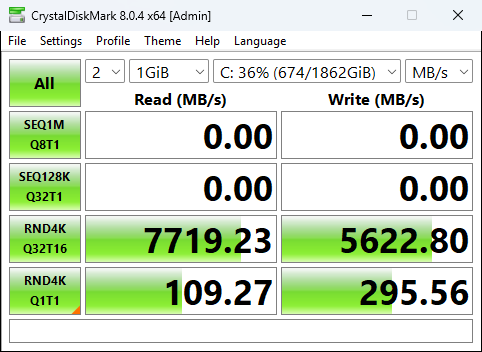
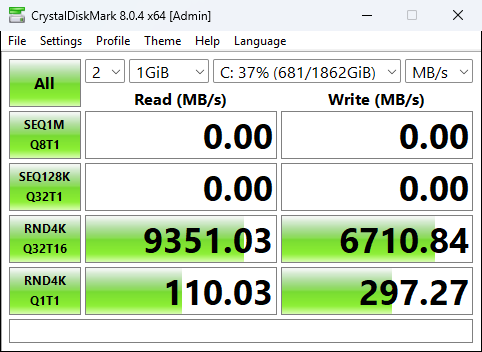
Just tried this and so far I have seen quite good improvements with 4K on the benchmarks.
I would create a restore point first just in case.
Just note, when rebooting before running a benchmark, I had to wait around 8 minutes for Windows Search Indexer to finish what its doing. I waited for a fair benchmark.
It requires KB5066835 to be installed. But this was released several months ago, and most people should have it.
It also requires Windows 11 24H2 or 25H2.
I have a 2TB SN8100 PCIe 5.0 drive.
Before.
After
I would create a restore point first just in case.
Just note, when rebooting before running a benchmark, I had to wait around 8 minutes for Windows Search Indexer to finish what its doing. I waited for a fair benchmark.
It requires KB5066835 to be installed. But this was released several months ago, and most people should have it.
It also requires Windows 11 24H2 or 25H2.
I have a 2TB SN8100 PCIe 5.0 drive.
Before.
After
Code:
reg add HKEY_LOCAL_MACHINE\SYSTEM\CurrentControlSet\Policies\Microsoft\FeatureManagement\Overrides /v 1853569164 /t REG_DWORD /d 1 /f
reg add HKEY_LOCAL_MACHINE\SYSTEM\CurrentControlSet\Policies\Microsoft\FeatureManagement\Overrides /v 156965516 /t REG_DWORD /d 1 /f
reg add HKEY_LOCAL_MACHINE\SYSTEM\CurrentControlSet\Policies\Microsoft\FeatureManagement\Overrides /v 735209102 /t REG_DWORD /d 1 /f
Last edited:

