


Associate
- Joined
- 3 Oct 2014
- Posts
- 1,786
EDIT : Microsoft have since stopped the update.
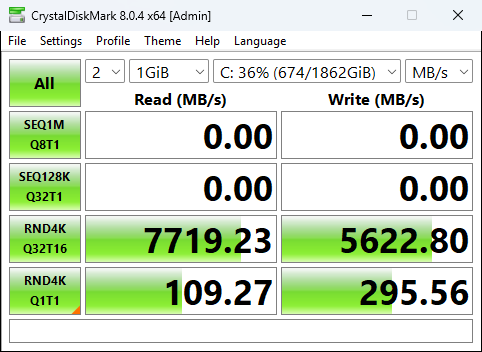
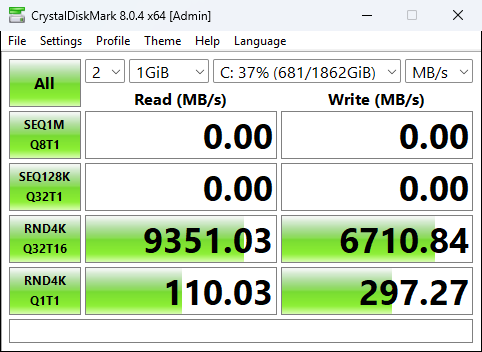
Just tried this and so far I have seen quite good improvements with 4K on the benchmarks.
** I would create a restore point / backup first just in case ! **
Just note, when rebooting before running a benchmark, I had to wait around 8 minutes for Windows Search Indexer to finish what its doing. I waited for a fair benchmark.
It requires KB5066835 to be installed. But this was released several months ago, and most people should have it.
It also requires Windows 11 24H2 or 25H2.
I have a 2TB SN8100 PCIe 5.0 drive.
Before.
After
Using the script from below @aaronyuri this always ensures Safe Boot works afterwards, thanks !
** Make sure you run the PowerShell Console as Administrator **
Just tried this and so far I have seen quite good improvements with 4K on the benchmarks.
** I would create a restore point / backup first just in case ! **
Just note, when rebooting before running a benchmark, I had to wait around 8 minutes for Windows Search Indexer to finish what its doing. I waited for a fair benchmark.
It requires KB5066835 to be installed. But this was released several months ago, and most people should have it.
It also requires Windows 11 24H2 or 25H2.
I have a 2TB SN8100 PCIe 5.0 drive.
Before.
After
Using the script from below @aaronyuri this always ensures Safe Boot works afterwards, thanks !
** Make sure you run the PowerShell Console as Administrator **
I wrote a dirty PowerShell script that does everything for you. Save it as nvme.ps1 - usage below:
To enable the NVMe driver.
nvme.ps1 -EnableNvmeDriver
Run this once, reboot, and then run it again. It's not possible to obtain the GUIDs for safeboot until you have rebooted to utilise the native NVMe driver
To disable the NVMe driver, run:
nvme.ps1 -DisableNvmeDriver
Reboot to complete
Code:param([switch]$EnableNvmeDriver, [switch]$DisableNvmeDriver) if ($EnableNvmeDriver) { # add reg keys reg add HKEY_LOCAL_MACHINE\SYSTEM\CurrentControlSet\Policies\Microsoft\FeatureManagement\Overrides /v 1853569164 /t REG_DWORD /d 1 /f reg add HKEY_LOCAL_MACHINE\SYSTEM\CurrentControlSet\Policies\Microsoft\FeatureManagement\Overrides /v 156965516 /t REG_DWORD /d 1 /f reg add HKEY_LOCAL_MACHINE\SYSTEM\CurrentControlSet\Policies\Microsoft\FeatureManagement\Overrides /v 735209102 /t REG_DWORD /d 1 /f # get GUIDs of NVMe devices $guids = (Get-WmiObject -Query "SELECT * FROM Win32_PnPEntity WHERE PNPClass = 'NvmeDisk'").classguid $guids = $guids | select -Unique if ($null -eq $guids) {Write-Output "Restart your machine and run this script again to add the GUIDs and fix safeboot"} if ($guids) { # loop through each GUID and add the safeboot keys foreach ($guid in $guids) { reg add HKEY_LOCAL_MACHINE\SYSTEM\CurrentControlSet\Control\SafeBoot\Network\$guid /f reg add HKEY_LOCAL_MACHINE\SYSTEM\CurrentControlSet\Control\SafeBoot\Minimal\$guid /f } } } if ($DisableNvmeDriver) { reg delete HKEY_LOCAL_MACHINE\SYSTEM\CurrentControlSet\Policies\Microsoft\FeatureManagement\Overrides /v 1853569164 /f reg delete HKEY_LOCAL_MACHINE\SYSTEM\CurrentControlSet\Policies\Microsoft\FeatureManagement\Overrides /v 156965516 /f reg delete HKEY_LOCAL_MACHINE\SYSTEM\CurrentControlSet\Policies\Microsoft\FeatureManagement\Overrides /v 735209102 /f }
Last edited:




