• Competitor rules

    Please remember that any mention of competitors, hinting at competitors or offering to provide details of competitors will result in an account suspension. The full rules can be found under the 'Terms and Rules' link in the bottom right corner of your screen. Just don't mention competitors in any way, shape or form and you'll be OK.

3700x question


Indeed, and is the basis of my point that AMD has not given information on "safe" static voltages. So continue with caution.

It is perfectly okay if your CPU is periodically using 1.4-1.5V to achieve boost frequencies, and you should see dips into sub-1.0V as the CPU goes into idle. These dips may be brief, and that's okay. Load voltages of around 1.2-1.3V are perfectly okay also. This is the processor working as expected. Ryzen is a highly dynamic system, with up to 1000 voltage and clockspeed changes every second. You will see a lot of bouncing around as you work with your system.

I anticipate that many people are now trying Ryzen processors for the first time (because they're awesome), and may not understand what to expect versus whatever CPU they had previously. You want to know if what you're seeing is "normal," but may not know what "normal" looks like. I get it! I want to assure you that the CPU needs voltages to boost, and voltages of 1.2-1.5V are perfectly ordinary for Ryzen under load conditions (games, apps, whatever). Even at the desktop, Windows background tasks need love too! You'll see the CPU reach boost clocks and voltages, too. But if your voltage is well and truly stuck, that's what I'm trying to troubleshoot.

 
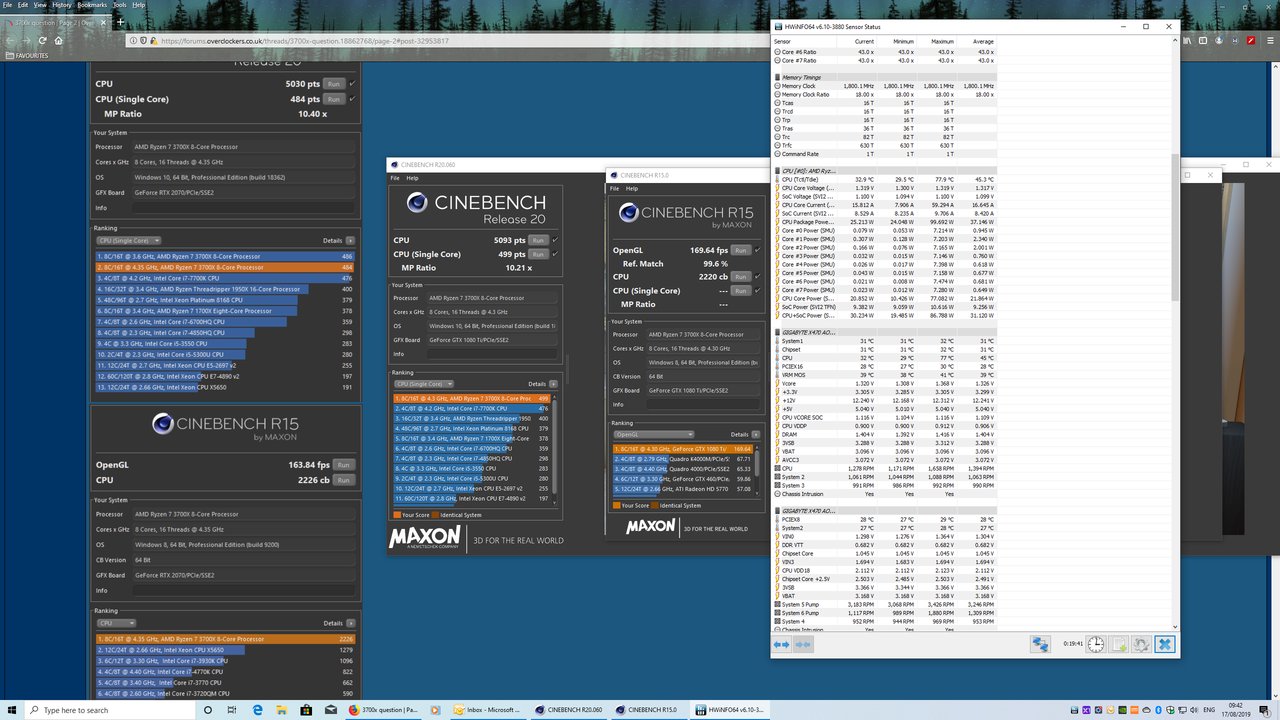
After somne testing using Ryzen Master, ive set my bios to 43.50, 1.37v. Seems the 1.0.0.3ab bios is stopoping my chip from hitting 4.4 single thread so decided to go with an All core OC but dont want to push the volts too much.

9tcH1II.png

Tjc2F8j.png

NF21vjQ.png
 
After somne testing using Ryzen Master, ive set my bios to 43.50, 1.37v. Seems the 1.0.0.3ab bios is stopoping my chip from hitting 4.4 single thread so decided to go with an All core OC but dont want to push the volts too much.

9tcH1II.png

Tjc2F8j.png

NF21vjQ.png
Looks like a very good chip although your R20 score seems low for that overclock.
Try running it with high priority in the task manager.
The screen might freeze while it's running but that's normal.
 
After somne testing using Ryzen Master, ive set my bios to 43.50, 1.37v. Seems the 1.0.0.3ab bios is stopoping my chip from hitting 4.4 single thread so decided to go with an All core OC but dont want to push the volts too much.

9tcH1II.png

Tjc2F8j.png

NF21vjQ.png

Nice, under heavy stress, make sure its drooping to around about 1.325v, level 5 on my MSI board for CPU LLC setting, you can test it by opening CPU-z and running something like IBT AVX. https://www.techspot.com/downloads/4965-intelburntest.html

Strange CPU's these 3000 series are though, the clock wall is pretty easy to find when overclocking these, I tried 4.4ghz first....no stable, down to 4.35ghz.........not stable.........down to 4.325ghz, runs stress tests all day long.

My Bioses Digital All Power Settings: https://imgur.com/uNxiRkh
 
Last edited:
If you have everything setup correctly, then try exiting any software you have running, for instance my Thermaltake TT Plus software stops my voltage from dropping, I guess its polling to often, if I exit the program, which is a start up program, my voltage drops as recommended, however, im manual overclocking now, with a hard set voltage so it doesnt anymore, but thats what used to stop it droping.
 
If you have everything setup correctly, then try exiting any software you have running, for instance my Thermaltake TT Plus software stops my voltage from dropping, I guess its polling to often, if I exit the program, which is a start up program, my voltage drops as recommended, however, im manual overclocking now, with a hard set voltage so it doesnt anymore, but thats what used to stop it droping.
mine is manually set voltage so maybe thats the answer....just didnt know how z10m has done it if he has a set voltage which I assume he must have to get 4.3 oc
 
mine is manually set voltage so maybe thats the answer....just didnt know how z10m has done it if he has a set voltage which I assume he must have to get 4.3 oc
Theres an option in the bios under amd overclocking > manual overclock where it asks for the max frequency and the max voltage in mv so 1300 = 1.3v. That way it will down clock when idle
 
If you have everything setup correctly, then try exiting any software you have running, for instance my Thermaltake TT Plus software stops my voltage from dropping, I guess its polling to often, if I exit the program, which is a start up program, my voltage drops as recommended, however, im manual overclocking now, with a hard set voltage so it doesnt anymore, but thats what used to stop it droping.

ah ok i just closed all the programs in the show icons task bar and im now getting 0.948 volts and core speed is also dropping as well so it must be something running in the background will need to investigate which program it is. Thanks for your help
 
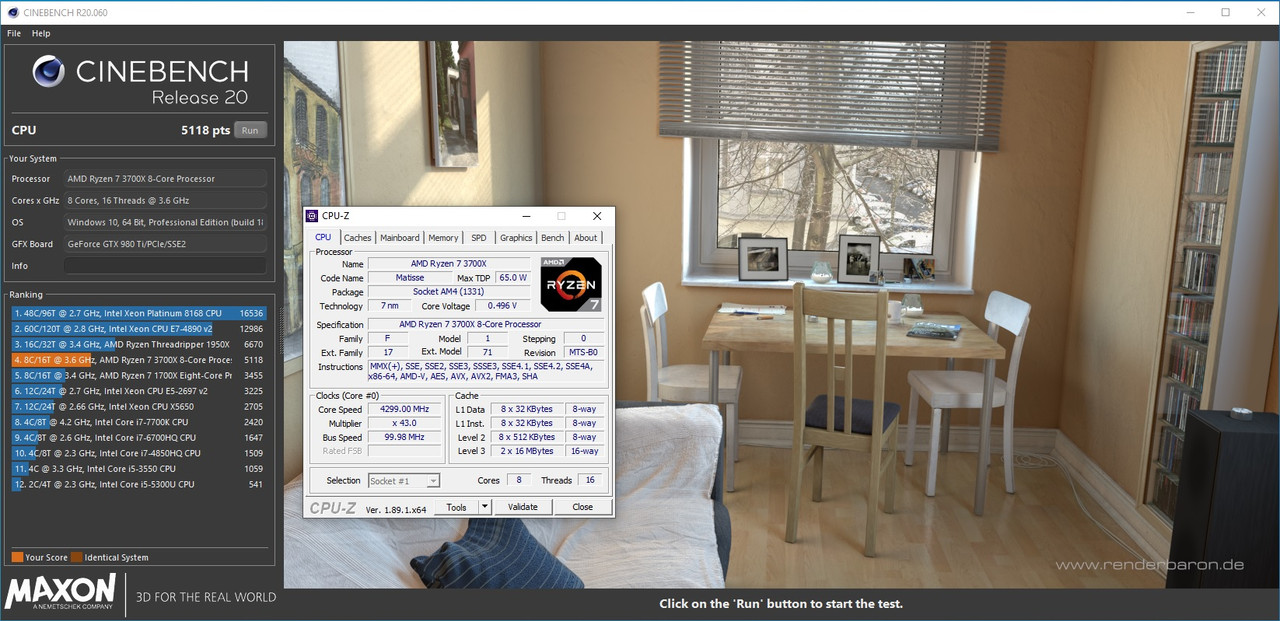
Re ran R2.0 but killed a few background tasks and my hardware moniitors, also set the memory CMD rate from 2T too 1T and set windows to use the Ryzen High Performance plan. Got a slight boost:
mdcFkb8.png
 
Back
Top Bottom