Bluescreen - Graphics Card Problem?

Associate
Joined
14 Oct 2008
Posts
416
I built this PC in August last year and haven't had any problems until recently. I haven't been doing anything particularly resource intensive recently and don't remember installing any new software/hardware before it happened (other than a windows update for Windows defender).

But the problem:
I was just browsing a few sites with Firefox and the screen started going really dodgy, getting blocky portions of black which kept moving around the screen etc. After about 5 or 10 seconds I got this bluescreen.
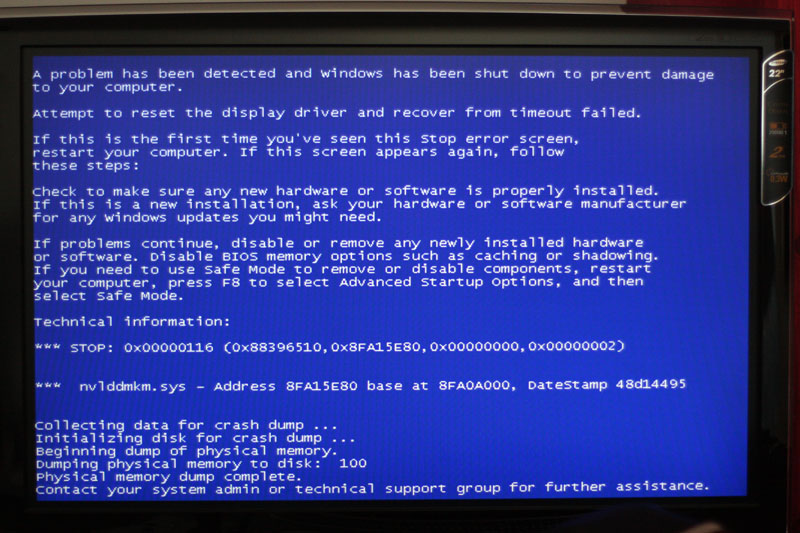
BlueScreen.jpg


I turned the pc off by the power button for a second and then back on, I could hear the fans running but couldn't see anything on the screen. I then totally turned it off at the power supply for a few minutes and turned it back on.

It's been working fine again for a few days but this morning I got up and had the same thing when I tried to turn it on (just a totally black screen as if the dvi cable was unplugged). Turned it off for a few minutes and then back on and it's been ok so far.

Any idea what could be causing this? I thought it may have been a heat issue at first, but the problem happening straight away when the pc had been off all night makes me think it isn't.

Here's the main spec:
Abit IP35 Pro Motherboard
Intel Q6600 Quad Core @ 3.3Ghz (used the instructions in the overclockers bundle to get the guaranteed OC)
4GB (4x1GB) OCZ PC-8500 RAM
Tuniq Tower Cooler for the CPU
OcUK GeForce 8800 GT 512MB GDDR3 HDTV/DVI (PCI-Express) - Retail

Apologies for the length of this post. I wanted to try and give as much information as possible.

Thanks in advance.
 
Last edited:

Ah! I looked the first time it happened and couldn't see anything. Checked around the time it happened today and there's loads of stuff. All these in the space of about a minute:

EventLog

There seems to be quite a few with EventID 14:
The description for Event ID 14 from source nvlddmkm cannot be found. Either the component that raises this event is not installed on your local computer or the installation is corrupted. You can install or repair the component on the local computer.

Oh, I forgot to say I'm on 32bit Vista.
 
Have you tried uninstalling and wiping graphics drivers then installing latest? I had a similar issue with nvidia graphics one with an 8800GT
 
have you got a spare dvi cable/ video card you can try?

Unfortunately not :( Although I have got a second monitor plugged in with a VGA cable/adapter and that wasn't working either.


Have you tried uninstalling and wiping graphics drivers then installing latest? I had a similar issue with nvidia graphics one with an 8800GT

Haven't tried that yet nope, I'll give it a try now.
 
Last edited:
I've installed the latest drivers. I guess I'll just have to play the waiting game now. Cheers for the responses guys, fingers crossed I won't need post in this thread again but I've got a funny feeling I will :p
 
Mine has been doing similar recently.

Went for a new HD and a new install - but it happened again.

Now it wont even boot - just hangs on a black screen and wont post.


New PSU arrives tomorrow - so will see if its that. If not the general consensus seems to be its the motherboard - so a rebuild it will be. My PC is about 2 years old tho.
 
I've installed the latest drivers. I guess I'll just have to play the waiting game now. Cheers for the responses guys, fingers crossed I won't need post in this thread again but I've got a funny feeling I will :p

Even if it works let us know so any others who have similar problems have a trail to follow :)
 
Just a quick update on this. I updated the drivers and all seemed well for a few days until this just popped up:
"Display driver nvlddmkm stopped responding and has successfully recovered."

Luckily it didn't seem as bad this time. Just sorted itself out without me needing to restart. Looks like it isn't properly resolved though :(
 
A friend had the BSOD and I had a look at it, not that I know much, but I looked anyway.
The only that worked it for me was to disable (msconfig) all at startup and this worked.
 
Clean the inside of your PC and re-seat your card.
Run memtest.

Problems occuring when you have TRUTHFULLY not changed anything will be a result of heat or some kind of fault (ram or videocard in this case).
 
Clean the inside of your PC and re-seat your card.
Run memtest.

Problems occuring when you have TRUTHFULLY not changed anything will be a result of heat or some kind of fault (ram or videocard in this case).

Cleaned it out today and I'm going to run memtest overnight tonight. Thanks :)
 
Got another bluescreen just now :(

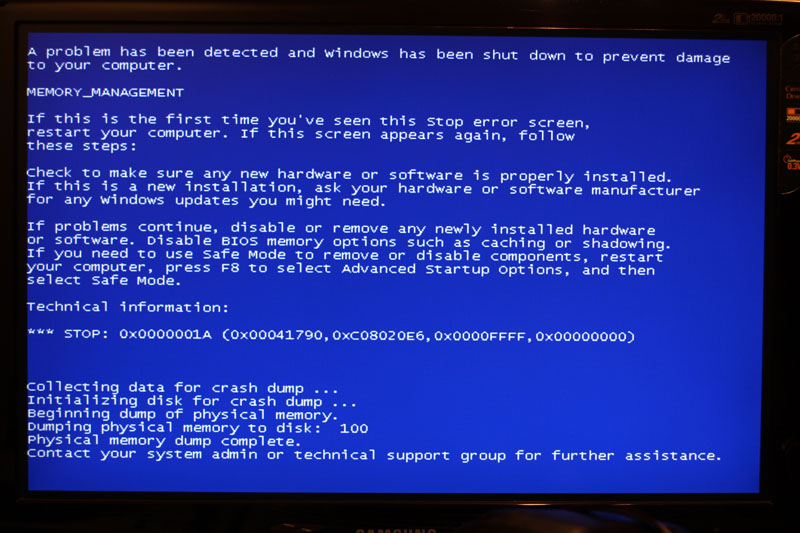
It's getting progressively worse which makes me worried that's it's probably a hardware fault. I'm just running memtest86+ now and I'm going to try and leave it going overnight if possible. Kinda hoping it comes up with loads of errors so I know what the problem is (possibly).

I've got a weird feeling it may be a power supply issue though? After the bluescreen I tried to turn the pc back on. All the fans came on at full speed and just stayed on full but no output was going to the monitor (the fans usually slow down after a couple of seconds). The cpu temps seemed fairly normal before it bluescreened but I'm not monitoring any of the other temps at the minute.

Bluescreen2009-02-24.jpg
 
Last edited:
memory management eh! had that a few times when my pc didnt have good cooling, my gfx card was never fried or damaged, but the ram seemed to be effected... possibly the ram is getting problems from too much voltage or heat.
good luck when u wake up, memory tests never showed anything wrong with my ram, but the system wudnt boot with certain individual sticks, you could try the old fashioned way of testing using each stick seperately, seeing if it bluescreens with a single stick.
obviously its a pain with 4gb of ram, but if youre trying it on a high end game it shudnt take to long to get a bluescreen on effected ram.
id say its probably 3gb work and 1gb shot if youre lucky ^_^
 
memory management eh! had that a few times when my pc didnt have good cooling, my gfx card was never fried or damaged, but the ram seemed to be effected... possibly the ram is getting problems from too much voltage or heat.
good luck when u wake up, memory tests never showed anything wrong with my ram, but the system wudnt boot with certain individual sticks, you could try the old fashioned way of testing using each stick seperately, seeing if it bluescreens with a single stick.
obviously its a pain with 4gb of ram, but if youre trying it on a high end game it shudnt take to long to get a bluescreen on effected ram.
id say its probably 3gb work and 1gb shot if youre lucky ^_^

Typical! The whole street had a power cut last night so I didn't get to see any results in the morning. haha

I've tested each stick individually today and the pc boots fine with each. So I'm going to try running for probably a week or so with each stick on its own and see if I can track it down any further :(

I hate hardware sometimes.
 
Last edited:
haha you and me both buddy! good luck with it! basically my pc came with like 2 fans, the heatsink and frontend fan, now because i bought the black edition amd 3.2ghz 6400+ it caused a lot of heat, they are sposed to come with no heatsink and you buy a decent one, but i was given a stock amd one and sent on my way, this caused overheating, ram fries, mobo destruction, eventually they replaced my mobo and i fitted extra fans, now its pretty good but still runs hot, getting new heatsink from here ^_^

morale of my story is if you have a 95nm cpu maybe thats what is killing your ram?
maybe get a ram cooler if the ram is shot, or just more airflow in the case!
ive got 6 fans running, the side off but i still get heats of 60celcius on my cpu, so its gonna take mega heatsink to tone him down XD

i just pray to jebus it isnt ur gfx card... have u tried running a load with the single sticks?
if it isnt single sticks then a wild card could be that it happens with 2 sticks, but that gets me thinking, maybe the ram SLOT is acting up, try with 2 sticks, but move the 2nd stick to slot 2, 3, 4 to test each slot for it, obviously if it doesnt happen with one stick, whos to say it wont with another, trial and error my friend!
 
Ok I'm really stumped by this now! I've tested each stick individually in slot 1 for a few days each. That all worked fine. I then tested a stick in each of the slots and that worked fine too.

I just seem to be getting problems with all 4 sticks in. I've reset the BIOS to defaults and the cpu is running at around 25-30 idle and 40 at full load. The problem occurred with 4 sticks literally just after I'd booted up so I think I can assume it's not a heat issue?

Not sure what else to try now though. Very annoying.
 
i doubt this could be the reason but i am runnign 4 x 1GB ram and was having crashes in games. And that Video driver error on windows that it has been recovered ran mem test doe 10 HOURS came up with nothing.

So i posted some Bios and CPU-z screen shots and everyone who replied was very helpful and haven't had a single problem since.

I had to change some timings and other stuff (OCZ forums helped me)

and upped the Memory Voltage to 2.13V and upped the NB to 1.2 V.

We will see how i get on when i try Overclocking my E7400
 
Back
Top Bottom