

You are using an out of date browser. It may not display this or other websites correctly.
You should upgrade or use an alternative browser.
You should upgrade or use an alternative browser.
Budget Build
- Thread starter HPTL7
- Start date
More options
Thread starter's posts
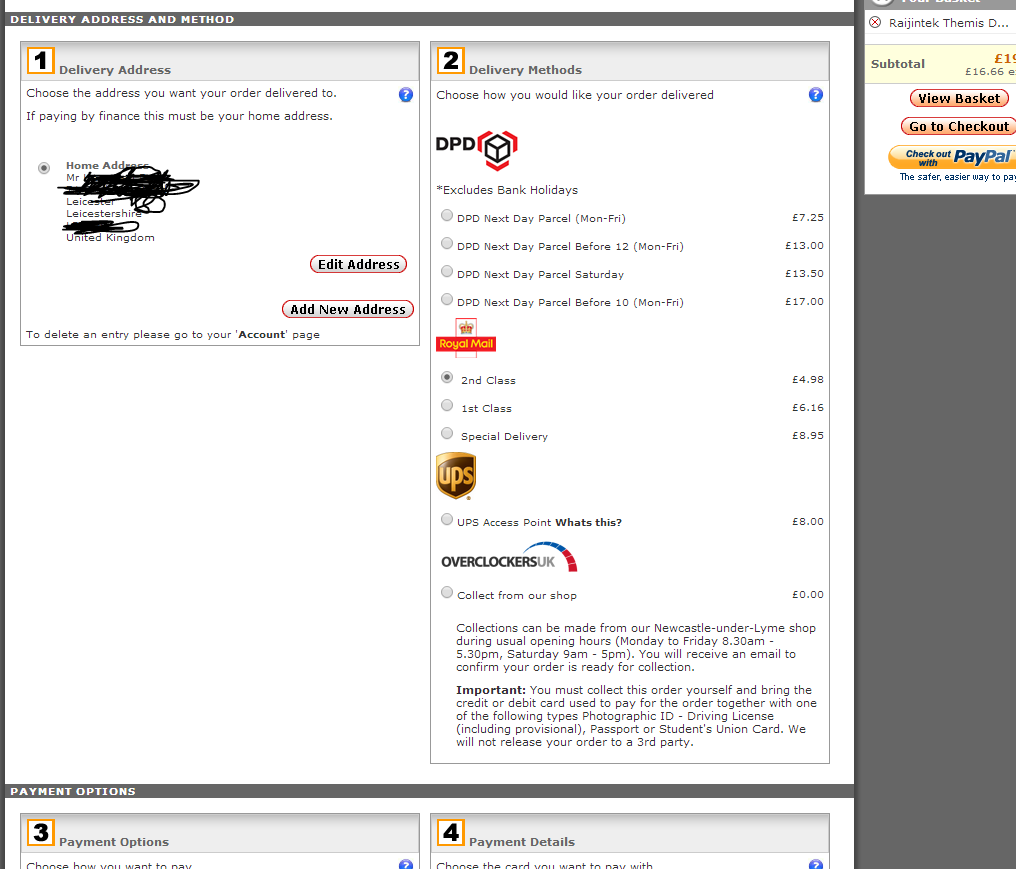
Go to your account on overclockers.co.uk
- on the left, you and your account
- go to "forums account" on that page
- log in
- it should say you qualify for free shipping or similar
- go to checkout and win
Thanks a lot.
Total win!


Soldato
- Joined
- 1 May 2003
- Posts
- 11,224
YOUR BASKET
1 x Samsung 120GB SSD 840 EVO SATA 6Gb/s Basic - (MZ-7TE120BW) £68.99
1 x Sapphire Radeon R7 240 Boost 4096MB GDDR3 PCI-Express Card £65.99
1 x Kingston HyperX 8GB (2x4GB) PC3-14900C9 1866MHz Dual Channel Kit - Black/Red (HX18C9BRK2/8-OC) £64.99
1 x Intel Pentium K Anniversary G3258 Socket LGA1150 Processor - Retail £52.99
1 x Asrock H81 Pro BTC Intel H81 (Socket 1150) ATX Motherboard £32.99
1 x Zalman ZM 450W GS '80 Plus' Power Supply £29.99
1 x Zalman T2 Plus Mini-Tower USB 3.0 - Black £19.99
Total : £345.53 (includes shipping : £8.00).


1 x Samsung 120GB SSD 840 EVO SATA 6Gb/s Basic - (MZ-7TE120BW) £68.99
1 x Sapphire Radeon R7 240 Boost 4096MB GDDR3 PCI-Express Card £65.99
1 x Kingston HyperX 8GB (2x4GB) PC3-14900C9 1866MHz Dual Channel Kit - Black/Red (HX18C9BRK2/8-OC) £64.99
1 x Intel Pentium K Anniversary G3258 Socket LGA1150 Processor - Retail £52.99
1 x Asrock H81 Pro BTC Intel H81 (Socket 1150) ATX Motherboard £32.99
1 x Zalman ZM 450W GS '80 Plus' Power Supply £29.99
1 x Zalman T2 Plus Mini-Tower USB 3.0 - Black £19.99
Total : £345.53 (includes shipping : £8.00).

Associate
- Joined
- 18 Jul 2014
- Posts
- 42
- Location
- United Kingdom
I'm going to get that atx mobo which I specd by accident before and get a bitfenix nos for it. I like the look of it and of course the price.
Edit - bitfenix neos*
The NEOS is a fantastic budget case, just sayin

One more question
If i were to buy the ssd on its own. Which cables would i need to buy? What would be best for performance? or would any cable work with same performance.
Thanks.
The motherboard will come with at least two SATA data cables. And the PSU should come with Sata power connectors. If you ever need more data cables, then something like this with 6Gb/s transfer rate:
http://www.overclockers.co.uk/showproduct.php?prodid=CB-078-AK
Even a 3Gb/s one would be okay but might as well get the latest with 6.
One more question
If i were to buy the ssd on its own. Which cables would i need to buy? What would be best for performance? or would any cable work with same performance.
Thanks.
Your mobo should come with at least 2 sata 6GB cables, so you have 1 for the hdd and 1 for the ssd. The power you get from the Psu. Read your manuals for further advice and info.
Don't forget, when installing the OS to the ssd, make sure AHCI is enabled in the bios. Then once the OS is installed, connect your hdd.

Your mobo should come with at least 2 sata 6GB cables, so you have 1 for the hdd and 1 for the ssd. The power you get from the Psu. Read your manuals for further advice and info.
Don't forget, when installing the OS to the ssd, make sure AHCI is enabled in the bios. Then once the OS is installed, connect your hdd.
Can i do this?
Connect ssd with existing build.
Start windows and boot from windows install disc and select to install on ssd.
then when new build comes, i connect the ssd to that.
Thanks.
Is there any way i can find out when this will be back in stock?
http://www.overclockers.co.uk/showproduct.php?prodid=CA-180-BX&groupid=2362&catid=2277
http://www.overclockers.co.uk/showproduct.php?prodid=CA-180-BX&groupid=2362&catid=2277
Anyone?
Is there any way i can find out when this will be back in stock?
http://www.overclockers.co.uk/showpr...362&catid=2277
Is there any way i can find out when this will be back in stock?
http://www.overclockers.co.uk/showpr...362&catid=2277
Contact Customer Service in the forum;-
http://forums.overclockers.co.uk/forumdisplay.php?f=116
or ring 'em up
http://forums.overclockers.co.uk/forumdisplay.php?f=116
or ring 'em up
Contact Customer Service in the forum;-
http://forums.overclockers.co.uk/forumdisplay.php?f=116
or ring 'em up
Thanks. I rang them. Next Tuesday/Wednesday
If i purchase this case : Antec 302 Three Hundred Two Ultimate Gaming Case - Black
http://www.overclockers.co.uk/showproduct.php?prodid=CA-174-AN
Then would the usb 3.0 header cable go straight into the motherboard or would i need some sort of converter?
http://www.overclockers.co.uk/showproduct.php?prodid=CA-174-AN
Then would the usb 3.0 header cable go straight into the motherboard or would i need some sort of converter?