• Notice regarding image hosts and attachments. See here.

Dead PC

Associate
Joined
21 Sep 2006
Posts
168
Location
Whittlesey
Hi All,

I'm hoping someone can offer some advice. My PC suddenly died while using it. Had a look inside but couldnt see anything untoward so started to troubleshoot. Disconnected all major bits just leaving the motherboard, cpu and ram connected and attempted to power up - no dice

I only had a 300w PSU i could use to test. plugged it in with no GPU connected and it did spin up but obviously no display so i've come to the conclusion its the PSU.

It's a corsair GS700 (700w) PSU. any tricks i can undertake to kick this PSU back into life?

Many thanks in advance.
Richard

 
It's a corsair GS700 (700w) PSU. any tricks i can undertake to kick this PSU back into life?
You wouldn't want to if it's died. You don't want to temporarily resuscitate a failing PSU that could then take out the rest of your components.

If it is the PSU be thankful the fail-safes did their job and didn't take any other components out.

If it's as old as i think it is it had a fair shake - time to buy a new one (as long as you're as sure as you can be it's at fault).
 
As already said; if it is the psu, that's not something you want to try and kick back into life. Just buy a new one with a good rating.
 
There is a very small chance that the fuse in the plug as blown - if you can, check this. Although if it's blown, I'd be wondering what caused it to blow...
 
Take the psu out and connect just a couple of fans to it and do the paperclip test. If it doesn't work then it's dead. There's a nice guide here with pictures on how to do the test. The GS is one of their poorer series and only has a 3 year warranty which has probably run out by now. Buy a decent psu this time.
 
Despite of Corsair's quality brand image GS-serie PSUs use cheap capacitors so if it's as old as your other parts would consider it behaving as planned.
 
Cheers all. It's definately the PSU. I bought this PC whole from facebay about two years ago. The PSU is about 4 years old. Better get shopping. Thanks again for the assistance.
 
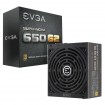
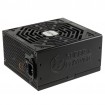
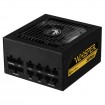
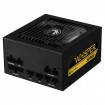
Some choices - be warned the Bitfenix has a large shroud over the 24 pin (you may think it ugly) if you have a windowed case.

A 550W is suffice and they all come with decent warranties: Super Flower 5 years and Bitfenix and EVGA 7 years (EVGA reviewing very well).

My basket at Overclockers UK:


​
 
Hey guys I should make my own thread but the same thing has kinda happened to me with my pc not turning on... Was very weird what happened since I was on it like 2 hours before and everything was fine then I tried turning on 2 hours later and literally just won't start..is there anything how I can diagnose what the problem is saving me taking the big machine back to the shop?
 
Last edited:
Hey guys I should make my own thread but the same thing has kinda happened to me with my of not turning on... Was very weird what happened since I was on it like 2 hours before and everything was fine then I tried turning on 2 hours later and literally just won't start..is there anything how I can diagnose what the problem is saving me taking the big machine back to the shop?
What's your full spec?

Initially, I would run through some of the basics checks first in the hope that one works or at least rule them out:
  • Double/triple check all your connections and hardware is seated properly - ideally remove and reseat all of them - including SATA leads etc...
  • Check the kettle lead is securely fitted into the back of the PSU - sometimes gets overlooked.
  • If using an extension lead try plugging PC directly into the wall socket - or a different extension lead if this isn't possible.
  • Clear the CMOS
  • If above fails try a skeleton setup - 1 stick memory in alternate slots, CPU, gfx card and nothing else (or onboard GFX if you have it). See if it boots.
  • Check motherboard is securely fitted - no movement.
  • Remove front panel header leads and short the power pins to see if it boots - to rule out the case connectors.
 
I also had this problem a few days ago.
PC worked in the morning, came home from work and PC dead. Fortunately i had a spare PSU to try and got my computer running again.
Thing is though That i did the jump start trick on the "dead" PSU and it worked, so i put it back in the computer and everything is working again.

I don't want to hijack this thread as i have my own here https://forums.overclockers.co.uk/threads/psu-reassurance.18790352/ if anyone would like to offer any advice on if i should keep or replace the X850.
 
I think I have a evga does anyone know exactly what tools I would need to remove the psu so i can test if it is dead, as I'm still quite a novice..is it a small flathead screwdriver/ small Allan key?
 
I think I have a evga does anyone know exactly what tools I would need to remove the psu so i can test if it is dead, as I'm still quite a novice..is it a small flathead screwdriver/ small Allan key?
You don't need to take it out of the case to do the paperclip test - if that's what you're planning on doing?

Just disconnect all the cables from the computer and run the test.

*But it's usually a philips screwdriver for removing the PSU - 4 screws at the back of the case (depending on case)..
 
Ok thanks. I really hope it is the psu and not my motherboard what has died on me. I took out the CMOS and reinserted and it does not work so that is 1 step done..
 
Ok thanks. I really hope it is the psu and not my motherboard what has died on me.
If it's 'dead dead' - the paperclip test will prove this.

But it could pass the paperclip test and still be the faulty part - but it's still a good test to get under your belt.

Are you using an insulated wire or actual paperclip?

If it's a paperclip just be sure to follow the instructions carefully.
 
I have a insulated wire what I will use..need to get a smaller Phillip screwdriver though tommorow so I can start this.. If the psu doesn't work is there any point in changing the fuse inside the psu itself to see if it will work or just purchase a new psu?
 
If the psu doesn't work is there any point in changing the fuse inside the psu itself to see if it will work or just purchase a new psu?
No - if the fuse has blown in the PSU it's done it for a reason - its done its job.

You would buy a new one.
 
Back
Top Bottom