• Notice regarding image hosts and attachments. See here.

Finally.... did it....

Soldato
Joined
8 Sep 2003
Posts
23,394
Location
Was 150 yds from OCUK - now 0.5 mile; they moved
I finally nuked Windows 11 from my home-lab server, and swapped to unraid.

I'm so glad I did it.

The server is now configured with the following:

Hardware
AMD 5600G CPU
ASROCK X570 Phantom Gaming 4 motherboard
RTX 5070ti
Antec 32GB DDR4 RAM 2400mhz
Antec 750w NEO-ECO Gold PSU
500GB NVME drive for appdata/user data
128GB NVME drive for caching (replaced with a 1tb nvme now) no 128GB in the server now.

A 42TB HDD array (5 data drives + 1 parity drive = totalling 6), The parity drive is a 16TB drive for protection against a drive failure and data loss.
2.5GB PCI-E LAN Card
All housed in an Antec P101S Case. (space for 2 more drives currently)


The parity build on a 16TB drive took approx 36 hrs. Was fun.

Software
I have the following docker containers:
  • Plex Media Server
  • Tautulli
  • Tracearr
  • Sabnzbd
  • Radarr
  • Sonarr
  • Requesterr
  • Seerr
  • Tailscale
  • CloudFlareTunnel (this is so I can run it all on a domain name, via tunnelling - giving access to seerr to my friends and family who have access to my plex media)
    • I have setup cloudflare access controls, using an application to sonarr, radarr, main server access, tautulli etc to be blocked behind a email pin code, which is blocked at cloudflare level before even getting to my domain direct - it's setup to only give an email code to my own single specific email address I approved.
    • This means that all my friends with my plex access are still able to access the seerr service, and they can request any content and it will automate downloading it, and adding it to my library for plex. All without any intervention needed from me.
I have a load of plugins, mostly are just QOL stuff for the UI, or drivers or backup utils, and script cleaners etc. I won't bore you with those, unless somebody is specifically interested in what I have.


Jobs still to do.

Software

I plan to install, mostly for playing with LLM & Music/Image/Video creation with AI.
  • Ollama
  • Open WebUI
  • LiteLLM
  • odysseus
  • ComfyUI
There will be more apps, I need I'm sure, but still researching.


The models I plan to run are as follows:

gemma3:4b
gemma3:12b
gemma4:12b
starcoder2:15b
deepseekv2:16b
minicpmv4.5
ministral-3:14b
gwen3.5:6b
mxbai
ornith:9b
gpt-0ss

Hardware
I plan to get a small screen for my rackmount server and have the unraid UI running on that 24/7 will be pretty cool, probs using a raspberry pi.
 
Last edited:

I got myself a portable 15.6" 1080p screen for £50, it's perfect for the odd time I need it to manage BIOS settings. Other than that, I've never needed to use a screen with Unraid.
 
For most people a bit bigger would be ideal but I've got a 7" touchscreen mounted on the door of my rack for the odd time I need to do stuff like BIOS.
 
For BIOS it's also plugged into one of my 3 monitors, via HDMI (main PC is all displayport to them) I actually did a BIOS update on my home-lab today actually and just switched inputs, and i have a spare k/b which i plug into the server front panel for the odd time I need the BIOS.

But I fancied running the unraid UI dashboard on a 7" touchscreen and have it in my rackmount which 3d printed a while back - just running via the IP address via a pi
 
Last edited:
For BIOS it's also plugged into one of my 3 monitors, via HDMI (main PC is all displayport to them) I actually did a BIOS update on my home-lab today actually and just switched inputs, and i have a spare k/b which i plug into the server front panel for the odd time I need the BIOS.

But I fancied running the unraid UI dashboard on a 7" touchscreen and have it in my rackmount which 3d printed a while back - just running via the IP address via a pi
Ahh right, mine is nowhere near my main PC and I don't have a rack :D
I have an old microsoft wireless USB keyboard/trackpad thing, and I connect the screen I mention with USB+HDMI when I need it, those cables are colied up between my Jonsbo N5 and the first Dell Wyse 5070
 
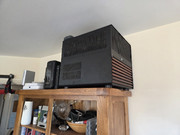
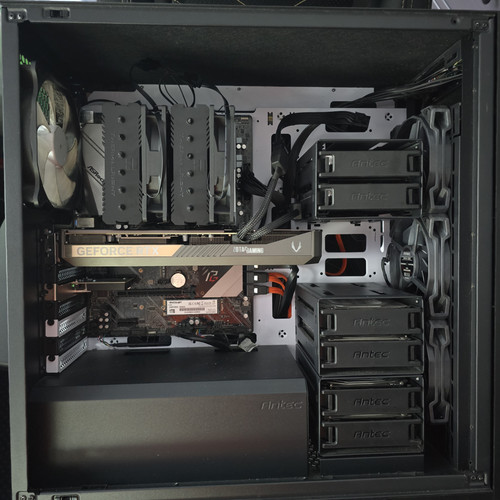
Here is my server, I installed a new 1tb NVME for my caching drive, cos 128GB wasn't cutting the mustard haha.

Swapped the stock front fans over to the Antec Nova fans also, to give a little extra cooling due to having 6 rust drives in the front.

 
Last edited:
I'm posting this incase it helps somebody else.

I was having a nightmare, the RTX 5070ti I installed was not playing nice, everytime I put a load onto the GPU it was crashing the WebUI - but my dockers were still fully functional.

After checking the logs, it seemed the kernel was unable to work with the open source drivers (must use the open source ones for Blackwell (RTX 5000 series) not the ofifical nvidia drivers. Cos Nvidia = MEH.

I finally last night after spending hours (over numerous evenings) trying to fix it, including putting the 5070 into my main PC to test the card was not faulty etc (which is isn't) I finally found the root cause.
I had my BIOS settings so that my iGPU was enabled, but I had my primary GPU set as PEG, not iGPU. Anyway after trying many other options, I swapped the primary GPU to be iGPU, and that certainly fixed my issues. Now I can get on with playing with my own local AI bots/models.

Light at the end of the tunnel.

 
I'm posting this incase it helps somebody else.

I was having a nightmare, the RTX 5070ti I installed was not playing nice, everytime I put a load onto the GPU it was crashing the WebUI - but my dockers were still fully functional.

After checking the logs, it seemed the kernel was unable to work with the open source drivers (must use the open source ones for Blackwell (RTX 5000 series) not the ofifical nvidia drivers. Cos Nvidia = MEH.

I finally last night after spending hours (over numerous evenings) trying to fix it, including putting the 5070 into my main PC to test the card was not faulty etc (which is isn't) I finally found the root cause.
I had my BIOS settings so that my iGPU was enabled, but I had my primary GPU set as PEG, not iGPU. Anyway after trying many other options, I swapped the primary GPU to be iGPU, and that certainly fixed my issues. Now I can get on with playing with my own local AI bots/models.

Light at the end of the tunnel.
I noticed last week when I rebuilt mine that I had to have iGPU set to primary to be able to see it in SpaceInvader's Transcoding-GPU-Benchmark.

Also it is worth installing the GPU Statistics plugin

Edit: while on uncast youtube (if you click the link above).. here are the recent AI videos
 
Last edited:
That's cool. We've definitely gone down the same route, homelab wise. Although I hadn't considered using LiteLLM. I'll look into it, thanks for the unexpected tip!
 
Last edited:
not sure what you're using for remote access, the webui is brilliant.

For remote BIOS access if needed, have a look at pikvm. You can run it on a Pi, just need a small dongle.

Welcome to the rabbit hole.
 
Oh dear.. I have now preordered a Jonsbo N5 E-ATX case. Looking forward to OCUK getting the stock to fulfil my order now.
 
I setup Immich over the weekend, what a great way to share and save your photo and videos. Glad I setup this service now.
 
I setup Immich over the weekend, what a great way to share and save your photo and videos. Glad I setup this service now.
Immich was one of the first things I setup, then I realised that I have 60,000 photos in desperate need of curation. I've wiped the DB for immich and I'm slowly going through to sort that out. I bought ACDSee to manage this on my desktop, stuck all the photos in YYYY-MM folders, and I'm through to 2011-11. It is going to take an age!
 
Yeah, I've been going through a load of old images I have saved elsewhere, slowly deleting 75% of it, and transferring the rest into immich.

I'm now working on langfuse, LiteLLM, Prometheus, Grafana and Loki.
 
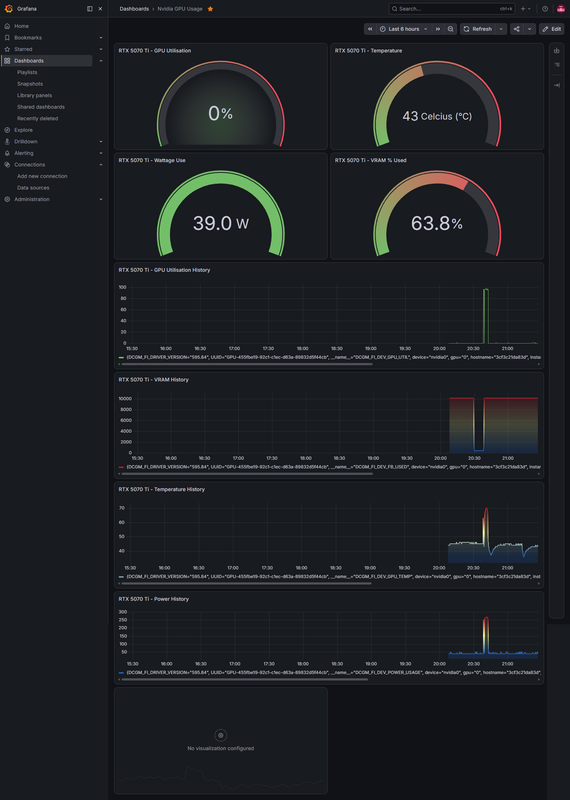
this is cool. Grafana.

screencapture-192-168-0-10-3005-d-adsj7jg-nvidia-gpu-usage-2026-08-10-21-29-43.png
 
I played with Grafana, a couple of months back. I was using it to collect logs from my 2 pi-hole boxes so I had 1 place to look at dashboard. In the end I dropped it as I didn't really need that.

I've also played with a full ELK stack, which I used to debug why I was getting dropouts on my IOT subnet when I was using draytek kit. It went after I solved that issue.
 
OP, great move ditching Windows in favour of Unraid, its a move you wont regret IMO. Have you opted to boot using USB or the recently implemented internal drive option?
 
OP, great move ditching Windows in favour of Unraid, its a move you wont regret IMO. Have you opted to boot using USB or the recently implemented internal drive option?
booting via USB currently, still running the trial of unraid, which doesn't allow internal boot yet - once I pay for my license I will be swapping to TPM/internal booting.
 
Last edited:
booting via USB currently.

Same here, I store nightly backups of my USB drive on a rolling 7 night basis, I'll likely stay on USB until my current drive fails. Until then, I can see no tangible benefit to changing other than a marginal increase to boot times which has little impact for me as my server is on 24/7 generally.
 
Back
Top Bottom