• Notice regarding image hosts and attachments. See here.

Firefox 3.6.6 now available!

already updated to 3.6.6 and the next one with 3.6.7 due by 20th July

Very sooooon for new Fx 4 due by November or later. Any idea what happen after Fx4 in the future like Fx 5 or something new name,etc??

 
Hmm, I've not noticed that. Does Task Manager show Firefox using a lot of CPU power? How many tabs have you got open?

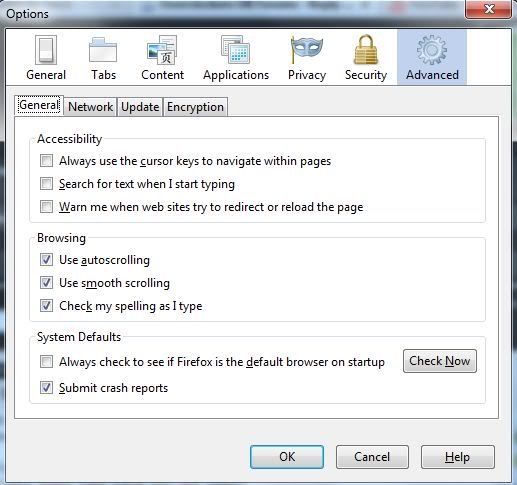
Try going to 'Tools > 'Options', then click on the 'Advanced' tab. In the 'General' sub-tab there is an option for smooth scrolling; is that checked?

smooth-scroll.jpg

The box is ticked. I usually have about 6 tabs open when it goes all slow but it only happens sometimes (was worse with 3.6.3, never happened with previous versions). The best way I can describe it is like when you have an weak pc that can't cope and there is a short delay when trying to click a hyperlink (basically during the time when the mouse cursor changes to the hand) or when switching windows and scrolling the page. It's definitely not my pc because I know have enough memory available ! :D
 
The box is ticked. I usually have about 6 tabs open when it goes all slow but it only happens sometimes (was worse with 3.6.3, never happened with previous versions). The best way I can describe it is like when you have an weak pc that can't cope and there is a short delay when trying to click a hyperlink (basically during the time when the mouse cursor changes to the hand) or when switching windows and scrolling the page. It's definitely not my pc because I know have enough memory available ! :D

And you have nothing running in the background, using up CPU? You could try temporarily moving/renaming your profile in C:\Users\(Username)\AppData\Roaming\Mozilla\Firefox\Profiles to see if it is linked to that.
 
Back
Top Bottom