First time Overclocker

Associate
Joined
16 Jul 2006
Posts
40
Hey guys.
Usually my best mate does all my overclocking for me but he's in Australia and here I am with a Asus P6TD with an i7 920 cooled by a H50-1. I'm running Windows 7 Pro 64, and have a 5970.

Sadly my mate isn't going to be back for a couple of months so I'd like to take a stab at overclocking this thing myself.

I've heard it's pretty common place for the 920 to be able to clock at 4.0GHz. I'd really like to reach that level since I've put this all in the Coolermaster COSMOS so it should be pretty cool.

I've read through the begginers guide but the moment I look at the BIOS I can't really match up a lot of things. I sadly don't know what to set what at etc.

There are three images on this page from Bit-Tech and I tried to follow their guide too but the Overclock failed and I've also heard its bad to just jump to high settings.

Anyway, I was hoping someone could hopfully guide me through overclocking this board so I can enjoy the sweetness of a 4.0GHz i7.

 
Hi i don't own or have experience of I7 stuff, but many on here will glady help.

I'll help them out by asking you to list the major components, that hav'nt been listed so that they have an easy point to go by, they will deffinatly want to know the spec of your memory.

Also in advance, get yourself cpu-z, prime95, Intel burn test, as they will ask you to stress test any clock you do.
 
Hey guys, internet has been out all day. I've got CPU-Z, Prime95, and a few others I've noticed suggested on guides about the net. I'll list my components below.

Sapphire ATI Radeon HD 5970
Asus P6TD Deluxe
Intel Core i7 920 D0 Stepping 2.66Ghz (Nehalem)
Corsair HX 1000W ATX Modular SLI Compliant Power Supply
Coolermaster Cosmos PURE Black Silent Full Tower Case
OCZ Gold 6GB (3x2GB) DDR3 2000MHz PC3-16000C10
Seagate Barracuda 7200.11 1.5TB
Corsair H50-1 High-Performance CPU Watercooler
 
Hey again. I know its bad form to double-post, when waiting for a reply but its been about 5 and a half hours so I thought that might be ok since usually this forum is buzzing.

So, just wondering if there is anyone there who can give me a hand with my issue?
 
Also sorry for not posting back myself to, i can't really help as no knowledge of the new intel stuff, but i do know many on here do, im surprised non have posted yet.
 
Okay, in order to get to 4.0 GHz try this in BIOS:

vCore: 1.30-1.35V
CPU Uncore: 1.3V
DIMM: 1.641.66V
PLL: 1.86-1.88V
IOH: Auto
ICH: Auto
CPU Clock Amplitude: Auto
Base Clock: 191MHz
CPU Multiplier: 21x
Memory Clock: Depends on your memory
Loadline Calibration: Enabled
Memory Timings: Auto

Boot into Windows and use CoreTemp to look at temperature and Prime95 to test stability. Good luck.
 
@PeterTheGreat
I'm confused what to type in each of the options in the BIOS. If you view the following pages 1 2 3. That shows you what I see when I look at my BIOS (although the settings that are typed in are not mine, they are from another article).
Where do I type in those settings you have given me, as I cannot see anything for Multiplier etc?
 
Just a quick note, the above post is open for anyone to answer actually. If anyone can help me interpret PeterTheGreat's post into what I should enter on the BIOS (images in the post above) then please let me know. I'm totally confused by ASUS' BIOS menu.
 
I will tell you.

First page
Cpu Ratio Setting 21
BCLK Freguency 191
Cpu Voltage from 1.30 to 1.35
Cpu PLL Votage from 1.86 to 1.88

Second Page
dram voltage 1.64

Third page
Cpu Ratio Setting 21
 
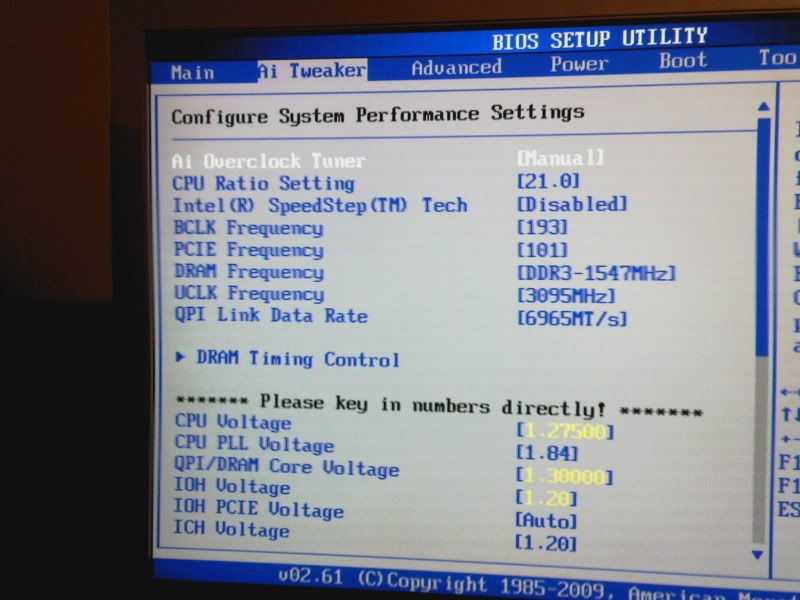
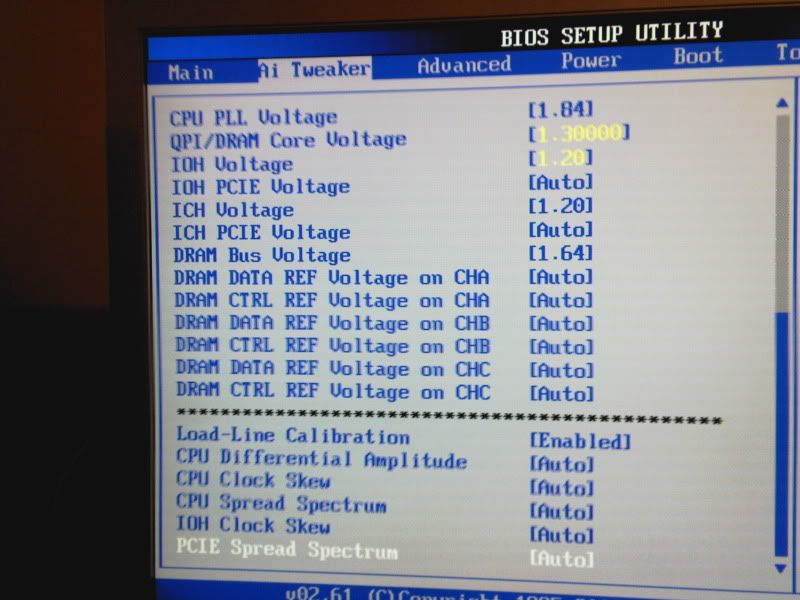
I can give you a few screenshots of my bios settings for a 4ghz overclock, im using the asus p6t deluxe v2 which is basically the same board as the p6td.

Photo-0095.jpg

Photo-0096.jpg


On the first pic, in the section listed as dram timing control youll have to go into this and change the first 4 settings (theese 4 only, rest on auto) to whatever your rams rated timings are.. Also regarding voltages, the cpu vcore will depend entirely on your cpu, (i need 1.2750 for 4ghz, you may need more, or you may need less) 1.3 is ok to start with, but if you can get it lower this is a good thing as it keeps temps down. the rest of the voltages ive entered should be fine, all are well within safe limits for an i7. Hit F10 to save setings and exit the bios, once back in windows run a stress test such as LINX to test for stability while keeping an eye on temps with coretemp.
 
Well CPU-Z is telling me I have a Core Speed of 4009.1MHz
Windows System (Control Panel) says I have 3.82GHz
I'm getting temperatures of around 76-80C with Prime95 running.

Whats an acceptable top temperature? Is there any way to get the temperature down but keep the core speed at 4GHz?
 
Your temps are fine for stress testing, but if you want to get them lower try lowering the vcore voltage a touch, (what vcore are you using btw), also a more powerful fan/fans on your cpu cooler can help, ive heard the stock H50 fan isnt that great.
 
Yeah I'm tempted to get a better fan for the H50-1, its not so great. Any suggestions?

My vcore is at 1.3 I think.

Also does anyone have any knowledge with the Sapphire 5970 OC ? I got the Redline tool for it but it doesnt want to work on Windows 7 64. My next step is to overclock the graphics card. Then I'm going to be a very happy chap.
Stress test is up to 80 - 86 now (last test finally complete).
 
Back
Top Bottom