GiffGaff FTTP

Soldato
Joined
1 Mar 2008
Posts
6,394
Location
Deep North
Anyone on GiffGaff FTTP (Nexfibre) and know if they use CGNAT or not?

Looking to get it put in my old house for accessing stuffs but would prefer no CGNAT.

£5 a month for 6 months plus £50 referrer bill credit seems like a good deal to me. :)

 
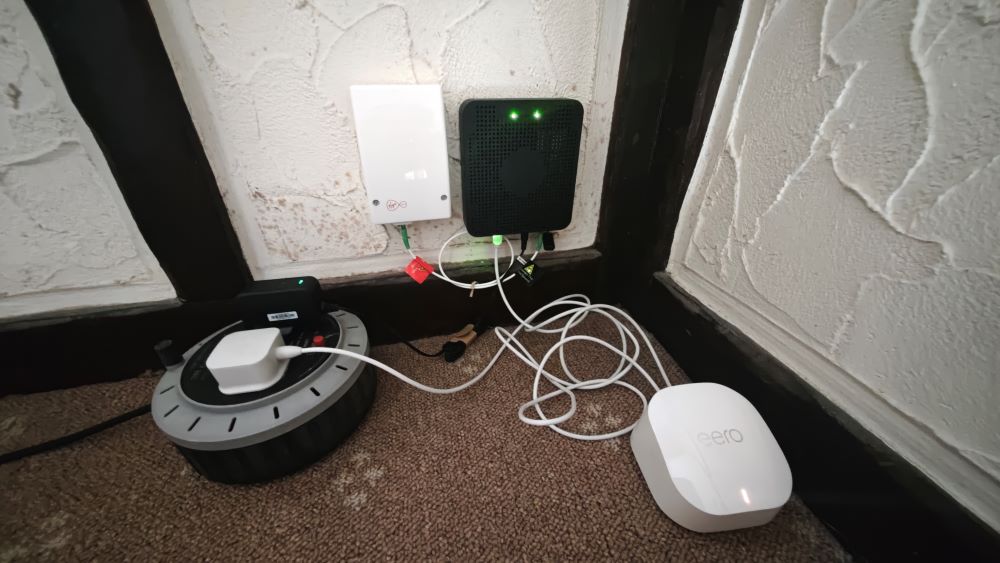
Just an update.. Had the Giffgaff FTTP (Nexfibre) installed and can confirm it's not CGNAT which is good.

However the Eero+ router they supply is rubbish so I'll be swapping it out for one of my Fritzbox routers shortly.

1783446922.jpg
 
Last edited:
I went live on the 6th with Giffgaff, but the speeds I'm getting are totally unacceptable.
Paid for a 500 Mbps down/up connection, but the most I've seen is 22 Mbps down.

@LeeUK, I see your comment about the router Giffgaff provide, so I'm wondering whether to invest in a better router and/or add another to strengthen the connection.

TBH, I just assumed, like with BT, that they would wire a cable from the newly installed point downstairs to where the PC is upstairs, so I'd still have an Ethernet connection.

According to the eero app, the download speed should be 541 Mbps and the upload speed should be 537 Mbps; however, on Speedtest, I'm currently seeing a speed of around 10 Mbps.
Clearly, the router's Wi-Fi isn't doing a good job.
 
Last edited:
@arc@css I'm getting near enough 800-900+Mbps on Ethernet on my PC (Eero has one extra LAN port) but sometimes the upload speed is more than the download on Ookla Speedtest. The Eero router says I'm currently connected at 971Mbps down & 967Mbps up. Wifi however is poor, lucky to get 400Mbps down on my phone even while sitting next to the Eero router. Went outside and the wifi signal almost dropped so I assume the signal doesn't travel far on these Eeros, Probably to make you buy extra to set up a mesh.

Also the Eero can only be configured via the app, no PC web browser access and it appears you need a subscription for extra features. Ha!
 
I think a customer has 14 day cooling off period, so if I can't get any joy from their messaging-only CS,
then I might go elsewhere.

What are good routers to consider? I know nothing about them.
 
I think a customer has 14 day cooling off period, so if I can't get any joy from their messaging-only CS,
then I might go elsewhere.

What are good routers to consider? I know nothing about them.
Flint 2 is an easy recommend when the price drops during sales on various China based websites to around £70.
 
Anything from GL-iNet are good like the Flint mentioned above, I have a GL-iNet mini travel router which I find good.

I have a TP-Link BE3600 at my main residence which is night and day compared to the Eero even if it isn't the best on the market.
 
Just an update.. Had the Giffgaff FTTP (Nexfibre) installed and can confirm it's not CGNAT which is good.

However the Eero+ router they supply is rubbish so I'll be swapping it out for one of my Fritzbox routers shortly.

1783446922.jpg

Was the white VM-branded box where your coax used to come in? I was really hoping they'd remove it to make the wall look a bit nicer.
 
Was the white VM-branded box where your coax used to come in? I was really hoping they'd remove it to make the wall look a bit nicer.

No, there is no old-school coax cable in my area, just the VM branded Nexfibre FTTP using Openreach ducts and poles. The installer installed it along with the black ONT on the right, apparently if you order VM fibre then you just get the white box with the fibre then going straight into the VM Hub router. This black ONT is only for Giffgaff customers currently for the supplied Eero router (or your own router) to plug into.
 
Last edited:
I went live on the 6th with Giffgaff, but the speeds I'm getting are totally unacceptable.
Paid for a 500 Mbps down/up connection, but the most I've seen is 22 Mbps down.

@LeeUK, I see your comment about the router Giffgaff provide, so I'm wondering whether to invest in a better router and/or add another to strengthen the connection.

TBH, I just assumed, like with BT, that they would wire a cable from the newly installed point downstairs to where the PC is upstairs, so I'd still have an Ethernet connection.

According to the eero app, the download speed should be 541 Mbps and the upload speed should be 537 Mbps; however, on Speedtest, I'm currently seeing a speed of around 10 Mbps.
Clearly, the router's Wi-Fi isn't doing a good job.
BT don't do that, OR do installs for them, and even then they will install the point 'witin reason', that means if you want it upstairs, they will put it upstairs as long as it's safe and reasonable to do so, The simple solution here is to run a cable either yourself or get someone in. The router is showing 500mbit on it's end, so changing wifi routers like for like in the same position won't make a significant difference, as they all follow the same legislation in terms of power limits. Wifi is a conveinience for mobile devices, not a replacement for fixed networking.
 
BT don't do that, OR do installs for them, and even then they will install the point 'witin reason', that means if you want it upstairs, they will put it upstairs as long as it's safe and reasonable to do so, The simple solution here is to run a cable either yourself or get someone in. The router is showing 500mbit on it's end, so changing wifi routers like for like in the same position won't make a significant difference, as they all follow the same legislation in terms of power limits. Wifi is a conveinience for mobile devices, not a replacement for fixed networking.
Thanks for the info.

I messaged Giffgaff today and have arranged for a booster router to be sent, which at least is free of charge, though I don't expect it will make a significant difference.

I also called Plusnet as they were one of the ISPs I was recommended.
In a nutshell, the chap I spoke to (nice to actually talk to a human being) said that they would need to come and do a survey to check whether they can use the old BT master socket that has been wired through the house,
though he seemed quite confident that it would be viable.

The good news is that if I do decide to definitely cancel Giffgaff, there is no termination fee apart from if running over into the next month, so only £5 - for the first 6 months.

Regarding an Ethernet cable, the chap on Giffgaff advised nothing lower spec than a 5e cable?
So, something like this?
https://www.overclockers.co.uk/networking/wired-networking/ethernet-cables/30m-ethernet-cables

The cable I require needs to travel from the downstairs lounge to the back of the property upstairs. I assume a shielded cable is preferable?
White would look better than something bright, e.g. red or green.

I've yet to measure the distance from the installation/entry point in the house to where my PC is, but I would have thought a length of 20m to 50m should be more than enough.
Better to have too much than not enough.

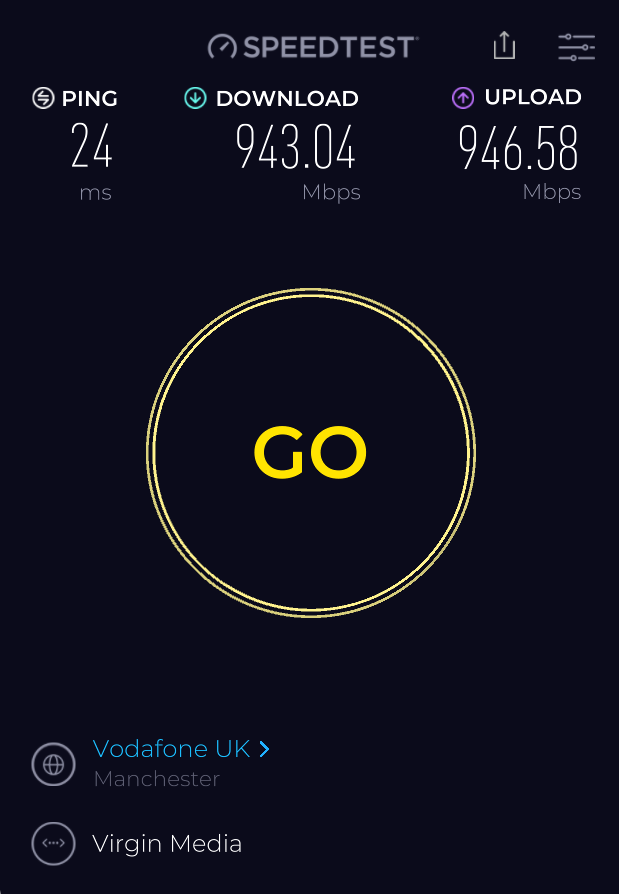
Incoming connection vs actual connection speeds:

pfjbWY8h.jpg

MAHXn4op.png
 
Last edited:
Was the white VM-branded box where your coax used to come in? I was really hoping they'd remove it to make the wall look a bit nicer.
My Virgin/Nexfibre install looks just like the pic, minus the separate ONT. It's not aesthetically pleasing in any way - I agree.

Giffgaff does enable much more simplistic router options due to the ONT. I would take advantage of that without a doubt. Those Eero routers are pants. Not as bad as the 5x, but close. :D
 
Not great pings on some of the speed test servers.

1783548350.png
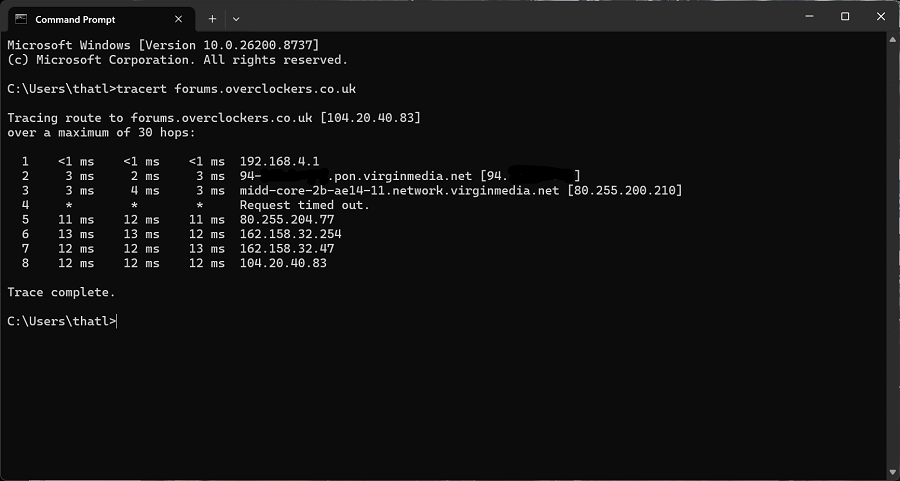
This looks a bit odd and a tad high. If you run a trace route, you will see the latency to each respective hop. Look for the 86 addresses as they will be the terminating BNG and Virgin core. You can then see what your minimum latency will be (your traffic will always ingress their core before being routed anywhere else).

Another thing to be mindful of is that sometimes speed test servers are in the same PoP as the local core that you're terminated into. My Netflix/fast.com speed tests hit a server in the same PoP as the core, for example. Latency there is the same as to my BNG/core router, and the Netflix server even has a Virgin IP address assigned to it! But Ookla/speedtest does not share any of this same PoP setup in my experience.
 
This looks a bit odd and a tad high. If you run a trace route, you will see the latency to each respective hop. Look for the 86 addresses as they will be the terminating BNG and Virgin core. You can then see what your minimum latency will be (your traffic will always ingress their core before being routed anywhere else).

Another thing to be mindful of is that sometimes speed test servers are in the same PoP as the local core that you're terminated into. My Netflix/fast.com speed tests hit a server in the same PoP as the core, for example. Latency there is the same as to my BNG/core router, and the Netflix server even has a Virgin IP address assigned to it! But Ookla/speedtest does not share any of this same PoP setup in my experience.
1783557413.png
 
That looks more normal. You're terminating into Middlesbrough, by the way (midd in the hostname)

Try the likes of 1.1.1.1, 8.8.8.8 and Google.com, bing.com

The OcUK forum is behind Clousflare (I think) and it will be hard to say where that really is.
 
That looks more normal. You're terminating into Middlesbrough, by the way (midd in the hostname)

Try the likes of 1.1.1.1, 8.8.8.8 and Google.com, bing.com

The OcUK forum is behind Clousflare (I think) and it will be hard to say where that really is.
Nice one, was trying to work out what the midd stood for heh. I'm north of Newcastle.

EDIT: 12ms to 1.1.1.1 too.
 
Last edited:
Back
Top Bottom