


That seems more in-line with what I would expect. Likely just that speed test server was not in good shape if it really was in Manc.Nice one, was trying to work out what the midd stood for heh. I'm north of Newcastle.
EDIT: 12ms to 1.1.1.1 too.
You are using an out of date browser. It may not display this or other websites correctly.
You should upgrade or use an alternative browser.
You should upgrade or use an alternative browser.
GiffGaff FTTP
- Thread starter LeeUK
- Start date
More options
Thread starter's posts
No, there is no old-school coax cable in my area, just the VM branded Nexfibre FTTP using Openreach ducts and poles. The installer installed it along with the black ONT on the right, apparently if you order VM fibre then you just get the white box with the fibre then going straight into the VM Hub router. This black ONT is only for Giffgaff customers currently for the supplied Eero router (or your own router) to plug into.
My Virgin/Nexfibre install looks just like the pic, minus the separate ONT. It's not aesthetically pleasing in any way - I agree.
Giffgaff does enable much more simplistic router options due to the ONT. I would take advantage of that without a doubt. Those Eero routers are pants. Not as bad as the 5x, but close.
Thanks! I guess they might be able to re-use my existing one where the HFC connection came in, although those ping times don't look great. I'm getting 4ms to 1.1.1.1 with Plusnet (ethernet) so there doesn't seem to be much incentive to move to Nexfibre/GiffGaff apart from the symmetrical speeds.

The booster router arrived today.
I've plugged it into the PC upstairs, added the device via the app, updated the software, and was pleasantly surprised to see this:
I don't believe there's a minimum expected transfer rate with Giffgaff, so I guess it could vary by a fair amount.
Anyway, I'm not counting my chickens just yet, but it's very encouraging.
I've plugged it into the PC upstairs, added the device via the app, updated the software, and was pleasantly surprised to see this:
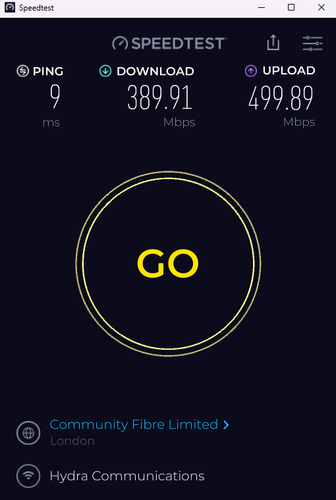
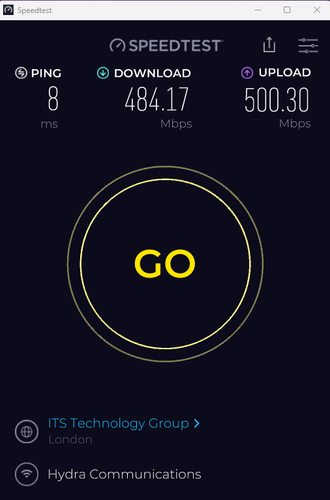
I don't believe there's a minimum expected transfer rate with Giffgaff, so I guess it could vary by a fair amount.
Anyway, I'm not counting my chickens just yet, but it's very encouraging.
Last edited:

I see it's available in my area
500mb
£5.00 for 6 months then £28.00
Wth £74 cashback
I already have my own TP link router is it as simple connect it to wall ont ? And request login ?
Previously have had virgin media and needed to put hub into modem only to use my own router
500mb
£5.00 for 6 months then £28.00
Wth £74 cashback
I already have my own TP link router is it as simple connect it to wall ont ? And request login ?
Previously have had virgin media and needed to put hub into modem only to use my own router
I disconnected the GiffGaff Eero router and configured my Fritzbox 7530 router along with my 2 extra 7530's as a mesh. Although the max WiFi speed on the Fritz 7530 is only something like 867mb on WiFi5, I still struggle to get 30+Mbps on Ookla Speedtest. When my Fritzboxes where on my old Zen FTTC 80/20 I got near enough the max download speed of 70+Mbps over WiFi.
However I still get 800-900Mbps when on gigabit Ethernet on PC. Just don't know why the WiFi is so poor compared to the old Zen FTTC.
However I still get 800-900Mbps when on gigabit Ethernet on PC. Just don't know why the WiFi is so poor compared to the old Zen FTTC.
Last edited:
It's way too early for me to provide a reliable account of the experience, but after having used the service for ~3 days, it's been solid.We’ll be switching from VM to Giffgaff FTTP after the 20th of July.
How are people finding the performance and reliability of the service, so far?
Despite the engineer saying I wouldn't need one, I had to get a booster router from them.
Without that, the connection was diabolical, in part, due to the cheap-as-chips eero router provided.
I opted for the aforementioned 500 plan.
Last edited:
What router do you have?Thanks for letting me know.
I'll probably be sticking with the ISP router, since we use mostly wired connections.
None (VM Hub 5x).
We have a Raspberry Pi, which I’m currently using to enable SQM on the LAN traffic and it works very well.
Presumably there’s nkthing wrong with the Eero as a wired router?
Doesn’t it have some SQM options also?
Smart Queue Management? Yes, SQM is supported in the eero app (I should add that I had no idea what that is, so I looked it up
).As for how good the eero routers are, I'm not the best person to ask.
I am, however, very surprised by just how much the connection improved once I added a booster.
One minute, it was performing an order of magnitude slower than the previous FTTC service,
whereas now, it runs almost full pelt (early days, though).
I still might go hard-wired later on, though, if the current service is consistently maintained, then what's the need?
Last edited: