Home Assistant beginners

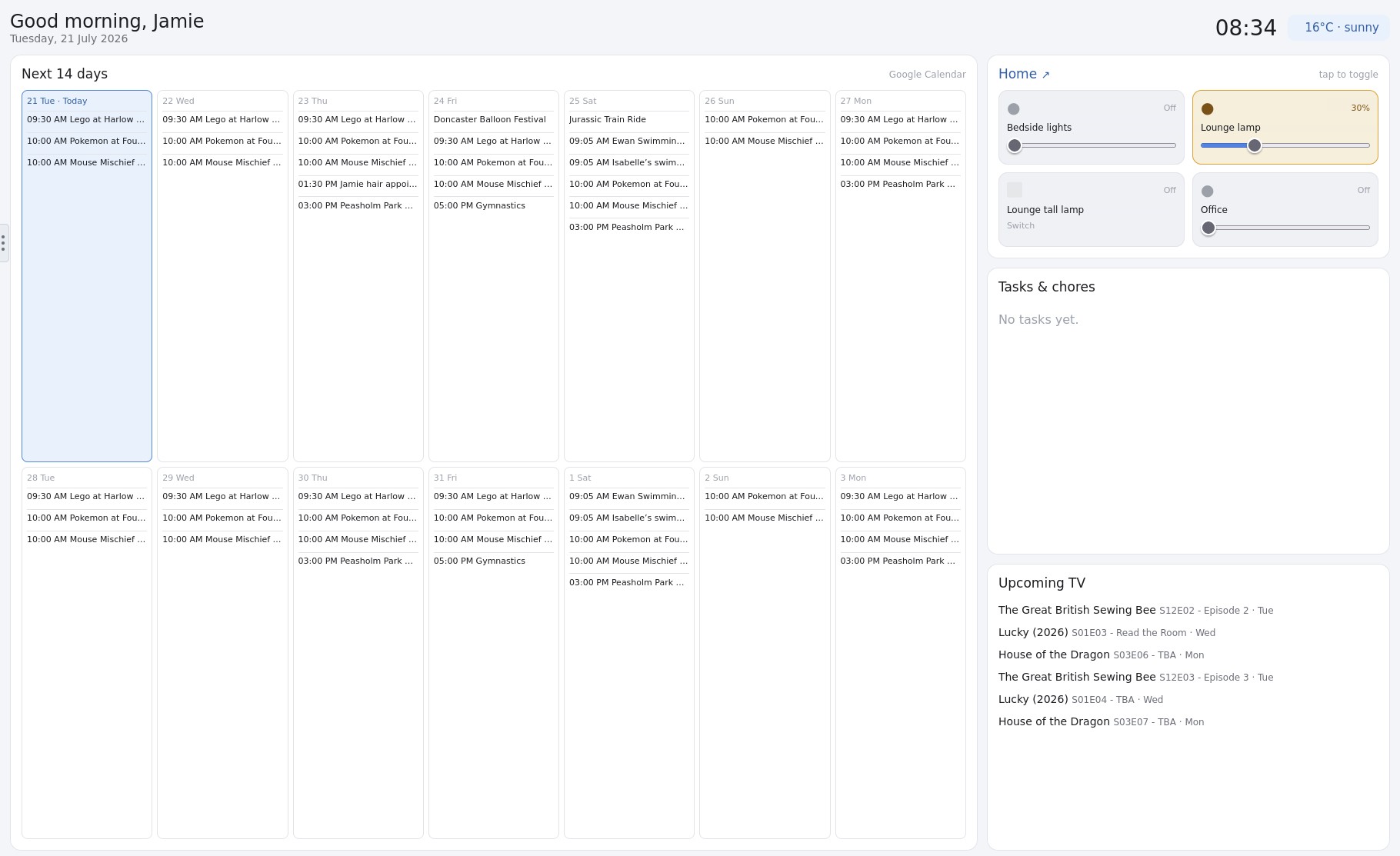
After months of fiddling around with Home Assistant to try and get the "Family Management" dashboard I wanted, I reverted to my dev roots and not-completely-vibe-coded this web page in about an hour. The idea is to have it on a big touch-sensitive screen somewhere in our new home.
The "Home" block at the top right and the Upcoming TV block are talking to Home Assistant and Sonarr respectively via API calls. The "Home" word is a link that opens HA in a browser.
The Tasks & Chores list is backed by a SQLite database - I just haven't added the functionality to add a new task yet - still deciding how to implement that.

There's more to do - there's a lot of dead space that could be better used, I want to add some logic around which HA entities are displayed, a dark mode would be nice and I want to create a User selector so the kids get a simplified view. I'm also thinking about voice integration but that'll need to either be piped through Alexa or I'll open the HA Voice can of worms once I get a server with a GPU.
It's been a lesson in using Home Assistant for what it's good at and not trying to beat it into submission to do something it's not good at.


Screenshot-2026-07-21-083443.jpg
 
Creating a dashboard isn't easy without watching tutorials videos. What's strange is my Yeelight which I added, the brightness slider is there but no on off switch?
 
saw this today on fb

'credit to Kayden D'Mello

I shared this on reddit and it was well received so I’m posting it here too in case anybody is interested!

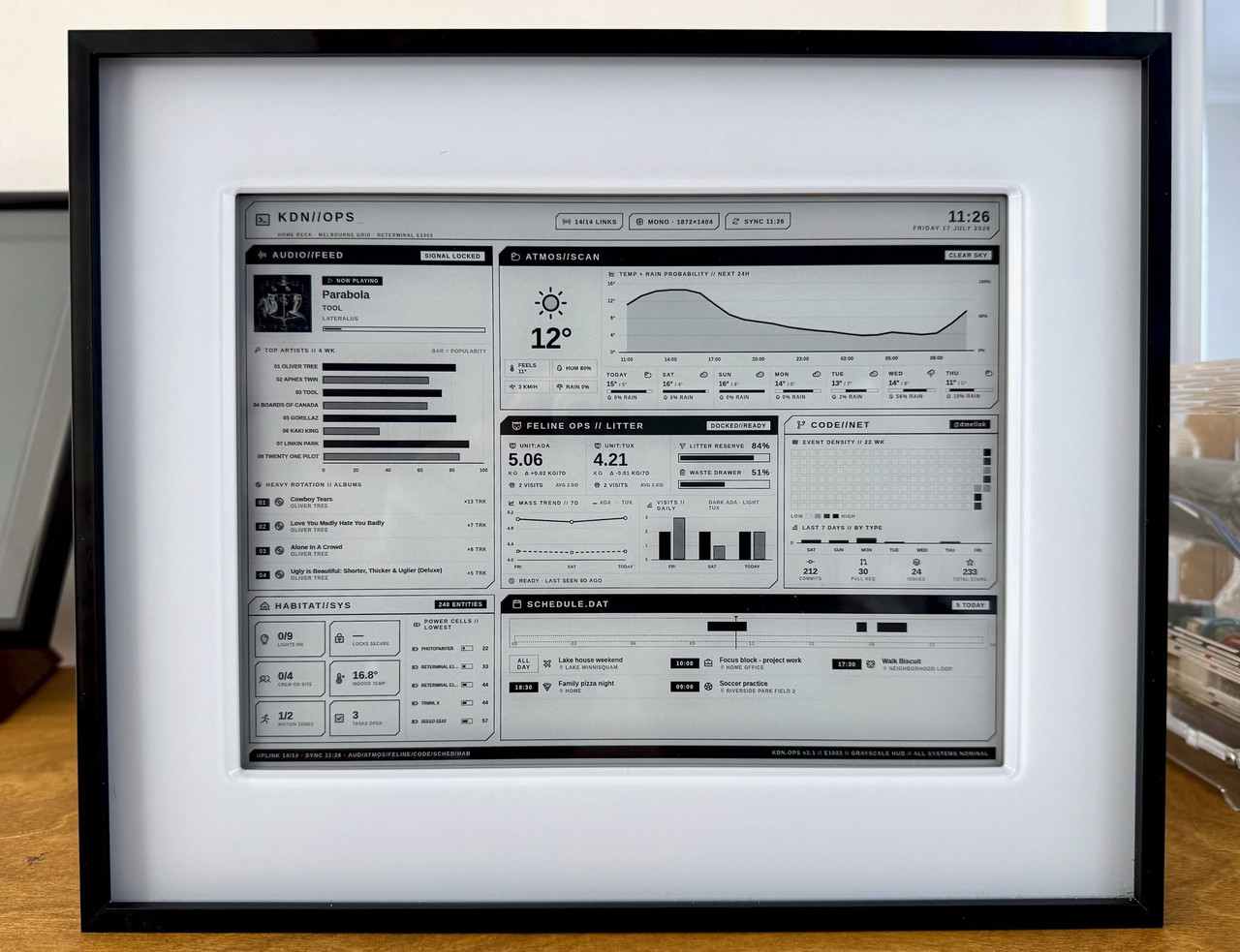
This is (one of) my eink dashboards.

Hardware is a Seeed reTerminal E1003 (10", grayscale). The panel refreshes on a schedule, and everything on it is live data:

- FELINE OPS: Litter-Robot 4 via the Home Assistant integration. Per-cat weight trends, daily visit counts, litter level, and waste drawer capacity. Ada and Tux are unaware they have KPIs now.

- Spotify: now playing with album art, falls back to my top artists/albums when nothing's on

- Weather: Open-Meteo, 24h temp/rain curve + 7-day outlook

- Calendar: today's schedule on a 24h timeline rail (dummy events for the post)

- GitHub: 22-week activity heatmap and totals

- HABITAT//SYS: lights, locks, presence, and the five saddest device batteries in the house

Built with Tesserae, a self-hosted dashboard server for e-ink panels I've been working on. You compose pages from live widgets and data sources, and it handles the rendering and pushing to devices. It plugs straight into Home Assistant.'

 
Windows on my server has annoyed me for the last time. I thought I completely disabled updates but it did something and everything just stopped working including remote desktop, had to restart the PC.

So I'm going to give Ubuntu Server LTS ago it seems to be the most recommended.
Moving home assistant should be really easy shouldn't it being a VMWare.
Plex was the issue last time due to permissions and the NAS where I store everything.
I need a way of messing and getting it working without turning the windows one of first so not sure how to go about that.
 
I’d just backup HA, start a new instance and restore from backup. Linux based VM solutions use a different format to VMWare and the conversion can be painful in my experience. A backup and restore does exactly the same job and is what I did when I moved my HA from Proxmox to a Mac based VM solution.
 
I’d just backup HA, start a new instance and restore from backup. Linux based VM solutions use a different format to VMWare and the conversion can be painful in my experience. A backup and restore does exactly the same job and is what I did when I moved my HA from Proxmox to a Mac based VM solution.
Just need to figure out a way of doing it all with minimum downtime. Last time I tried Linux I failed miserably.
 
Just need to figure out a way of doing it all with minimum downtime. Last time I tried Linux I failed miserably.
Definitely go for the backup/ restore option then. If you’re not confident with Linux then adding the complication of working with VMs to the equation is asking for trouble. To make things super easy, I’d pay for a months subscription to Nabu Casa so you can backup to the cloud. When you start your HA VM on Linux, you’ll be able to download and install the backup from the cloud and away you go.
 
Definitely go for the backup/ restore option then. If you’re not confident with Linux then adding the complication of working with VMs to the equation is asking for trouble. To make things super easy, I’d pay for a months subscription to Nabu Casa so you can backup to the cloud. When you start your HA VM on Linux, you’ll be able to download and install the backup from the cloud and away you go.
I already put my backups on my NAS surely that's good enough, or even a USB stick.

 
I know a few people on here are running the slzb-06 zigbee controller. I've upgraded to the latest OS and ZHA fails to start up - I get the error (ZHA failed setup will retry 'on_off').

I know it's not an issue with the controller itself, that is online and reachable from HA, I can also access the controller web interface and that shows the radio all running.

It's done it twice now with OS upgrades although I can't remember how which was the earlier version. I've reverted back to 2026.5.3 and everything is working perfectly again.

Has anyone bumped into this? I'll attempt all the incremental upgrades rather than upgrade to the latest and see where it fails. I don't really fancy pairing 100 zigbee devices again though, although I suppose if that's the only way forward then I think I'll ditch ZHA and move to Z2MQTT.
 
Had some signed lights ordered but ordered E27 instead of B22. So sent them back and started looking for bulbs I can get wuicker. But ended up buying 3 used Philips Hue with Ambience for £15. Is there a specific pairing process?

 
Had some signed lights ordered but ordered E27 instead of B22. So sent them back and started looking for bulbs I can get wuicker. But ended up buying 3 used Philips Hue with Ambience for £15. Is there a specific pairing process?
Hue is terrible via Home Assistant in my experience I'm slowly replacing mine.

 
Hue working fine with HA for me. The only pain is getting them paired, the easiest way is get a remote light switch. Otherwise its case of following various guides online and its hit and miss at best. Keep trying though and they will eventually pair.

Thats not a HA issue, its a Philips Hue pairing/security thing
 
I’d just backup HA, start a new instance and restore from backup. Linux based VM solutions use a different format to VMWare and the conversion can be painful in my experience. A backup and restore does exactly the same job and is what I did when I moved my HA from Proxmox to a Mac based VM solution.
Did it again today Plex and Home Assistant both offline, can't remote desktop to it. Had to cycle the power.
I might for the short term move it to next to my PC so I can have a monitor on it to see what it's actually doing.
 
Back
Top Bottom