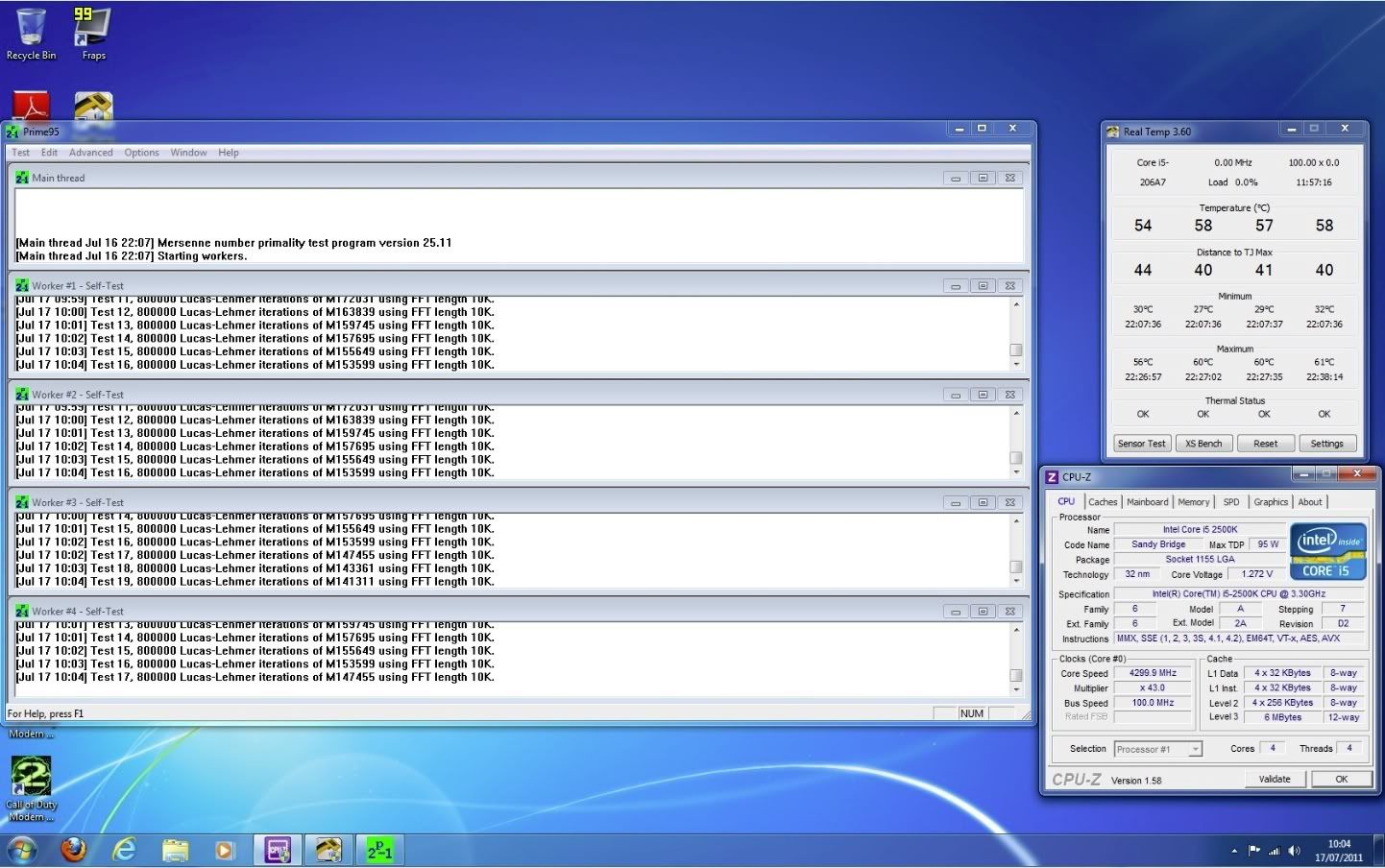
i5 Overclock

if still BSD then a clean installing windows 7 tomorrow, where can I get the latest driver for Intel Rapid Storage from ?

I would still do a clean install even if the system does appear to be stable after the updates.

I where can I get the latest driver for Intel Rapid Storage from ?

Mine is Intel driver 10.5.0.1026

Try here - link - look at the left hand side of the page - 'drivers and downloads'.

 
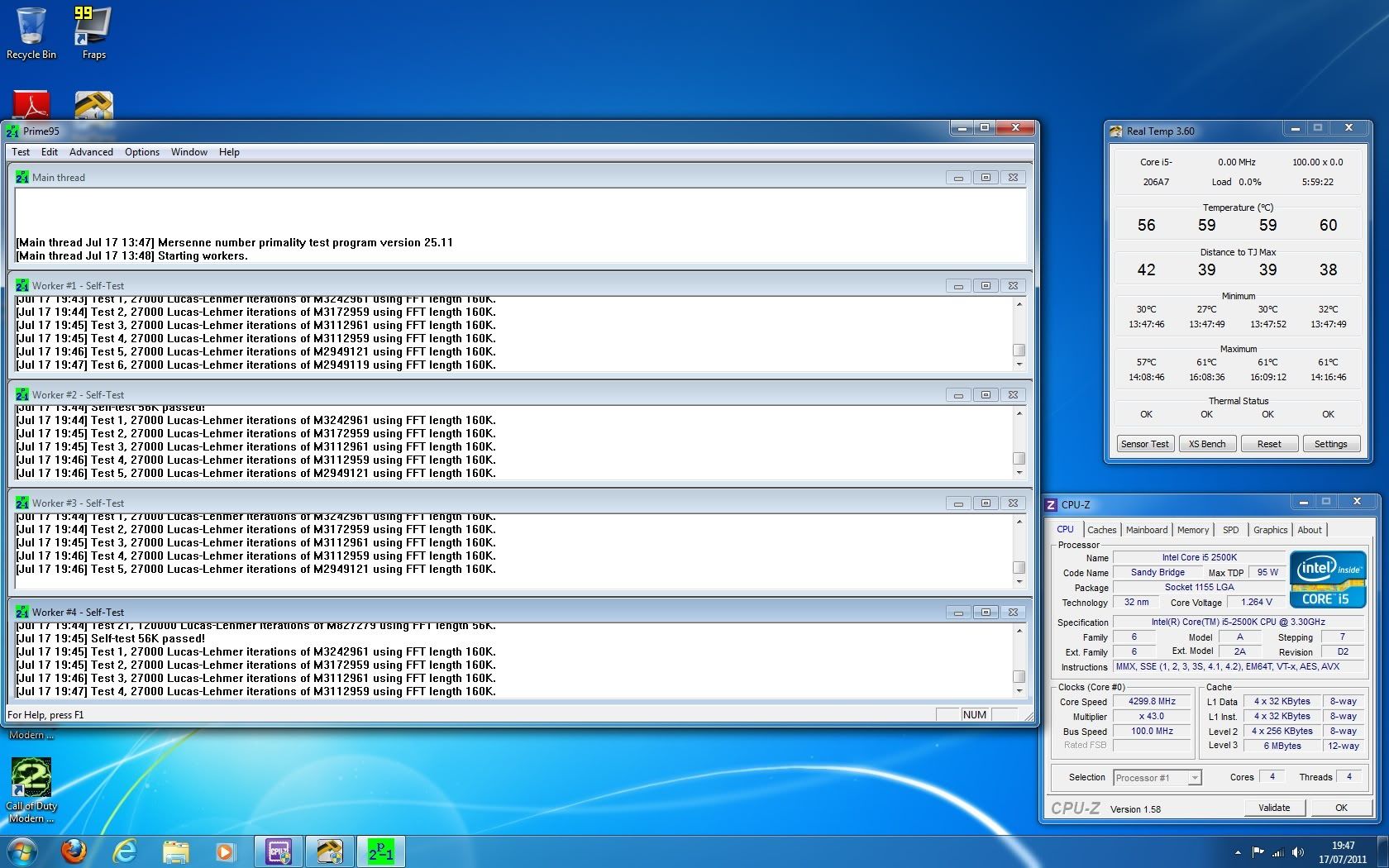
Well - I left Prime95 to run all night and I've just decided to finish the test, here is the end result :)

overclockfinished2.jpg


Just one concern though, I noticed while testing a game out and running the windows assessment test, the core voltage did seem to bounce right up to 1.320v a couple of times according to CPU-Z. Should I be worried about this?

Thanks all :)

Liam
 
Just one concern though, I noticed while testing a game out and running the windows assessment test, the core voltage did seem to bounce right up to 1.320v a couple of times according to CPU-Z. Should I be worried about this?

Thanks all :)

Liam

Im not 100% but I would say as prime stresses it all the time its pulling the volts all the time. Windows or say IBT drops the stress from 100% volts drop at bit.

It happens to me aswell.
 
Well - I left Prime95 to run all night and I've just decided to finish the test, here is the end result :)

Looks very promising - and your temps are very solid considering how warm it is.

Just one concern though, I noticed while testing a game out and running the windows assessment test, the core voltage did seem to bounce right up to 1.320v a couple of times according to CPU-Z. Should I be worried about this?

No, that's fine - the spike is well within tolerance and 1.32V would be acceptable if it was running at that all the time.

I would use and abuse it with general use now (gaming, apps, browsing music etc...) and see how the sytsem behaves.

You should consider running a blend test for a few hours too as this combines CPU and memory together for stabiliy - but it should pass that with ease.
 
Additional: I would recommend you try the fan adjustment in the BIOS as you will be surpised how much quieter your machine will become.

For your set up i would perhaps set an idle speed of 50% and a temp tolernace of 50 or 55 degrees for the fans to spin up to 100%. You may find that the fans remain at 50% even when gaming as they don't stress the CPU as much as prime.

It's very rare that the fans on my SA spin up to 100% - even when stress testing - as i have my tolerance set at 60 degrees.
 
Last edited:
Excellent - I think I nay do a blend test overnight tonight and see how it goes, thanks Plec :)

I looked at that CPU fan target in the bios earlier and did what you said, but strangeley I hardly noticed any reduction in fan noise at all! :confused: I could hear a reduction, but only very slightly. The BIOS did report that both the CPU fan and the system fan were running at 800rpm with a 50% reduction set - strange hhmmm.
Liam
 
How many fans have you got in your case?

As you can only control the CPU and sys 1 and sys2 headers with this feature - are all your case fans attached to the right headers?
 
Please updated your Real Temp version 3.67 as it will show correct clock speed, vid, etc. Your 4.3GHz look awesome and great temperature too. Keep it running for 24 hours max then after that, run linx 100x then you all good to go!

Had done HDDErase secure on latest firmware on my SSD with 1.33v and got latest intel rapid storage technology v10.6.0.1022 and will installing fresh clean windows 7 64 bit after my lunch.
 
Last edited:
I've got the CPU fan & 2 case fans - one at the rear which is connection to the SYSFAN1 connector on the motherboard, and the second one at the front of the case - but this is connected to a molex connector because of the extra power it needs from the LED lights.

So effectively only the CPU fan & the rear case fans can be controlled at the moment, the front one isn't very lout at all really. I think from listening closely to the rig, the graphics card fan & the PSU fans are the loudest (I've noticed the graphics card fan gets slightly louder when gamiong).

I'm doing a blend test on Prime as we speak, it's been running since 13:45 and so far so good, I'm going to run it until 10pm at least :)

Bulldog - I will update to the latest version of RealTemp later :D

Liam
 
I think from listening closely to the rig, the graphics card fan & the PSU fans are the loudest (I've noticed the graphics card fan gets slightly louder when gamiong).

Sounds good - are you using after burner for the gfx?

I'm doing a blend test on Prime as we speak, it's been running since 13:45 and so far so good, I'm going to run it until 10pm at least :)

Anything over 6hrs is fine - as you've already ran an extensive small fft test on what is a relatively minor clock. Some members will say you need to do 12hrs or more - but with a clock your size, personally, i think it's overkill.

Stress testing is an important task, especially with big clocks to fine tune settings and 'try to ascertain stability and long stress runs are advisible - but it's everyday stability/usuage that's important.

As mentioned before, i've had setups that will pass all the stress testing i could throw at it but will still randomly freeze when browsing, listineing to music.

So, once you've finished your blend test i would use and abuse it with your favourite games and browse etc...

If you don't experience any BSODs or start up issues over the coming week - you can pretty much pass it as stable.
 
Last edited:
Done, installed fresh windows 7 pro 64 bit and all been online updates with all latest drivers from gigabyte. I was surprise that my SSD went up from 7.5 to 7.7 now on the windows index score. Just ran small ffts for 2 hours so far with 4.4GHz (100x44) all set on AUTO including vcore on AUTO, idle at 0.972v and loads at 1.26v with max temp at 62C after re-seating silver arrow again and put tight on the vault pressure bracket and a small tiny dot of chill factor III in the center, temp much better now at 59-60-62-61 (no BSD so far) going to try 4.6GHz now. :)
 
Last edited:
Best of luck bulldog...

:) I think it will not going to get any BSD again, thanks to fresh installed windows 7 and new firmware up to dates. Running 4.6GHz (set vcore 1.32v at the bios) running small ftts for nearly 2 hours as I put ram timing at 7-7-7-20-2T @ 1.5V 8GB in 1333MHz. Max temp are 62-63-65-64

:) I leave it running all this evening till tomorrow morning, if stable, then change to full blend test for 12 hours next.
 
Just finished a 6 hour Prime blend test, here is the result :)

overclockfinal2.jpg


Overvall, very happy! I'm going to see how things go throughout the next few days with playing COD, music & general web browsing & I will report back.

Many thanks once again Plec! :)

Liam
 
Last edited:
Overvall, very happy! I'm going to see how things go throughout the next few days with playing COD, music & general web browsing & I will report back.

Many thanks once again Plec! :)

Great stuff and no problem.

If you want to have a play with a higher clock (just seen your other post) bump the thread and we'll see what she can do... (but note you'll have to stick to a static voltage.)
 
small ftts had been passed after 10 hours. Now running full blend test for the next 10 hours :) 4.6GHz seem more stable now with 1.32vcore as temp still 65C.

It's looking like the firmware updates and the fresh Win 7 install have done the trick.

For future reference it's always advisable to re-install windows when changing chipset/motherboard (it's fine if it's the same chipset). I know it's possible to put an existing install into a new chipset, but it's prone to problems; such as you've experienced.

You have a respectable clock there bulldog with temps and voltages well within tolerance.

Hopefully, with general use (games/apps/browsing etc) over the next week it will continue to remian stable.
 
Both small ftts and full blend test had passed after 10 hours each. also passed 25x linpack. Very happy now with 4.6GHz at 1.32v and never went above 65c. Look like Plec is correct there advised me to updated new SSD firmware, do a clean fresh windows 7 64 bit and it does the trick with no freeze, no bsd so far. Now running Microsoft Flight Simulator X and other gaming and do some dvd video editing and see if it was stable for a whole week.

Plec, many thanks, without you, I probably end up with stock speed and give up overclocked. At the end of the day, my chip is great and the board too. Nothing wrong with it and good job I never ordered a new board and chip. No cold boot issues now. :)
 
Plec, many thanks, without you, I probably end up with stock speed and give up overclocked. At the end of the day, my chip is great and the board too. Nothing wrong with it and good job I never ordered a new board and chip. No cold boot issues now. :)

Excellent - i'm glad it looks like we got it resolved.

Hopefully, it will prove just as stable in day to day usage - 4.6GHz at 1.32V is a very respectable clock and with temps to match.

Be happy...
 
:) All day yesterday played on flight simulator x and other gaming and watched dvd was no problem and stable.

:mad: Today switched on pc, went on internet surf for an hour and now got dreading BSD with 0x124 and I am so angry as why is sandybridge is a biggest jokes, passed all 10 hours on ftts and 10 hours blend test and passed 25x on linpack and was stable on gaming, dvd etc and now it no longer stable, getting BSD four times today as I had to push up 1.38v from 1.32v on the vcore and still getting BSD. Prime test is a joke really.

Totally fed up and so sick of tired of waste my bloody time of going all over again. God, I hate sandybridge right now. I am thinking of going back to bloomfield i7 920 as it always stable for a year! Why is sandybridge is so fishy! I wish Intel never put onboard GPU on the chip (that's probably caused BSD likely)
:mad: not very happy overall as I thought new firmware SSD and fresh installed of windows x64 had resolves it but it wasn't the case!

I rated bloomfield 10/10 and sandybridge 3/10 for best overclocking.

I cannot really understand why it so stable for 24 hours and then crashed down to earth with horror BSD! If prime passed with a stable, it should stayed stable all times (why caused BSD!!!!_ Intel, you are making this sandybridge a very poor overclocking indeed.
 
Last edited:
Back
Top Bottom