• Notice regarding image hosts and attachments. See here.

Mach 3.2

Associate
Joined
8 Jan 2009
Posts
1,569
Location
Northern Ireland
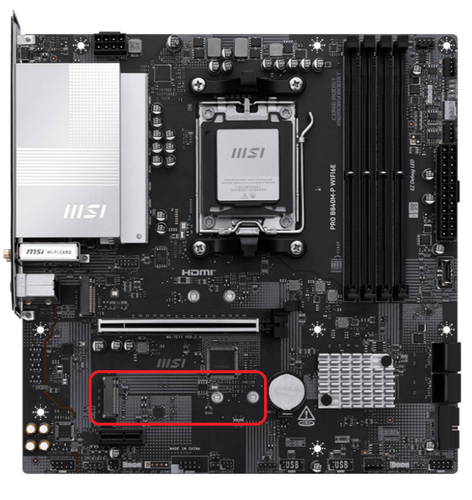
New system and I want to install a NVMe SSD, but I cant find a slot on my motherboard. There is no slot at the bottom. There is one at the top, but it is being used. Can anybody tell if there one under the GPU. The motherboard MSI.Should say it is a mach 3.2
 
Last edited:

Can you take a picture of the inside of your case with the GPU out so we can see the full motherboard?

The website listing for the 3.2 doesn't state a specific B840 motherboard, so it could be a few different ones. While it'll almost certainly have at least one more m.2 slot there's a chance it's hidden behind some sort of panel.
 
CPU-Z should do, don't think they use anything custom in these builds.

Aye, but with a photo we can just slap a big red arrow pointing to the second m.2 in paint. :p

Hunting schematics or photos of B840's is a bit of a faff, it'll definitely have at least one other slot regardless.
 
being mean to be kind, but for the love of dear jesus please don't go messing around with the rig.
you've messed around with what, 4-5 different mobos recently and haven't got one to work. there's literally only one common denominator here...

I thought the OP's name was familiar.

Yeah, maybe go for an external storage drive OP. You can get some decently fast USB-C options, and even NvME enclosures to plug in that way too.
 
Looking at the product pictures, it looks like you have the MSI Pro B840M-P WIFI6E.

The second slot is just below/slightly covered by the GPU.


EDIT

Is this yours?

https://www.overclockers.co.uk/ocuk...-rtx-5070-pre-built-gaming-pc-fs-pb07-ep.html

Looking at the product pictures, it looks like you have the MSI Pro B840M-P WIFI6E.

The second slot is just below/slightly covered by the GPU.


EDIT

Is this yours?

https://www.overclockers.co.uk/ocuk...-rtx-5070-pre-built-gaming-pc-fs-pb07-ep.html
Thanks, your right it is covered by the GPU
 
Back
Top Bottom