


My son got a pc for Christmas and it won't work. The 3060ti card won't give a signal to the monitor tried all the cables and different port but none will give also tried it to the TV and still no signal. The fans are not spinning. He old pc and ps4 work fine with the monitor any ideas as I've got very upset teenager!!
You are using an out of date browser. It may not display this or other websites correctly.
You should upgrade or use an alternative browser.
You should upgrade or use an alternative browser.
NEW PC WONT WORK
- Thread starter jms22
- Start date
More options
Thread starter's posts

Make sure the card is fully engaged in the slot at both ends. Make sure if it requires any additional power connectors, it will likely have at least one, is fully secured and clipped into place so the catch is engaged.
Do the same for the RAM as well, make sure the catches at both ends are fully engaged.
Do the same for the RAM as well, make sure the catches at both ends are fully engaged.
Last edited:

Soldato
- Joined
- 24 Jun 2021
- Posts
- 4,919
- Location
- Oxon
post a picture of the inside so ppl can see if it's all connected properly.
post the full system specs.
post the full system specs.

Are the power connectors definitely seated in the graphics fully, you shouldn't be able to pull them out if they are in all the way and locked in.
Also same goes for all the power connectors.
Have you definitely connected to the graphics card and not the motherboard. You could try and swap that over anyway and see if there's a signal from either.
Has it got a boot drive installed with an operating system installed?
Also same goes for all the power connectors.
Have you definitely connected to the graphics card and not the motherboard. You could try and swap that over anyway and see if there's a signal from either.
Has it got a boot drive installed with an operating system installed?

Man of Honour
- Joined
- 23 Mar 2011
- Posts
- 19,284
- Location
- West Side
Was it an Overclockers pc ? if yes link or name of pc.Bought pre built as I'm not very IT
Last edited:
Just the graphics card it's an rtx 3060 tiThe fact you says the fans aren't spinning is worrying, is that all of the fans on the PC or just the graphics card?
Soldato
- Joined
- 24 Jun 2021
- Posts
- 4,919
- Location
- Oxon
check the switch on the power supply is set to 1 (on)
Man of Honour
- Joined
- 23 Mar 2011
- Posts
- 19,284
- Location
- West Side
Was it an Overclockers, if yes link or name if pc please.Bought pre built as I'm not very IT
Yes it's an gaming radiance boltWas it an Overclockers, if yes link or name of pc.
Yes it ischeck the switch on the power supply is set to 1 (on)
Yes windows 11 but with the screen not working we can't do anythingAre the power connectors definitely seated in the graphics fully, you shouldn't be able to pull them out if they are in all the way and locked in.
Also same goes for all the power connectors.
Have you definitely connected to the graphics card and not the motherboard. You could try and swap that over anyway and see if there's a signal from either.
Has it got a boot drive installed with an operating system installed?
It all came pre built so we didn't have to do anything about from plug and playYes windows 11 but with the screen not working we can't do anything
Man of Honour
- Joined
- 23 Mar 2011
- Posts
- 19,284
- Location
- West Side
ThisYes it's an gaming radiance bolt
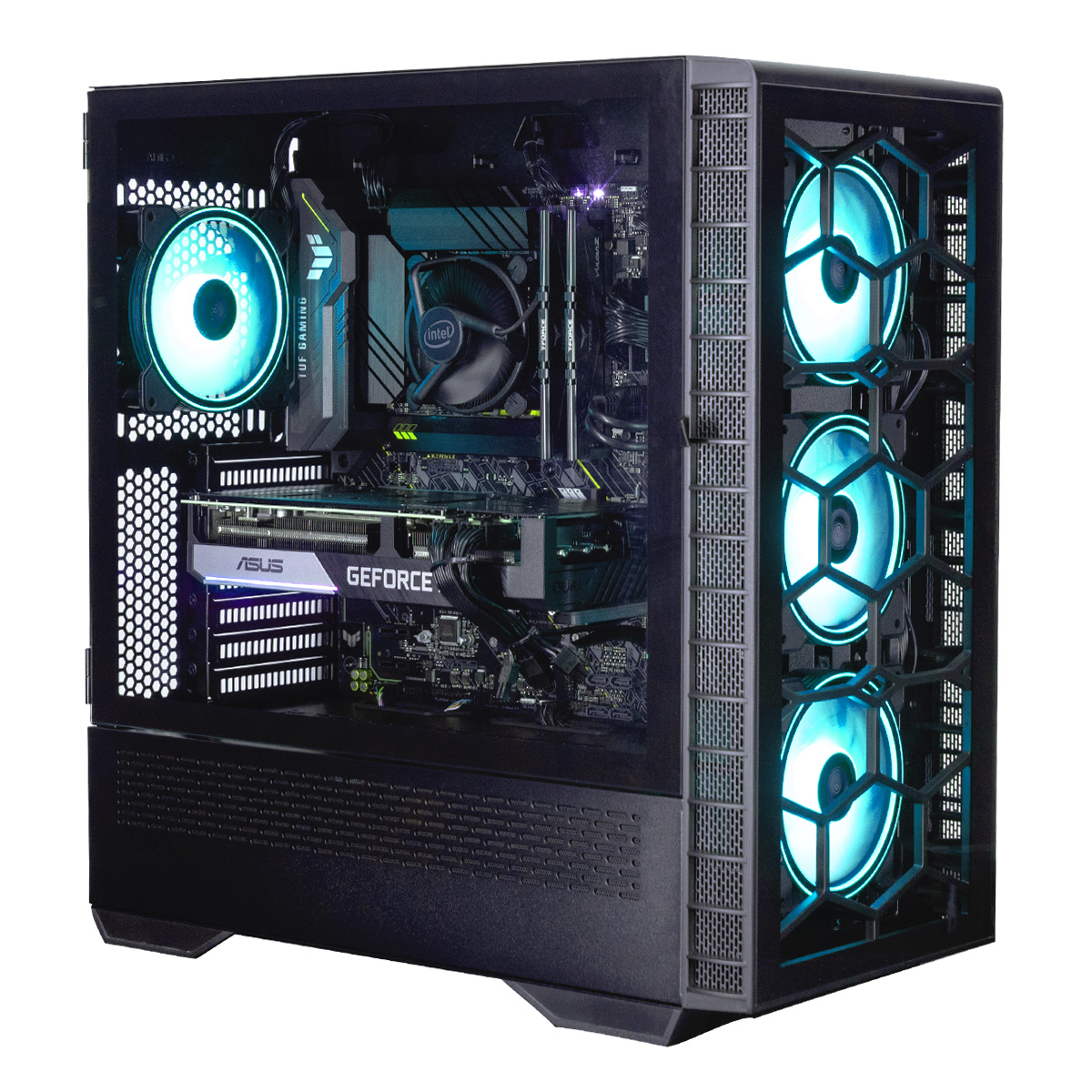
OcUK Gaming Radiance Bolt - Intel Core i5 11400F - Powered By Asus Gaming PC
Order OcUK Gaming Radiance Bolt - Intel Core i5 11400F - Powered By Asus Gaming PC now online and benefit from fast delivery.
 www.overclockers.co.uk
Soldato
- Joined
- 24 Jun 2021
- Posts
- 4,919
- Location
- Oxon
sounds like either:
- gpu not correctly in its slot
- gpu power cables not connected (check both ends)
- gpu not correctly in its slot
- gpu power cables not connected (check both ends)
Connections can come loose during shipping, it's not unusual to have to check it over, they'd run you through it on the phone if you called them. I would have thought there'd be instructions to that effect in the box too.It all came pre built so we didn't have to do anything about from plug and play
Just on the graphics cardThe fact you says the fans aren't spinning is worrying, is that all of the fans on the PC or just the graphics card?
Yes that's itThis
OcUK Gaming Radiance Bolt - Intel Core i5 11400F - Powered By Asus Gaming PC
Order OcUK Gaming Radiance Bolt - Intel Core i5 11400F - Powered By Asus Gaming PC now online and benefit from fast delivery.