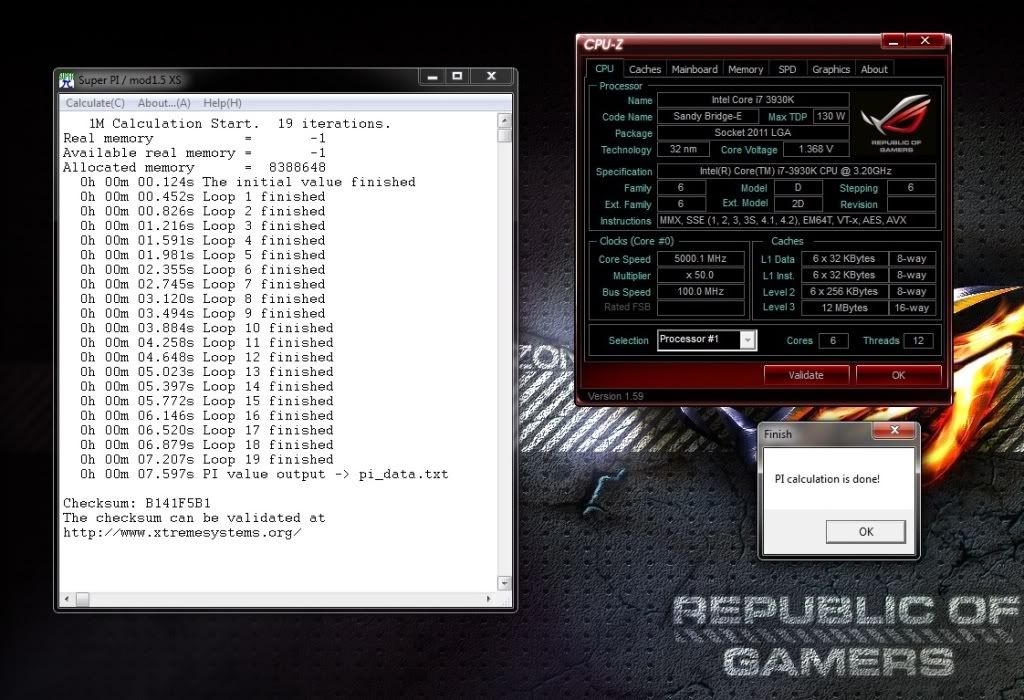
************ Official 39XX Overclocking Thread ************

Benchmarks show that above 2000MHz the more higher the frequency the less the improvement. It's still quicker, but the real question is; Will i see the difference outside of benchmarks? The answer is no. But i will settle for the highest i can get.

Regardless, i've went back to 125 strap to see where i can get now i've got more experience with the voltages.. and oh my is it different! The offset is completely different. I can't get 4.5GHz [36x125] stable with the same vcore offset as found in getting 4.6GHz [46x100] stable. Interesting...

I managed to get better CPU temperatures with my last reseat of the Phenteks heatsink, so will see what get tomorrow with my voltage.

 
When using bclk straps, don't use offset.

It seems like when using offset, it starts from about 1V, regardless, and does not drop at idle. So when you offset using bclk strap, you need to basically offset 0.35V. That's my experience with 2 boards and 2 chips anyway, and is why I don't OC using the straps but just multiplier.
 
[email protected]

5ghz-1.jpg
 
This is the first top end board i've purchased, but i found overclocking relatively easy on it

I set the cpu voltage to 1.35 and 47x100, for a stable 4.7ghz (on water)

I'm not sure if i would hit that so easily on air though
 
Will join the fun soon, think i need to rma my board as dimm slot 5 seems to not be detecting ram modules :(

Can't be without a board so might have to buy another while i wait and i keep looking at the r4e :D

I am having to RMA my 2nd board due to a similar fault.
 
4.6 @ 1.365 for me, using H100 cooler. Stable as can be (At the moment) lol

Am sure my life would be a lot easier if I decided to go with 4.6.... maybe it's the sensible thing for me to do... stable is good... :)


Wow! Doubt I could boot at those voltages at 5GHz, let alone actually run something :)

Very nice!


Post a cpu-z validation if you guys want me to add you to OP.
 
Decided to try an older bios (heard 1005 good for clocking), after adjusting everything, I couldn't understand why I was suddenly needing lots more voltage, and still not managing to get even remotely stable.

Was up to 1.38V, but still getting errors in IBT.

Finally noticed that had not adjusted the voltages for one set of ram! Oops!

Running, normally again now funnily enough :)

Have to continue playing tonight though - work now :(
 
Wouldn't say getting 4.5 makes for a bad chip. Maybe just average... but certainly not bad.

Still not sure if mine is good or great, because despite my initial temps with the phanteks, they are STILL higher than I would like. Would settle for low 80's on very high IBT run (max peak of 83), and am still a couple of degrees off that.

Even that I am sure is higher than most people would be willing to accept.

So I may never discover even close to the full potential of my chip. Though I am still convinced it's a combination of TIM and me being unable to mount these monster coolers properly :D
 
Did you find out the revision/stepping of your chip? Whether it was a C2 or not? And i assume you got it from Overclockers yes? Just want to see if you got the same as me.

Mine is a C2 Batch# 3148C636

EDIT: Just checked your CPU-Z Validation, it's a C2. But did you get it from Overclockers? If so it'll be the same batch.
 
Yeah, I got it from here.

Will try to remember to check batch number when I inevitably reseat the cooler.

What board are you using again?
 
I've got a wierd one, overclocking my 3930k, same double wall socket, psu plugged straight into wall and i couldnt get anything stable above 4.6 without very high voltage, however i inadvertintly discovered that using a cheap 10 quid power meter, the kind that displays the current watts being consumed, between the plug and socket, i am able to get a stable 4.8ghz, removing the watt meter and i just bsods at those same settings!. Found exactly the same thing on my other pc which is a phenom ii x4, same wall socket directly plugged in, 4ghz is the limit, plug it into the watt meter and it gets 4.2ghz, whats going on!!.
 
I've got a wierd one, overclocking my 3930k, same double wall socket, psu plugged straight into wall and i couldnt get anything stable above 4.6 without very high voltage, however i inadvertintly discovered that using a cheap 10 quid power meter, the kind that displays the current watts being consumed, between the plug and socket, i am able to get a stable 4.8ghz, removing the watt meter and i just bsods at those same settings!. Found exactly the same thing on my other pc which is a phenom ii x4, same wall socket directly plugged in, 4ghz is the limit, plug it into the watt meter and it gets 4.2ghz, whats going on!!.

:confused:

What power supply are you using?
 
:confused:

What power supply are you using?

A antec high current gamer 620watt in 3930k machine and a coolermaster silent pro 600 watt in the phenom ii pc. The 3930k is pulling about 480 watts at the wall at 100% load running prime95 at 4.8ghz, i've wondered about possibly needing more headroom in the psu, but it wouldnt explain why i get the same issue with both pc's. I dont know anything about this kind of thing so i can only guess the watt meter is acting as some sort of power conditioner :confused:
 
Last edited:
Well, have ordered a cheap power meter thing and a couple of power conditioner extension things... I live in a really old flat with dodgy everything, so will be interesting to try.
 
Back
Top Bottom