• Competitor rules

    Please remember that any mention of competitors, hinting at competitors or offering to provide details of competitors will result in an account suspension. The full rules can be found under the 'Terms and Rules' link in the bottom right corner of your screen. Just don't mention competitors in any way, shape or form and you'll be OK.

Overclocking 7950

OK try and run 1100 core at 1.165v then.

Check your maximum temperature when gaming and your maximum temps during benching heaven, and note your maximum fan speed. There are checkboxes in the afterburner monitoring section for all these.

What case do you have?

Your temps are a lot higher than mine, although I did reapply thermal paste on mine.

ill upload some pics of my rig later today
 
Sorry to butt in but I still cant seem to up the voltage on my card using any programm even msi afterburner. Kompbuster and GPU Z show the voltage as default nomatter what i set it too :/.

Doesnt anyone else have this problem?
 
Sorry to butt in but I still cant seem to up the voltage on my card using any programm even msi afterburner. Kompbuster and GPU Z show the voltage as default nomatter what i set it too :/.

Doesnt anyone else have this problem?

You have gone into the settings of msi afterburner and checked the two boxes for monitoring and adjusting the voltage haven't you?
 
Yeah i even went in and changed almost everything to 1 just to be sure and still nothing. Iv tried catalyst 12.8 and 12.4 so far with afterburner 2.2.3 with no success.
 
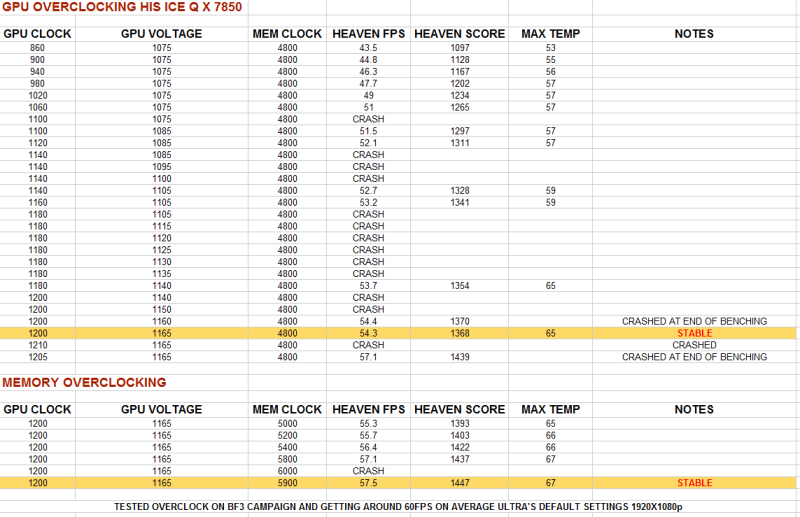
Increasing the voltage and trying to wing an overclock is not the way to go. Each card is different so you'll need to do it incremently whilst using unigene for benchmarks, then play something like BF3 for half an hour after you're stable in Unigene. If you get crashes, grey screens in game then reduce the Memory speed and try it again.

What Joe Bloggs got for his overclock or seeing results on 3D Mark vantage gives you something to aim for. However what these don't tell you is whether their setups are under water or air; what temps they got and what fan profile they were running.

When I did my 7850 (see below) I could monitor temperatures and when gpu throttling occured. Doing it this way I found the sweet spot for my fan profile (loudness) vs temps and maximum overclock. By taking a wild stab in the dark you'll never know this.

MAJNUSBENCHRESULTS.png


HTH

Very organised way of doing it, it certainly beats my method of writing numbers of scraps of paper and losing them... I might just have to copy this method :)
 
Tried bf3 today, the temps were fine they went to around 71 max, but what bothered me is i got some screen tearing on bright areas
 
@ Stock that Temp seems very High. Your card has if not the best GPU cooling, My max temp on BF3 is 61C

Yes I agree, very high temps considering. I just assumed he must have poor case cooling or the cooler isnt seated that well.

OP, you should force vsync if you are running at 60Hz, the tearing will go away and your temps may drop too while gaming. Obviously disable vsync for benching though.
 
Yes I agree, very high temps considering. I just assumed he must have poor case cooling or the cooler isnt seated that well.

OP, you should force vsync if you are running at 60Hz, the tearing will go away and your temps may drop too while gaming. Obviously disable vsync for benching though.

This yer forgot, he running it without vsync :D @op your Over running your card say you getting 100FPS and you have 60hz=60FPS you wasting 40FPS plus card working more than you need.
Switch vsync on and you should be in 50c+ i say.
 
0aad2bb4.jpg


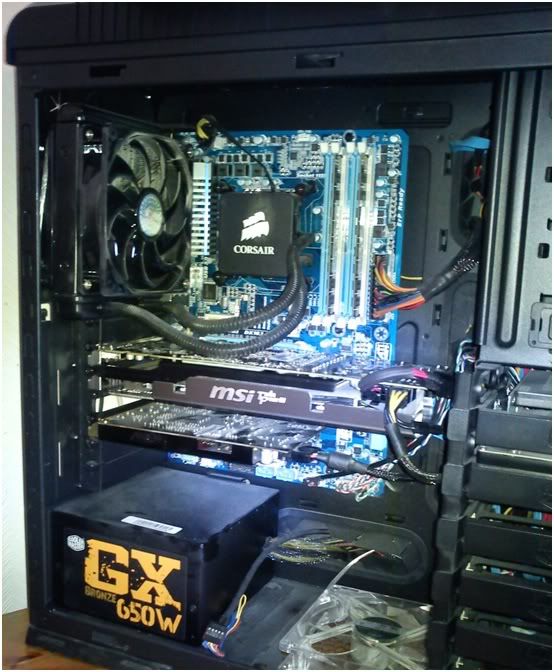
This is what the card looks like in my rig, dusty i know :p but my room is a dust magnet for some reason
 
Back
Top Bottom