

PC shutting off

Soldato
Joined
23 Dec 2013
Posts
3,549
Location
North Wales
As the title says my PC keep on randomly shutting off and powering itself back on. It does not blue screen and literally just powers itself off, the only thing that i can see when it happens is a red LED comes on on the motherboard about .5 seconds before it shuts off. This has happened both under load and idle.

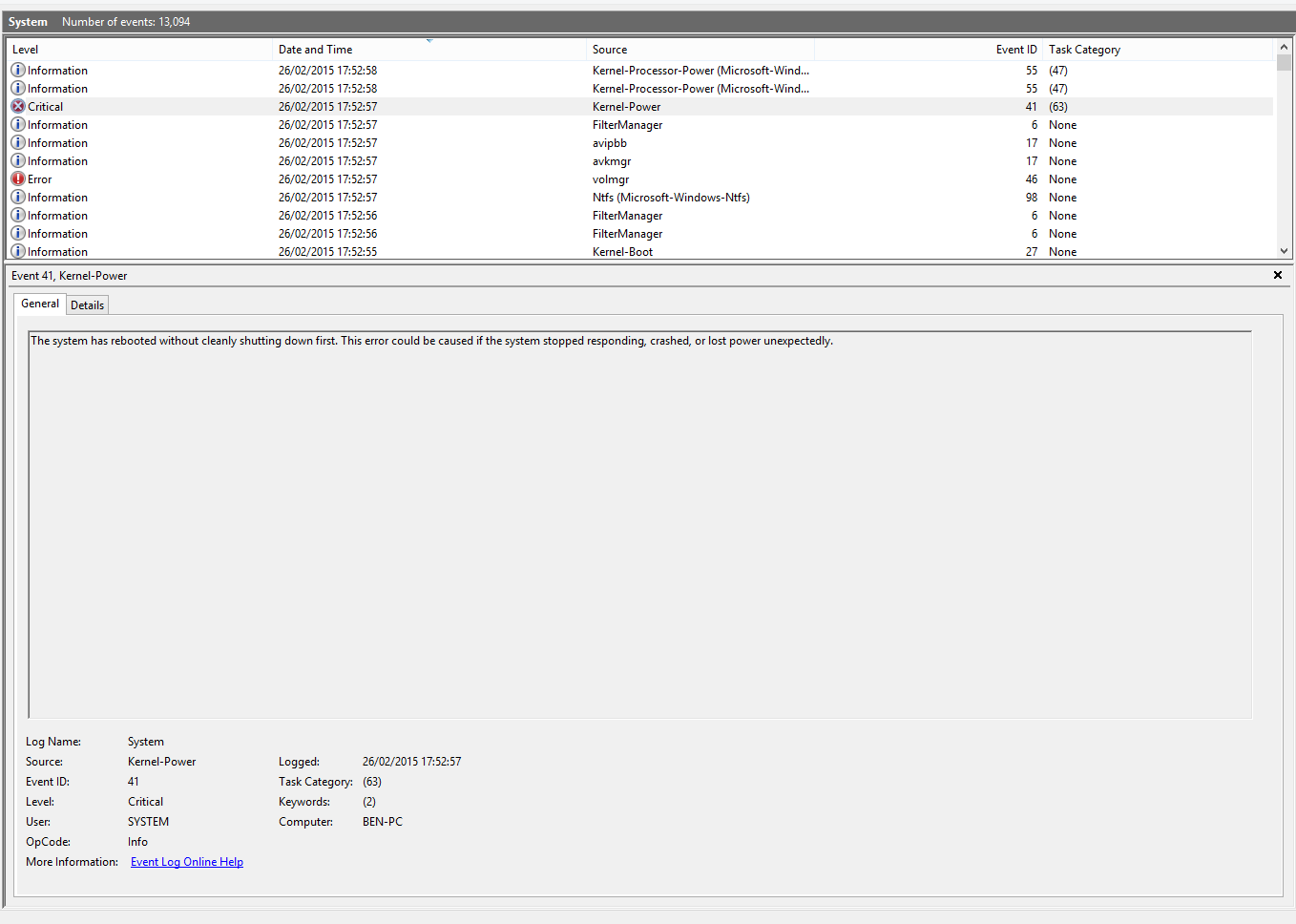
The event log only shows that the PC forcibly powered off. I have checked the following:

  • Fan connections
  • Memory seating
  • Heatsink seating
  • GPU seating
  • Temperatures

Anything i've missed? It's still doing it. Any ideas? :(
 
Erm, try setting bios back to defaults and run it on stock for a while... could be a dodgy overclock, doubt it, but worth a try

Could an unstable northbridge cause it? It's not overclocked or under/overvolted. It is red hot to the touch.

Looking around some peeps say it could be the CPU fan header detecting that the connected fan/pump reads 0RPM for a split second, which causes a power off.
 
Last edited:
Am still getting this issue.

8507813fee74727b83624c31ec5c797d.png
 
So is the CPU back at stock now and still doing it?

Is there sufficient cooling in the case going over the VRM area?
 
Could be a PSU issue.
Ive had the event-id 41 before and I narrowed it down to an audio driver conflict. I disabled all of my drivers apart from the Realtek one and its been happy ever since.
 
So is the CPU back at stock now and still doing it?

Is there sufficient cooling in the case going over the VRM area?

Yes it's back at stock (3.5Ghz) and it's still doing it. There is the rear fan on the case which is blowing air over the VRM area which is hot to the touch but not overly hot.

The Northbridge however seems to be red hot to the touch, i can hardly touch it.
 
I had a issue similar on 8.1 - not sure if that is your OS but might be a checked option in the power settings.


Might be the complete wrong thing however.
 
i had the same problem a while ago which ended up with me buying a new psu. although i am not to bothered about replacing the psu as it was starting to sound like a jet plane, the problem was actually the akasa 24 pin cable extension had melted to of its pins. so check everything is my advice.
 
i had the same problem a while ago which ended up with me buying a new psu. although i am not to bothered about replacing the psu as it was starting to sound like a jet plane, the problem was actually the akasa 24 pin cable extension had melted to of its pins. so check everything is my advice.

That interesting actually, i use an Akasa 8 pin extention for the CPU power. I'll check that. My 8320 does draw a lot of power, maybe as you said it has melted.

Am i covered by any sort of warranty if that happens? The PSU is only like 6 months old. The extension is only like a couple of months.
 
Found the issue. Front fan controller on the case is faulty, one of the soldered joints has failed on it's PCB. Does anyone know if Fractal Design stock the front I/O PCB? I have opened a ticket on their support page but am wondering if anyone knows in the meantime.
 
Turns out that isn't the problem as after disconnecting the front I/O it's happening again. Really don't know what it's likely to be now and i'm honestly stumped. This time it happened though the PC wouldn't power back on at all! Took about 2 - 3 minutes before i got it to power on again. Is it more likely to be a PSU problem at this point?
 
First thing I would do with it would be to try a different PSU. I would come and have a look for you but Wales is a bit of a trek ;)

I've just done a complete re-wire of my entire PC and it's working fine for now. Fingers crossed it's sorted now. Removed some unnecessary cables from my PC.
 
I've just done a complete re-wire of my entire PC and it's working fine for now. Fingers crossed it's sorted now. Removed some unnecessary cables from my PC.
Rewiring might help to improve aircooling inside, so your nb would be a bit colder. But I'd suggest you buying a fan (30-35mm - depending of NB size, sorry have no time to check your mobo) and placing it to NB. If you don't mind, you can change thermal grease underneath as well, if you know how to do it.
 
Back
Top Bottom




