

You are using an out of date browser. It may not display this or other websites correctly.
You should upgrade or use an alternative browser.
You should upgrade or use an alternative browser.
PC Upgrade
- Thread starter mart1985
- Start date
More options
Thread starter's posts
Try installing HW info and open the monitoring, leave it running in the background while you play some warzone then once your done gaming take a snapshot of the CPU and GPU sections and post them up so we can have a look.
Just run the monitoring sensors when in game and screenshot?
Ya should look like this.Just run the monitoring sensors when in game and screenshot?
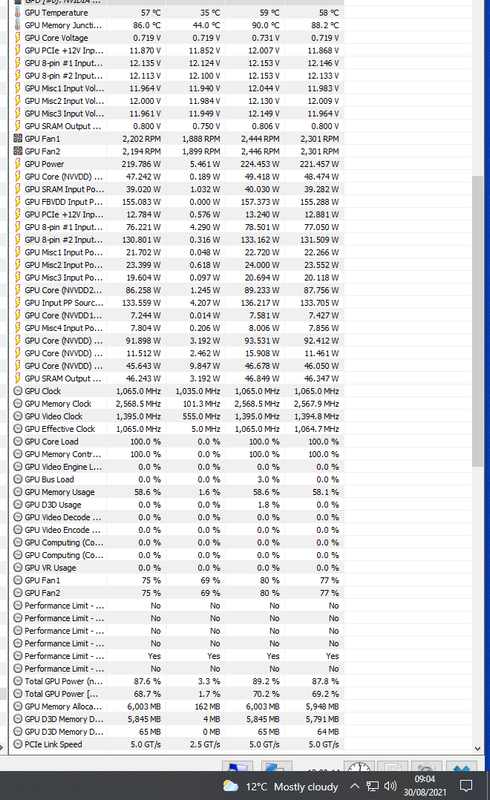
Ya should look like this.
Brilliant, thank you. I'll try and get that tested today.
Ya should look like this.
@Joxeon Here are the screenshots.
https://ibb.co/bRSWY0v
https://ibb.co/8DMx0QB
https://ibb.co/xh0m4m0
I had tried a few different changes before hand, resulting in 70-80 FPS...I'm also getting an awful picture on my monitor now. No idea how, but it is like everything has an outline to it and in game it felt like I had motion blur on when I didn't. I did update the mobo bios prior, as it turned out that was about 2years out of date.
Looks like you need to set the memory speed again as its only running at around 2400mhz and you are right on the edge of memory usage so you may want to consider a 32gb kit.
Also the CPU looks like it's only running at the base clock of 3.6ghz which would definetly hurt fps, it should be hitting around 4.4ghz. Check in the bios for a setting called "core performance boost" and make sure this is turned on.
Also the CPU looks like it's only running at the base clock of 3.6ghz which would definetly hurt fps, it should be hitting around 4.4ghz. Check in the bios for a setting called "core performance boost" and make sure this is turned on.
Looks like you need to set the memory speed again as its only running at around 2400mhz and you are right on the edge of memory usage so you may want to consider a 32gb kit.
Also the CPU looks like it's only running at the base clock of 3.6ghz which would definetly hurt fps, it should be hitting around 4.4ghz. Check in the bios for a setting called "core performance boost" and make sure this is turned on.
Thank you, it must have reset with the bios update - likely explains the drop in frames again.
The core boost setting is on auto (only other option was disabled).
There was a red figure for the power usage, is that suggesting an upgrade for the PSU too?
Would the following upgrades make sense:
Would there be a noticeable temp increase with a new CPU and PSU?
I don't think it's psu related but there is something that's making your CPU run at just 3.4ghz and 1v where is should be running at 4.4ghz and up to 1.475v,
Is the core clock set to auto?
Check the CPU isn't running at a 45w mode etc.
Do you have Latest chipset driver and Windows power plan set to balanced?
https://www.amd.com/en/support/chipsets/amd-socket-am4/x570
Is the core clock set to auto?
Check the CPU isn't running at a 45w mode etc.
Do you have Latest chipset driver and Windows power plan set to balanced?
https://www.amd.com/en/support/chipsets/amd-socket-am4/x570
Last edited:
I don't think it's psu related but there is something that's making your CPU run at just 3.4ghz and 1v where is should be running at 4.4ghz and up to 1.475v,
Is the core clock set to auto?
Check the CPU isn't running at a 45w mode etc.
Do you have Latest chipset driver and Windows power plan set to balanced?
https://www.amd.com/en/support/chipsets/amd-socket-am4/x570
I haven't overclocked my CPU, everything is still stock. I can't see any options in my bios to change anything from stock settings. When I looked into OC the CPU, the benchmarks suggested it wasn't worth it.
Power plan is set to gaming.
The CPU is running at base clocks though, stock settings should see it boosting to 4.4ghz.I haven't overclocked my CPU, everything is still stock. I can't see any options in my bios to change anything from stock settings. When I looked into OC the CPU, the benchmarks suggested it wasn't worth it.
Power plan is set to gaming.
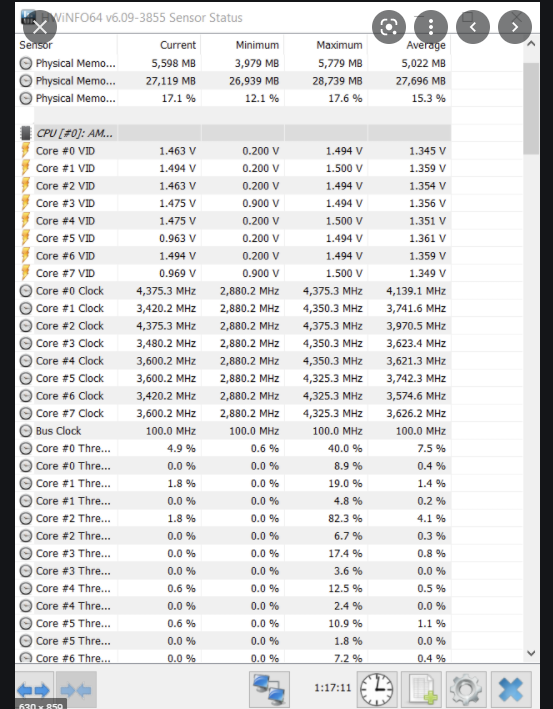
If it's only running at 3.4ghz this is why your fps is low.
This is what the clocks should look like on a 3700X at stock.
Last edited:
The CPU is running at base clocks though, stock settings should see it boosting to 4.4ghz.
If it's only running at 3.4ghz this is why your fps is low.
This is what the clocks should look like on a 3700X at stock.
I have changed the power setting to balanced, and downloaded and installed the AMD chipset update - do I need to do anything else having installed it? The bios looks the same as before.
Have a look in hwinfo and see if the clocks and voltage are bouncing around.I have changed the power setting to balanced, and downloaded and installed the AMD chipset update - do I need to do anything else having installed it? The bios looks the same as before.
Have a look in hwinfo and see if the clocks and voltage are bouncing around.
The 'Active Clock' is fluctuating between 35XX and 42XX with the ratio between 35-43. That looks as though it has worked? I will try it tomorrow and run hwinfo whilst playing and post screenshots again with FPS results.
Thank you for your help, really appreciate it.

Associate
- Joined
- 11 Jun 2021
- Posts
- 101
- Location
- UK
I had this issue with Destiny 2, Had a 3700x and a 3080. Everything was fine, but I was getting ridiculously low frames in busy areas, which shouldn't really happen with such a card (unless you're on flight sim at 8k). 1440p maxed out I was getting maybe 70-90fps in busy scenes. Cold war without DLSS was around 140fps, which was fine to me. Yesterday I upgraded to a 5800x, and my god the difference is huge. at least 40fps increase in busy scenes, and stable fps across the board, not to mention cold war without DLSS maxed now runs between 160-200fps. Unfortunately its our CPU that is bottlenecking, as my ram is only 3200mhz CL16. Even a 5600x would be good enough to upgrade to.
I had this issue with Destiny 2, Had a 3700x and a 3080. Everything was fine, but I was getting ridiculously low frames in busy areas, which shouldn't really happen with such a card (unless you're on flight sim at 8k). 1440p maxed out I was getting maybe 70-90fps in busy scenes. Cold war without DLSS was around 140fps, which was fine to me. Yesterday I upgraded to a 5800x, and my god the difference is huge. at least 40fps increase in busy scenes, and stable fps across the board, not to mention cold war without DLSS maxed now runs between 160-200fps. Unfortunately its our CPU that is bottlenecking, as my ram is only 3200mhz CL16. Even a 5600x would be good enough to upgrade to.
Thanks @serious_adam15 I think I will go with the 5800x or 5900x and also upgrade my RAM to be on the safe side. Those frame rates are more in line with what I've seen on Twitch etc. Banging my head against a wall running a £1000+ GPU and getting 110 FPS...
Associate
- Joined
- 11 Jun 2021
- Posts
- 101
- Location
- UK
Yeah, I know the feeling. The only issue is you may see temp increases with these chips as they run hotter than zen 2. Make sure you have a decent cooler on it and it will be a much better improvement to your fps.Thanks @serious_adam15 I think I will go with the 5800x or 5900x and also upgrade my RAM to be on the safe side. Those frame rates are more in line with what I've seen on Twitch etc. Banging my head against a wall running a £1000+ GPU and getting 110 FPS...
Yeah, I know the feeling. The only issue is you may see temp increases with these chips as they run hotter than zen 2. Make sure you have a decent cooler on it and it will be a much better improvement to your fps.
I was concerned about that. I was thinking of getting a Dark Rock Pro 4 as an upgrade to my existing cooler. Hopefully that will help.
So I have decided to go ahead and upgrade several components of my build. Will the following work along with my existing mobo and GPU?
https://ibb.co/C7nFKd9
My two main concerns are the heat from the new PSU and whether the new cooler will fit (I have a Lian-Li Lancool One Digital Midi Tower - Black Window case).
https://ibb.co/C7nFKd9
My two main concerns are the heat from the new PSU and whether the new cooler will fit (I have a Lian-Li Lancool One Digital Midi Tower - Black Window case).
So I went ahead and upgraded the cpu, ram, psu and cooler. Took me most of yesterday to watch videos and figure out how to replace everything! Did a quick Heaven (6000) and Cineworld R23 (19000 for multi) bench yesterday, will try again today - slightly worried about the temps and Cineworld bench seemed to be a bit low at first glance.
So I ran the new upgrades this evening, with the grand result of a boost from 110 FPS to 135...
Also the CPU spent the whole time sat at 90/91 degrees, which seems far too hot.


No idea what to do at this point. With a new cpu, gpu, psu, ram etc, there isn't much left!
Also the CPU spent the whole time sat at 90/91 degrees, which seems far too hot.
No idea what to do at this point. With a new cpu, gpu, psu, ram etc, there isn't much left!