


I was looking at getting a Creality Pika during black Friday, this could be interesting....Bambu releasing a 3D Scanner

Bambu Lab S1 3D Scanner: Easy in Hand. Pro in Every Scan. | Bambu Lab UK
Meet Bambu Lab S1, our first 3D scanner. The same ease of use you trust, paired with pro-level scanning precision. Coming in November.
-
Notice regarding image hosts and attachments. See here.
You are using an out of date browser. It may not display this or other websites correctly.
You should upgrade or use an alternative browser.
You should upgrade or use an alternative browser.
Random 3D printing chatter
- Thread starter Cenedd
- Start date
More options
Thread starter's posts
Soldato
- Joined
- 20 Oct 2002
- Posts
- 12,486
- Location
- Derby
Definitely. I do hope that it isnt pro in every scan with a pricetag to match.
I'm torn between getting one and waiting for the next gen, ideally with 5/6 heads. CMYK+White+Support filamentsSnapmaker U1 is under £700 now. Wonder when the next iteration is coming out?
Already have a P1S so there's no desperate need for one...might be able to wait for the next gen...maybe...it looks like a great printer

Soldato
- Joined
- 7 Jan 2009
- Posts
- 7,199
Anyone recommend a good cleaning solution to clean the plastic removable enclosure from a Resin Printer? (Elagoo Mars 4)
This red part.
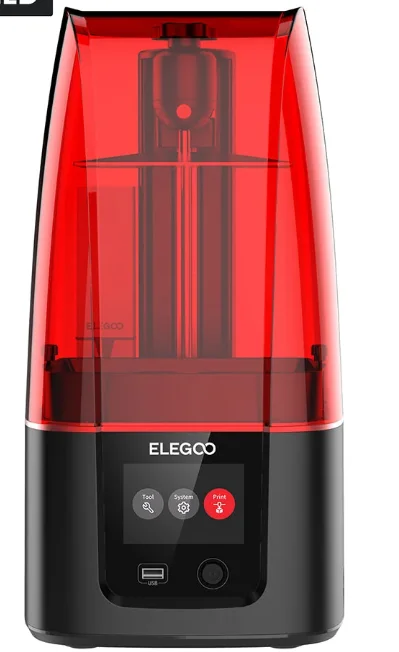
Mine has smudges/oil and general grime on it from the resin, but basic glass cleaner wont shift it.
Cheers!
This red part.
Mine has smudges/oil and general grime on it from the resin, but basic glass cleaner wont shift it.
Cheers!
Last edited:

Plus if you stick your email address in, you get a £25 off £400 Printer order voucher, and a £15 off £120 filament/accessory order.
Pretty sure I've just talked myself into an X2D, as at £474 it seems rude not to. (I can move our AMS2 Pro onto the X2D, and leave our current P2S with just an AMS HT)

After about 6 months of hiatus I’ve started printing again with my A1 with AMS Lite. 1000hours in and still kicking strong, dusted and greased, switched on and was printing within 10mins.
Currently doing various fidget toys mostly clickers with mechanical switches.
Currently doing various fidget toys mostly clickers with mechanical switches.
Plus if you stick your email address in, you get a £25 off £400 Printer order voucher, and a £15 off £120 filament/accessory order.
Pretty sure I've just talked myself into an X2D, as at £474 it seems rude not to. (I can move our AMS2 Pro onto the X2D, and leave our current P2S with just an AMS HT)
My A1 is going solid but really fancy an enclosed printer to do engineering filaments, the P2S and X2D combos are very tempting but there's also a lot of rumour's of new printers post black Friday.
H3C is the only one I've heard a serious rumour of, which is way more than I'd be looking to spendMy A1 is going solid but really fancy an enclosed printer to do engineering filaments, the P2S and X2D combos are very tempting but there's also a lot of rumour's of new printers post black Friday.
I’d probably be on the same boat as you. Even if I could print with engineeering filaments, I don’t have any design skills.My A1 is going solid but really fancy an enclosed printer to do engineering filaments, the P2S and X2D combos are very tempting but there's also a lot of rumour's of new printers post black Friday.
I’m purely on the find and print category.
H3C is the only one I've heard a serious rumour of, which is way more than I'd be looking to spend
Now officially announced
Bambu Lab H3C: Tool Changer. Game Changer. | Bambu Lab UK
Meet Bambu Lab H3C, a next-generation tool changer 3D printer that makes multi-material printing faster, more reliable, and effortless. Coming November 3rd.
bambulab.com
That thing is going to be an absolute monster of a machine!Now officially announced
Bambu Lab H3C: Tool Changer. Game Changer. | Bambu Lab UK
Meet Bambu Lab H3C, a next-generation tool changer 3D printer that makes multi-material printing faster, more reliable, and effortless. Coming November 3rd.

Associate
- Joined
- 18 Dec 2008
- Posts
- 767
I count 9 different filaments at once!That thing is going to be an absolute monster of a machine!
I guess the AMS is built in.
Opens up so many printing possibilities.
No the ams isn't built in - there is a new AMS3 according to the patentsI count 9 different filaments at once!
I guess the AMS is built in.
Opens up so many printing possibilities.
Hmm reddit has links to this thing. The PDF's here point to a machine with what looks like 7 tools. Oh its a P3C! How many models are they releasing?!

 fccid.io
PF006-P — Giteki 211-260730
Japan MIC Giteki record 211-260730 for PF006-P. View applicant details, radio specifications and listed documents.
Last edited: