


Why Preset K precisely? I use dlss swapper and always set 'use the latest'. Am I good or shall I always check which preset is the best for every game?Seems this graphics glitch was due to DLSS dll version 310.4, used DLSS Swapper to switch to 310.21 (one version older) and that's perfect with Preset K and no glitches.
I'm now following the voice in the other world area, tose fast moving stabby things are gnarly.
Very much enjoying it, buttery smooth no traversal stutters, only the handful or initial shader comp hitches but nowhere near the 300ms shown on the DF video, more like 15ms ish? Small enough to ignore in the few times it happens.
Oh yeah did I mention OLED friendly black levels?
You are using an out of date browser. It may not display this or other websites correctly.
You should upgrade or use an alternative browser.
You should upgrade or use an alternative browser.
Silent Hill F
- Thread starter Gray2233
- Start date
More options
Thread starter's postsDeleted member 280263
Deleted member 280263
This plays flawlessly at max settings 4K DLSS with a 4070 and the September 10th drivers.
The only setting I turned down to get a locked 60FPS was lumen from Epic to high, the rest is maxed out, and I turned motion blur off, because **** that ****
No stuttering what so ever. This is silky smooth, it's crazy to think the same team made SH2R, what a shame they couldn't have gone back and made it run like this, but I still love SH2R, despite it's major hiccups!
FWIW I don't mess around with overclocked controllers, I've found when using them, or overclocking a stock one, it causes stuttering - which it wouldn't surprise me at all if is what causes most peoples stutters, they're just unaware that it's a known risk - I tested this theory with Cronos: The New Dawn, as soon as I overclocked my PS5 controller, it happened. Went back to stock, and it was fine again. I definitely think people are assuming just because they have X hardware, that it's the games fault, half the time...
Anyway, here's the settings used, and a quick few beginning screenshots, so not to spoil anything
https://i.~ibb.co~/S4H1tjDY/SHf-Win64-Shipping-2025-09-24-13-32-54-648.png
https://i.~ibb.co~/Xx64MsGz/SHf-Win64-Shipping-2025-09-24-13-33-07-189.png
https://i.~ibb.co~/Xx64MsGz/SHf-Win64-Shipping-2025-09-24-13-33-07-189.png
https://i.~ibb.co~/kgfdMGhc/SHf-Win64-Shipping-2025-09-24-13-33-28-097.png
https://i.~ibb.co~/v4mhyTsY/SHf-Win64-Shipping-2025-09-24-13-28-01-216.png
https://i.~ibb.co~/Kz6yQRj6/SHf-Win64-Shipping-2025-09-24-13-32-21-365.png
https://i.~ibb.co~/tpTJvqJz/SHf-Win64-Shipping-2025-09-24-13-32-44-707.png
The only setting I turned down to get a locked 60FPS was lumen from Epic to high, the rest is maxed out, and I turned motion blur off, because **** that ****
No stuttering what so ever. This is silky smooth, it's crazy to think the same team made SH2R, what a shame they couldn't have gone back and made it run like this, but I still love SH2R, despite it's major hiccups!
FWIW I don't mess around with overclocked controllers, I've found when using them, or overclocking a stock one, it causes stuttering - which it wouldn't surprise me at all if is what causes most peoples stutters, they're just unaware that it's a known risk - I tested this theory with Cronos: The New Dawn, as soon as I overclocked my PS5 controller, it happened. Went back to stock, and it was fine again. I definitely think people are assuming just because they have X hardware, that it's the games fault, half the time...
Anyway, here's the settings used, and a quick few beginning screenshots, so not to spoil anything
https://i.~ibb.co~/S4H1tjDY/SHf-Win64-Shipping-2025-09-24-13-32-54-648.png
https://i.~ibb.co~/Xx64MsGz/SHf-Win64-Shipping-2025-09-24-13-33-07-189.png
https://i.~ibb.co~/Xx64MsGz/SHf-Win64-Shipping-2025-09-24-13-33-07-189.png
https://i.~ibb.co~/kgfdMGhc/SHf-Win64-Shipping-2025-09-24-13-33-28-097.png
https://i.~ibb.co~/v4mhyTsY/SHf-Win64-Shipping-2025-09-24-13-28-01-216.png
https://i.~ibb.co~/Kz6yQRj6/SHf-Win64-Shipping-2025-09-24-13-32-21-365.png
https://i.~ibb.co~/tpTJvqJz/SHf-Win64-Shipping-2025-09-24-13-32-44-707.png
Last edited by a moderator:

Associate
- Joined
- 3 May 2007
- Posts
- 2,302
^ its made by a different team than the ones that made sh2r
Deleted member 280263
Deleted member 280263
Ah, that explains a lot then! I saw that they were both Bloober, but didn't look into it more than that.^ its made by a different team than the ones that made sh2r

The shader stutter hitches happen on every single PC with no exception. This is a Dev+UE5 issue with pre-comp not fully being set to compiling every shader needed so has to be done in realtime during gameplay for remaining assets via Async compute. You are getting them too but they will be rare/small enough to go unnoticed like on my system, it has nothing to do with controller considering it happens with or without one anyway. At this point this issue has been thoroughly documented through multiple sources anyway so there is no room for error.
As for what is Preset K? Best described in the quote below:
Here is what Preset E looks like, the default preset if you don't change anything and just install and run the game, this is DLSS 3 Quality by the way:
Here is what Preset K looks like using DLSS 4 dll version 310.2.1 and setting Preset K or "Latest" in DLSS Swapper or NVPI or NV App:
Edit* Keep an eye on the wheel spokes.
Using Preset K also smooths away some of the hair pixelation observed sometimes mostly in cutscenes, there is still some blocking but that's due to the depth of field as the blocking only seems present in areas of DoF in those cutscenes, again a UE5 trait with older versions of UE5.
If set to Latest model then yes you will be using Preset K if you have installed a driver version that embeds the latest build of the DLSS dll files (v310.x and above), otherwise it will use Preset E as older versions of DLSS dll have no idea what Preset K is. The game ships with v3.7.10 of DLSS SR dll file, so Preset E would be what your game is using unless you overriide the dll version as well to use a v310.2.1 build (as per my DLSS Swapper screenshots).Why Preset K precisely? I use dlss swapper and always set 'use the latest'. Am I good or shall I always check which preset is the best for every game?
As for what is Preset K? Best described in the quote below:
As of January 30th, 2025, the “Latest” model for DLSS Super Resolution has been updated to Transformer "Preset K", a minor refinement to Transformer Preset J, which showcases improved temporal stability, reduced ghosting, and enhanced detail in motion.
Here is what Preset E looks like, the default preset if you don't change anything and just install and run the game, this is DLSS 3 Quality by the way:
Here is what Preset K looks like using DLSS 4 dll version 310.2.1 and setting Preset K or "Latest" in DLSS Swapper or NVPI or NV App:
Edit* Keep an eye on the wheel spokes.
Using Preset K also smooths away some of the hair pixelation observed sometimes mostly in cutscenes, there is still some blocking but that's due to the depth of field as the blocking only seems present in areas of DoF in those cutscenes, again a UE5 trait with older versions of UE5.
Last edited:

Soldato
- Joined
- 21 Oct 2002
- Posts
- 6,587
- Location
- West Sussex
much better now running in sync with average 110fps on how I got mine setup atmThe latest nightly build of Special K has added a framerate limit bypasser for the cutscenes. No more being slammed back to 30fps every 5 minutes.
Last edited:


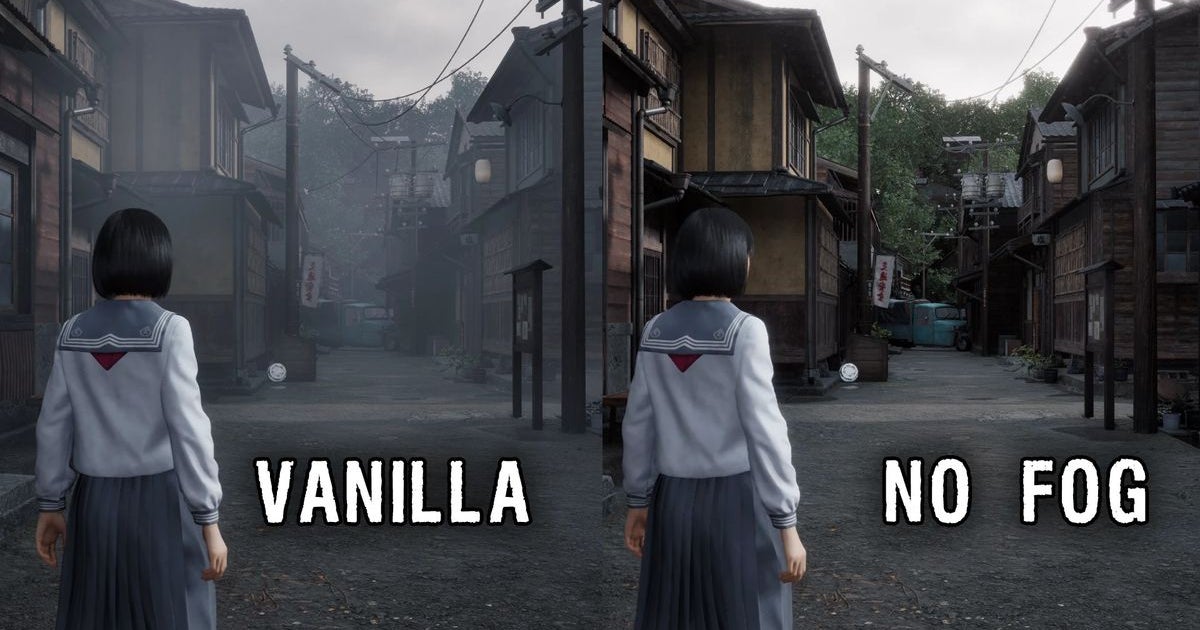
No fog mod already LOL why on earth remove that! 
 www.rockpapershotgun.com
Silent Hill f modder removes the fog a day before release, beginning game's logical transformation into a wholesome life sim
As sure as summer follows spring, somebody's already removed the fog from the new Silent Hill game.
www.rockpapershotgun.com
To be fair to him, he was never going to like it, doesnt run brilliantly well on his potato PC, he is useless at gaming so was never going to gel with its combat but he does at least point out that everyone has different opinions of different games, but seriously if his opinion is that this game is "complete trash" then he clearly has never played a game which IS actually complete trash.Will watch when home from climbing, fully expected a rancid from him too lol

It's almost like these modders never played silent hill before, remove fog....... Also have yet to see a single reshade that actually looks naturally good vs unusually brash/
It was arguably in part a hardware restriction back with the original on PS1 where the fog was legitimately suffocating in outside areas, but it also added a ton of atmosphere and upped the fear factor.
Anyone modding the fog out is probably the sort of person that massively ups the brightness to painful degrees in horror/exploration games so that they can "see where they're going" -- and those people lack souls.
Whilst true, the hardware at the time could only draw so far into the distance so the devs (going by interviews posted during the SH2 Remake development phases) said that they designed the world around a fog system which became a part of the lore of how everything turns upside down in this series since then. So even if it was because of tech limitations, those limitations made what Silent Hill came to be.It was arguably in part a hardware restriction back with the original on PS1 where the fog was legitimately suffocating in outside areas, but it also added a ton of atmosphere and upped the fear factor.
Anyone modding the fog out is probably the sort of person that massively ups the brightness to painful degrees in horror/exploration games so that they can "see where they're going" -- and those people lack souls.
Whilst true, the hardware at the time could only draw so far into the distance so the devs (going by interviews posted during the SH2 Remake development phases) said that they designed the world around a fog system which became a part of the lore of how everything turns upside down in this series since then. So even if it was because of tech limitations, those limitations made what Silent Hill came to be.
It makes the franchise for me, removing it is nonsensical.
Gizza kiss!

The rawness of the "disease" spreading is quite spectacular it has to be said.


Certainly nailed atmosphere as good as if not better than SH2 Remake. Been playing the last few hours via the G7 Pro controller and have to say whilst the Dualsense sticks feel more natural, the G7 is just more comfortable a controller. I've also tweaked a custom stick curve too so kind of feels similar to dualsense more than before, and am obviously wireless with that.
The rawness of the "disease" spreading is quite spectacular it has to be said.
Certainly nailed atmosphere as good as if not better than SH2 Remake. Been playing the last few hours via the G7 Pro controller and have to say whilst the Dualsense sticks feel more natural, the G7 is just more comfortable a controller. I've also tweaked a custom stick curve too so kind of feels similar to dualsense more than before, and am obviously wireless with that.
Last edited:
Deleted member 280263
Deleted member 280263
Someone needs to do a Sarah Michelle Gellar mod so it's like the American The Grudge remakeI'm put off by the idea of spending a game running around as a little school girl.


Last edited by a moderator:

Gizza kiss!

The rawness of the "disease" spreading is quite spectacular it has to be said.


Certainly nailed atmosphere as good as if not better than SH2 Remake. Been playing the last few hours via the G7 Pro controller and have to say whilst the Dualsense sticks feel more natural, the G7 is just more comfortable a controller. I've also tweaked a custom stick curve too so kind of feels similar to dualsense more than before, and am obviously wireless with that.
Not to mention, no wire!
Last edited: