Slow transfer rates

Caporegime
Joined
3 Jan 2006
Posts
25,335
Location
Chadderton, Oldham
Hi, I have a WDC 320GB, on an Asus P5N-E SLi, is there something in the bios that needs to be enabled, disables, changed or something? because at the moment my transfer rates are so slow, right this minute I am trying to transfer a large file, and its going at 4.08 MB/sec :confused:

Any help will be appreciated. .

Thanks
Willz.

 
Does the drive have a SATA 1 jumper? Some do and that will slow down the drive. Give more details of the drive or look it up on WD's web site.
 
malcolm said:
Does the drive have a SATA 1 jumper? Some do and that will slow down the drive. Give more details of the drive or look it up on WD's web site.
Changing the drive from 150Mb/s operation to 300Mb/s will have no impact whatsoever on the transfer rate of the drive simply because at about 70Mb/s it's not being bandwidth limited by the interface, regardless of mode.

To the OP, are you copying the file to a different physical hard disk or to another location or partition on the same disk?

Have you run HDTach or HDTune to see if the drive itself is running slow?
 
rpstewart said:
Changing the drive from 150Mb/s operation to 300Mb/s will have no impact whatsoever on the transfer rate of the drive simply because at about 70Mb/s it's not being bandwidth limited by the interface, regardless of mode.

To the OP, are you copying the file to a different physical hard disk or to another location or partition on the same disk?

Have you run HDTach or HDTune to see if the drive itself is running slow?

How can I change it to 300MB/s even though it may not help?

It was transfering the files from 1 partitions to another, I only have one drive in my PC.

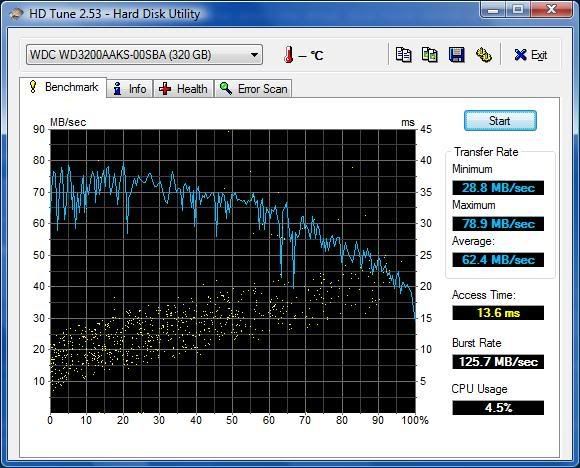
Just ran HDTune, this is the results:

HDTUNE.jpg
 
The drive's fine. Transferring between locations on the same physical disk is always going to be slow, the drive only has a single set of read and write heads so it has to keep moving between the source and target locations. The time spent moving the heads really affects the average transfer rate.
 
Is set something in Bios from Auto to Large and now I just tried transfering a 4GB file and the transfer rate was about 20+ MB/sec.
 
Back
Top Bottom