Some Advice Please

Soldato
Joined
13 Dec 2006
Posts
6,978
Location
On the forest moon Endor
Hi there, my first post in this section and it's as title really - we've got the following equipment:

  1. Technics DVD/CD SL-DV290
  2. Technics Processor SH-DV290
  3. Technics Stereo Tuner/Amp SA-DV290
Exactly the same as this one

We also have:

  1. Samsung Series 5 40" Full HD (1080p) LCD TV (model Le400A556PLF)

Now I know the stereo system is aged, but I was hoping to get surround sound working through the television - can anyone advise if it's possible using the above two systems please? We use the television predominantly with the PS3 either for gaming or watching movies through an attached USB flash drive. Or would I be much better off scrapping the Hifi surround sound and purchasing something like this? Also, if I did go for the Logitech option would that work alright through the television and PS3?

Thanks in advance guys

 
The Technics gear may be getting on a bit,but I would put money on it sounding waaaaay better than that God awful LG garbage.

Thanks for the reply there - I knew the Technics was good in it's day, I didn't know if that day had come and gone though? I'll perceiver and see what I do do re trying to link the speakers to the television. . . . . .

The LG (Logitech) I linked to isn't that good as a surround sound for tv/ps3 then?
 
Do you know if the tv has an audio output? These are often rca connectors aka phono plugs. It should then be a case of running an rca cable from the back of the tv to the aux input on the amplifier (I can't see the back of the Technics system clearly, but looks like there is an aux in on the second unit from the top, just above the speaker connectors). Then, anything shown on the tv should also be heard through the Technics system :)

If you have the Technics system in place and speakers in the right position, I can't see any real benefit to getting the Logitech setup (although you do get a subwoofer with the Logitech). Your call :)

/edit - I've had a look at the quickstart guide for your tv, and it shows an audio output just above where the aerial plugs in, so as long as the Technics has an aux input (which I'd be amazed if it hasn't) then the two should certainly work together :)
 
Last edited:
There's not much in the way of accurate online manuals to check for the Hi-Fi, so you're going to have to do a bit of testing yourself. However, here are a few pointers to get you going...

1a) Is there a digital input on either coax or optical - You need this if the amp is to process DD & DTS from an external source

1b) If the answer to the above is "Yes & Optical" then next check if the amp will process DD & DTS in this way - It might only do that for its own DVD player

If "Yes & Coax" (looks like a single phono socket but with an orange coloured centre ring) then you'll need a coax to optical convertor box something like this. But first check your manual to see if the amp will decode DD & DTS from an external source before spending any money.

2) If there isn't a digital input then things get a bit trickier. TVs won't usually convert a digital signal via HDMI to an analogue signal you can use with a phono or jack cable input on an amp. You'll need to connect each source either to the TV via the SCART/Component/S-Video/Composite inputs for the analogue audio to follow, then connect the TVs SCART output to the amp, or connect each source direct to the amp via stereo phono cables cables. Direct connection is easier so long as there's enough spare inputs on the amp. In this way you are playing back a stereo signal or (if the amp can do it) making stereo in to surround using ProLogic or some form of Technics' own surround processing.


LG is Lucky Goldstar, a manufacturer of TV sets. Logitec is not LG.

The Logitec kit is a basic PC surround kit. It has 1x stereo phono input and 1x 5.1 input on 3x 3.5mm jack sockets which can also be used as a plain stereo input. This is pretty much the same as the analogue audio outs on most sound cards. My view is that this kit isn't the best solution for your needs. It's cheap enough, though I think you'll find yourself getting a bit fed up with having to set the volume manually via the left speaker. But the biggest hiccup is there's no manual source selection. I guess the device uses auto signal sensing. This means that if the TV is on and connected then the 506 will ignore any other source. The result is that you're back to a hotch potch wiring scheme via the TV. And finally, for this sort of price you can't expect DD and DTS decoding. ProLogic would have been nice but you don't even get that.

Overall I'd either go with connecting the TVs headphone out socket to the Technics Hi-Fi, or if you want proper surround get a secondhand AV amp and a 5.1 speaker kit to do it properly. The headphone socket connection isn't the best quality surround, but it's cheap, easy to do and it makes use of your existing hi-fi until you decide you want something better. :)
 
Thanks for all the advice here guys - greatly appreciated. I'll be hopefully getting this all sorted out on my next day off on Wed :)
 
Last edited:
Hi there

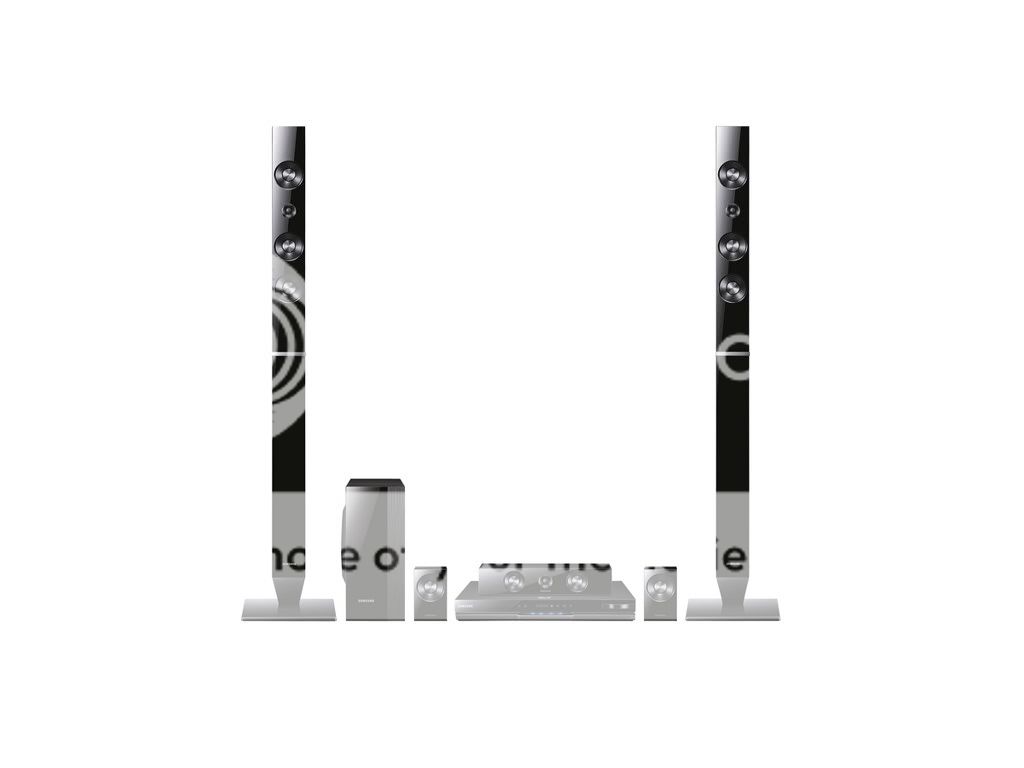
Well after a little mucking about the stereo surround works fine with the TV but is useless with the PS3 so I've decided to move the stereo upstairs to the computer room and purchase this:

A106P_SP286_04_PQ04W.jpg


It's the Samsung HT-D5530/XEU 3D Blu-ray DVD Home Theatre System. Should be delivered and installed by the end of the month. I'll pop a few pics up when it's all done. I'm looking forward to COD in surround sound along with a few decent films as well. Also I was wondering if anyone could advise whether they know if this product will work with no problems with my television please?
 
Hi there

the speakers have now arrived, unfortunately we wont have the time to set these up and enjoy them until the end of the month due to work commitments :(

I've also been considering one of these and I wondered what people thoughts were on them? Would it tie in okay with the Samsung stuff or would it just be a waste of money?

// Edit if my link is against forum rules please let me know and I'll replace with a JPEG picture.
 
Last edited:
Back
Top Bottom