

You are using an out of date browser. It may not display this or other websites correctly.
You should upgrade or use an alternative browser.
You should upgrade or use an alternative browser.
SSD advice
- Thread starter AndyOcUK
- Start date
More options
Thread starter's posts
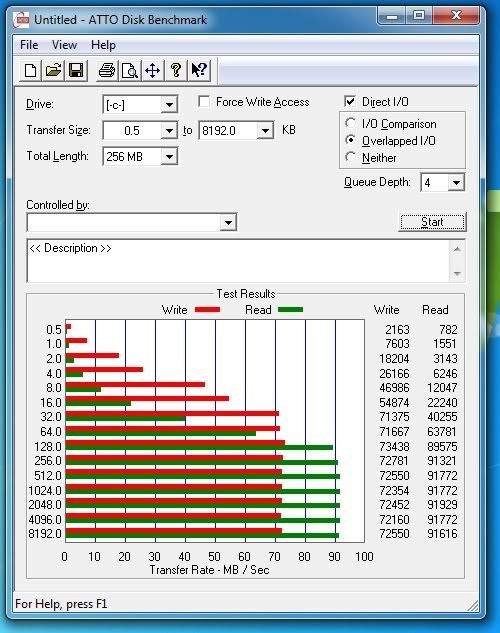


This it what Im going todo.. Before I install windows change it to ACHI in the bios. Once windows is installed, make sure defrag and indexing is turned off for the drive, and then just use it like you would any other drive... I think these loads of tweaks ppl do to make the drive "apparently" last longer, are prob doing more harm then good.
About trm and garbage collection, just let the drive and windows sort that out, cos Im guessing windows is left idel at some point every day? So that should be enough.
Thanks for your perspective. I'm already using ACHI for my other 3 HDDs, so that isn't an issue. I like indexing on my other drives so I'd just want to stop it happening on the SSD. Is unticking "allow files on this drive to have contents indexed in addition to file properties" and then removing all C:\ locations in Indexing Options enough to do this?
Regarding garbage collection, is there anywhere that describes exactly how it works? Currently if I leave my PC on whilst not using it, it'll go to sleep after 30 minutes. I don't want to turn this feature off so will the SSD have time to perform garbage collection in this 30 minute time frame?
um thats not good, have you installed chipset drivers etc, and set to ahci in bios?
yep
also, CPC benchmark result here:
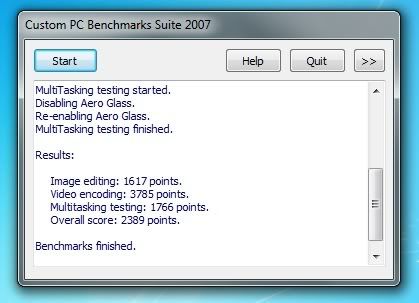
will I see better performance on the intel controller?
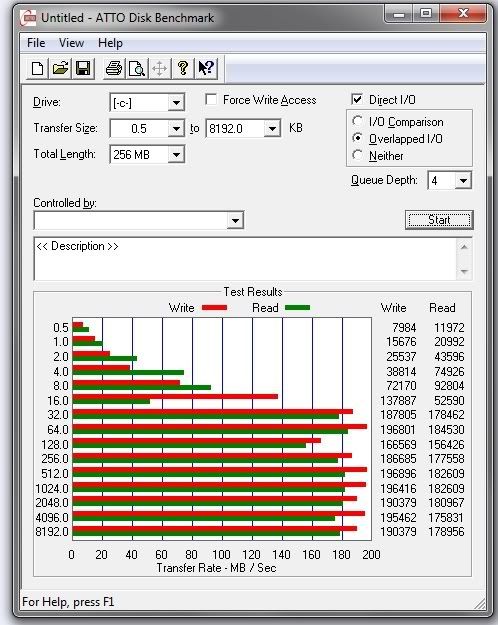
At the moment, its only as quick as my Raptor's (2 X 150GB) in RAID 0
Here's the Raptors on same Atto test (currently DESTROYING the SSD):
Last edited:

Regarding garbage collection, is there anywhere that describes exactly how it works? Currently if I leave my PC on whilst not using it, it'll go to sleep after 30 minutes. I don't want to turn this feature off so will the SSD have time to perform garbage collection in this 30 minute time frame?
The only thing I know about the Trim and Garbage Collection is, it happens when its idel and think its more down to the SSD doing itself rather then windows telling it that it needs do it.
Found it:
SSD Atto Results[/QUOTE]
I'm no expert (by any stretch of the imagination) but that doesn't look right to me - the speeds look very low - what's the manufacturers quoted speeds for the drive?
I think you need to put them on the Intel controller, see what speeds you get there. :)
I'm no expert (by any stretch of the imagination) but that doesn't look right to me - the speeds look very low - what's the manufacturers quoted speeds for the drive?
I think you need to put them on the Intel controller, see what speeds you get there.
my thoughts exactly
Corsair speeds:
195 MB/s sequential read
70 MB/s sequential write