SSD=Amazing

It's the same actually. I had both and used them both as well. Just recommending 3.3 as it seems it's the most common recommended at the OCZ forum.
My procedure is enable IDE mode and Compatible mode in the bios, disconnect all sata drives, boot from the USB drive and at the DOS prompt, connect the drive you want to erase and type HDDerase and just click "y" all the way.

Yeah, that's the driver i'm using.

By the way, in building the array, I used the 128 bit cluster size coz i'm using and moving large files a lot. (Video and Photo editing).
 
Last edited:

Just windows and programs and the odd game going on my array so I'll try the 4k suggestion from ocz and see how I go. Unless somebody gives me good reason not to?

Thanks btw
 
These newer Crucial drives do seem nice and quick.
I'm actually currently using the previous generation of Crucial SSD in my machine.
However as I've got SATA3 controllers.....

....ah OK.
I can buy in the 128GB C300 drives for £180 all included.
Think I'd be crazy not to at that price.
 
just installed a OCZ Vertex 2E 60GB and these speeds look slow to you,ive enabled AHCI and did a fresh install and used sata 1 for the connection


Last edited:
Probably where you're going wrong then. I put my two vortex 2e on my asus 6gb/s sata and it has crippled them. Although my read speeds are good, they are not great and my write speeds are about a 5th of the single vortex 2e on here.

I'm going to put them on the Intel sata II controller tonight to see if there is an improvement.

Sata III may be good for the crucial drives but does seem to cripple write speeds or at least with the marvel controller.

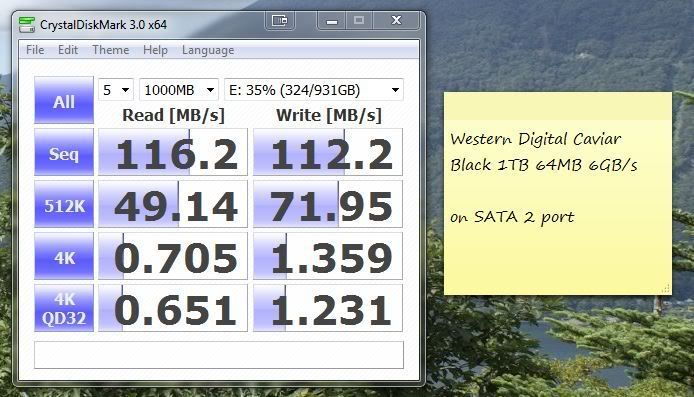
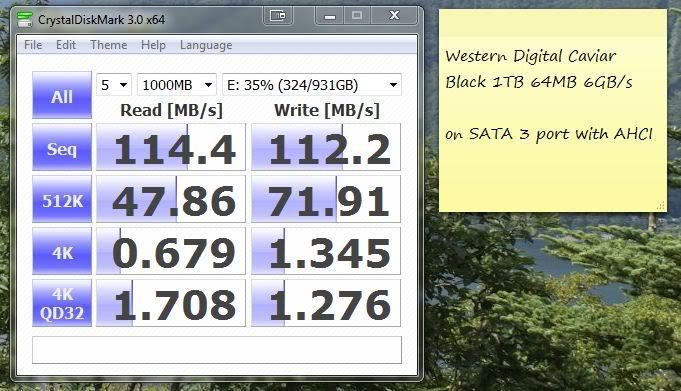
tested the same drive on the sperate ports, not much in it till you look at the random 4K read QD32

SATA2.jpg


SATA3.jpg
 
just installed a OCZ Vertex 2E 60GB and these speeds look slow to you,ive enabled AHCI and did a fresh install and used sata 1 for the connection


That's a bit on the low side. Check the OCZ forum as they've got some settings for AMD board.

On intel chipset, this is how it looks.

eqoy9f.jpg
 
Hdderase worked and my performance is where it should be. Only problem now is I have a smart error in bios on boot up :(
 
If you're using a Gigabyte mobo, there's a fix at the OCZ forum and they're also working on a new firmware to fix this issue. Toolbox is on its way as well, hopefully soon.

At the moment, you can opt to disable smart monitoring in the bios as its not reading the sandforce smart attributes properly same with Crystal Disk Info.
 
Bizarrely enough it's an Asus board. I have read the threads on ocz about the gigabyte but not come across anybody with this problem on the Asus board.

Going to try the 1.11 firmware tonight but that means finding a disk to have windows boot up on as the firmware upgrade program is windows only :(

Only thing is the firmware states its for vertex 2 and vertex 2ex but no mention of vertex 2e. I think I best check with them to be sure it's okay for my vertex 2e drive.

And for the life of me I can't find where in the Asus bios you can switch off smart monitoring on the harddrives so I have switched off stop on F1 error for now.
 
Last edited:
And for the life of me I can't find where in the Asus bios you can switch off smart monitoring on the harddrives so I have switched off stop on F1 error for now.

Main BIOS screen -> AHCI Config -> Select the SSD and press Enter to get to SMART option :)
 
Bizarrely enough it's an Asus board. I have read the threads on ocz about the gigabyte but not come across anybody with this problem on the Asus board.

Going to try the 1.11 firmware tonight but that means finding a disk to have windows boot up on as the firmware upgrade program is windows only :(

Only thing is the firmware states its for vertex 2 and vertex 2ex but no mention of vertex 2e. I think I best check with them to be sure it's okay for my vertex 2e drive.

I've got a Vertex 2E and here's the firmware I used http://www.ocztechnologyforum.com/f...ilable-now-for-all-OCZ-Sandforce-based-drives

Here's an addendum to the flashing instruction, so, i guess you can just run it off a USB stick.

EDIT: The updater runs fine in Windows 7 or Vista 64-bit, it will NOT run from a 64-bit Install DVD or Recovery CD

1. Boot to the disc (also make sure your USB Stick with the files on it is plugged in)
2. Select repair computer, then select command prompt.
3. Once at the command prompt type "Diskpart"
4. At the new Diskpart prompt type "List Volume"
5. Displayed on the screen will show the various drive letters available, one of them will be your USB stick. Note its drive letter.
6. Type "Exit" at the Diskpart prompt.
7. Now type <DriveLetter>and then a colon ( : ) where <DriveLetter> is the letter from step 5.
8. Now type "ssdupdate" that you put on the USB stick and you will see everything as above.
9. Once complete, the system will reboot automatically.
 
Last edited:
These newer Crucial drives do seem nice and quick.
I'm actually currently using the previous generation of Crucial SSD in my machine.
However as I've got SATA3 controllers.....

....ah OK.
I can buy in the 128GB C300 drives for £180 all included.
Think I'd be crazy not to at that price.

That's a great price, I'm really happy with mine - running it on an asus U3S6 and it's flying along :p
 
Last edited:
Bizarrely enough it's an Asus board. I have read the threads on ocz about the gigabyte but not come across anybody with this problem on the Asus board.

I just realized now that after updating my SSD's firmware, I ran HDDErase as well prior to re-installing my OS. And, yes, I remember I had the smart error message in the bios after the firmware flashing which restarted the system.
 
Last edited:
Back
Top Bottom