SSD=Amazing

the 64GB won't be workable, I did a recent clean install on windows 7, and already 43gb of windows +apps + docs, and 32gb of downloads

Why exactly are you putting downloads onto your Windows partition???


A 64 Gb SSD is perfectly fine for a Windows 7 drive.

 
got one. :D

DSCF2492.jpg


benchmarks to follow.
 
I cant use Achi mode though because I'm using Raid, and that makes boot time about 5s longer while it detecs the drives, but Windows is super fast, and after it finishes booting, everything is loaded and ready to use in just 2 seconds.

Back on the HDD i would have been waiting 20-30 seconds for the hourglass to go away and before anything would open up.
 
got mine installed

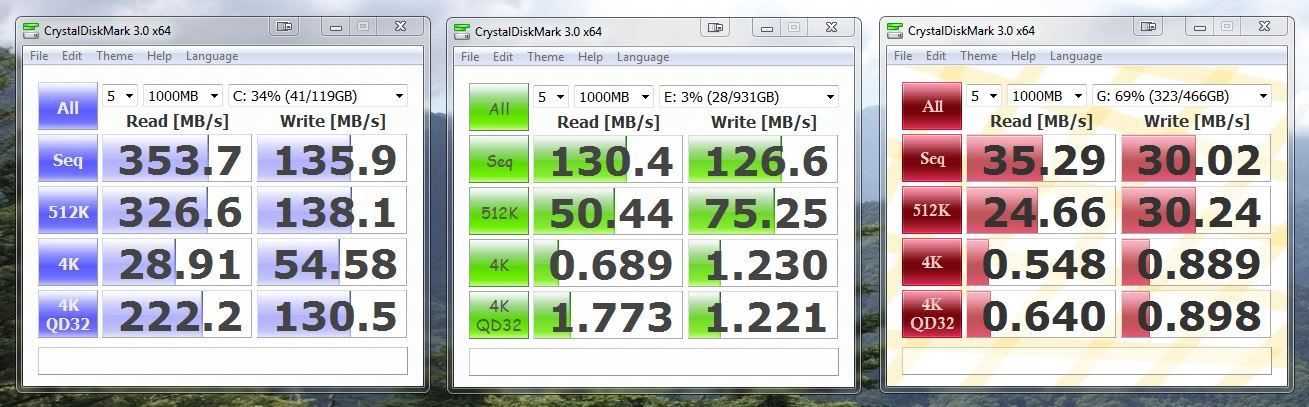
DiskPerformance.jpg


blue - Crucial C300 128GB 6GB/S
green - Western Digital Caviar Black 1TB 64mb 6GB/S
red - my external usb hdd

Funny that the WD Black Sata III drive is slower than a Sata II Sammy F3, do you actually have that connected to a Sata III port?

The Samsung F3 is still the king of 1 Tb drives, and the new 2 Tb F4 is awesome for <£85 with speeds almost as good as the WD Black, and 1 Tb F3.
 
Why exactly are you putting downloads onto your Windows partition???


A 64 Gb SSD is perfectly fine for a Windows 7 drive.

it's a netbook with only one hard drive enclosure,

12.1" atom dual core 330, nVIDIa ion, so it's pretty nippy for a netbook.

I will see if its worth geting the 128gb, it's tempting, I know my battery life is gonna be better with it, and so will the vibration that I get on the touchpad sometimes with the drive spinning.
 
On the other hand, it makes malware unlikely to stick.

I remember being advised once by a chap who was a police computer forensics bod that it was a good idea to stick your temp folders on a ram drive.

Said it made their life a bit trickier when people do that :)
 
This thread has inspired me to finally bite the bullet, haven't upgraded anything in the pc for over a year, so it's due I guess :D

Picking up a 64gb C300 tomorrow
 
Got my X25 80gb today, how do you guys benchmark? 5 runs at 1000mb i guess?

This is so much better than a normal SATA hd, really really noticeable.
 
Crystaldiskmark is used to benchmark SSDs, but dont run it too often because it wears them down with the writes.

Its usually a bad idea to continually delete and put new stuff onto an SSD as they only have a limited number of rewrite cycles, but they have plenty to last for many many years.
 
I caved in last week and went ssd as well. Got 2 40gb intel ones in raid0 and I agree the performance is amazing. But for me the novelty soon wore off and then I realised I basically just spent 150 odd quid to load things a few seconds quicker. Plus it was a right hassle to migrate my win7 install onto the ssd. Maybe it's because I already ran 500gb raid0 before so the wow factor wasn't as big for me. Either that or I just expected too much :p

that is the same reason why i keep holding out for a ssd, except i have two raptor on raid 0
 
Now i installed my x25 80gb is there any firmware/drivers i got to install? i got windows 7 64 bit too.
 
Just bought a Vertex 2E 240GB this evening, does anyone else have experience with these drives? Quite excited to see how it performs.
 
how do you guys benchmark? 5 runs at 1000mb i guess?
For SSD's AS SSD Benchmark, unless they are sandforce based then use ATTO. If you have to use CDM, 5/1000MB at the least, ideally 9/4000MB for as accurate results as your going to get with CDM.

I've been enjoying an SSD for just over 2 years now, all I can say is, if your still waiting do yourself a favour and dive in.
 
Back
Top Bottom