

You are using an out of date browser. It may not display this or other websites correctly.
You should upgrade or use an alternative browser.
You should upgrade or use an alternative browser.
ssd location question
- Thread starter GJ02
- Start date
More options
Thread starter's posts


Soldato
- Joined
- 20 Apr 2008
- Posts
- 3,865
- Location
- West Midlands
because there are no moving parts etc then it doesn't matter how it's mounted. you can leave it hanging if you like.
As for the fans it doesn't matter at all. you wont lose any performance if you have a fan pointing at it. Which you don't really need as they run pretty cool anyway.
As for the fans it doesn't matter at all. you wont lose any performance if you have a fan pointing at it. Which you don't really need as they run pretty cool anyway.
thanks for replys guys
im thinking of locating it in the middle case in my antec 1200 just above the other 2 hdds, the only reason i ask about the fan is because of the front panel intake fan pulling air in, wasnt sure if it was a good idea or not.
thanks once again
im thinking of locating it in the middle case in my antec 1200 just above the other 2 hdds, the only reason i ask about the fan is because of the front panel intake fan pulling air in, wasnt sure if it was a good idea or not.
thanks once again

Associate
- Joined
- 18 Jan 2004
- Posts
- 505
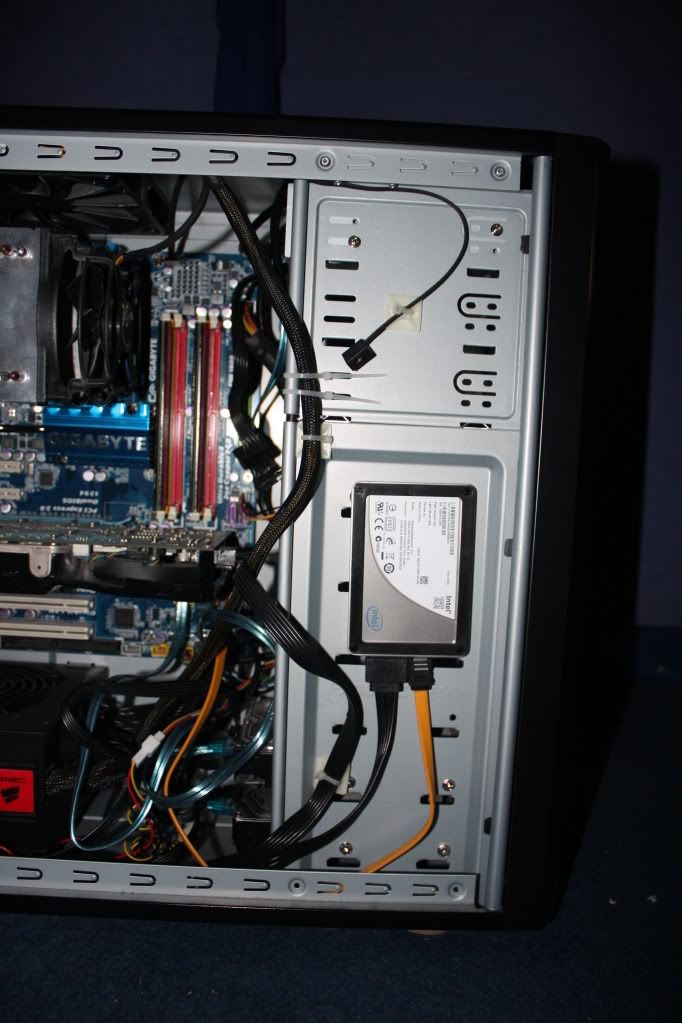
since taking this pic I have addressed the cable hang issue

Associate
- Joined
- 16 Oct 2003
- Posts
- 243
- Location
- Belfast Norn Iron
Ive just bought one of these too. Was just going to set it on my other one that wont be on. You dont happen to know of any guides to help me install it as my w7 boot drive?
Ive just bought one of these too. Was just going to set it on my other one that wont be on. You dont happen to know of any guides to help me install it as my w7 boot drive?
If youre going to be installing windows 7 on it you don't need to do anything specific with the ssd because win 7 is set up for SSDs already .
Just leave windows to install the drivers for your comp and then youll have automatic trim.

Last edited:
If youre going to be installing windows 7 on it you don't need to do anything specific with the ssd because win 7 is set up for SSDs already .
Just leave windows to install the drivers for your comp and then youll have automatic trim.
Assuming windoze detects it as a ssd.
Both mine and my brothers fresh install of Win 7 U didnt detect them as SSD`s and left auto defrag on and prefetch, superfetch etc.
There's a neat little tool that will check and turn off if necessary defrag and prefetch etc. called ssd tweaker.
Just run it to be sure
Associate
- Joined
- 18 Jan 2004
- Posts
- 505
When you set up your bios - use AHCI instead of RAID or IDE mode- and after you have installed win 7 do not install the latest motherboard chipset drivers - the sata controller needs to use the "standard AHCI 1.0 Serial ATA Controller" driver written by MS in 2006.... I did actually install the chipset drivers, but rolled back the SATA driver to use the MS one - either way you should be OK.
This will ensure that TRIM works so that your SSD performance doesn't diminish over time/use.
This will ensure that TRIM works so that your SSD performance doesn't diminish over time/use.