


SSD not performing

Associate
Joined
20 May 2007
Posts
1,042
Location
Stoke-on-Trent
Ive got 2 ocz vetex 2 ssd's in raid 0 and they are miles behind in the benchmarks ive seen. Ive got all the latest drivers and they are connected to intel sata 3 ports on the motherboard. Anyone got any ideas?
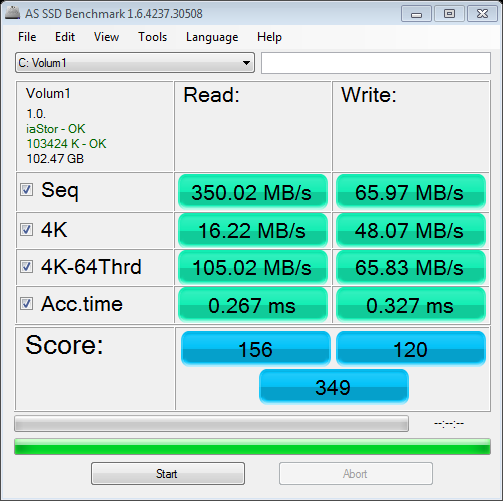

as-ssd-benchVolum10609201222-31-32.png
 
I could do because its a fresh install so wont be loosing anyhting, ill set them up as single drives tomorrow and try the benchmark again.
 
With the benchmarks you are trying to compare to, double check if you're comparing like-with-like. There's two versions of the Vertex 2E 120gb, a 107gb slower version and the 111gb faster version

EDIT:
Hm, didn't notice you were doing it with 60gbs, might be worth checking still. There's probably 2 versions of those too.
 
Last edited:
have you run an atto benchmark anyway? just to compare,as ssd always shows lower score compared to atto
 
atto is showing correct speeds,roughly 240/250mb per single drive 500-550mb in raid 0

be sure to use the latest mb bios,and rst drivers
 
Are all ssd's different then in terms of speeds?
Also one of the drives is showing 56Gb and the other is only 51Gb.

I have rst version 11.2.0.1006 which i think is the latest
Don't have the latest bios yet though.
 
they should all perform the same,the different sizes shown could be down to reserved space for maintaining the drive,dead cell replacement ect,only way to be sure is back up data,secure erase the drives and clone data back to the ssd's,it will restore any lost performance also due to no trim,the bios contains oproms for raid so you might need latest bios to get latest version
 
OK I will update the BIOS when I get back in. I don't have any data on the drives apart from the os so can I just secure erase then do a fresh install again?
 
I tried that Samsung magician tool but when I tried to erase the drives it said that it's not compatible with my drives. I tried the ocz toolbox program but that won't work on my motherboard so then I tried hdderase and that wouldn't work either.
Are there any other programs I can try, this is becoming a right pain in the arse.
 
I used to use the original ocz vertex ssds in raid0 and had a lot of problems with them failing.

What I found even though its a useless benchmark WEI was useful for indicating that something was wrong with the array. What would happen is the score for the array in WEI would drop to 6.0 or lower. When I investigated this would be because one of the drives for some reason had lost its speed on access times bringing down performance for the entire array.

If the individual drives were then tested using normal benchmarking tools like ATTO to start with it did not show any problems. Eventually the read/write speeds also failed and then it was picked up by normal benchmarking software.

My point is WEI is a useless benchmark but sometimes it can pick up things normal benchmarking tools can miss.
 
Windows was extremely slow last night then became unresponsive and crashed with a bsod.
Upon reboot it took ages for the motherboard to detect the ssd's and when it got to the raid setup screen it said failed next to the ssd array.
I deleted the array then shut down and removed one of the drives and tested them seperatley. All was going well and I updated one of the drives firmware and did a secure erase using the ocz boot utility, but when I plugged the other one in I found that it was the cause of the problem.
It takes ages for it to be detected on start up and ocz boot utility won't work with it.
So looks like I'm going to have to rma it.
 
To be honest i find the AS SSD benchmark at little unreliable compared to ATTO. I have one of the Sata II OCZ drives on my amd board and AS SSD shows 190MB/s read and ATTO shows it as 250MB/s read what to believe?

Must also say the microsoft achi driver doesnt seem that bad at all, got better results with it compared to the AMD driver
 
ATTO tests using compressible data and AS SSD tests using in-compressible data. Basically... Sandforce based drives work better with compressible data.

I also don't think there is always the HUGE gain that some would have you think running the Intel RST drivers over the stock MS AHCI W7 ones. I've run with both on these SSD's and found very little difference. Though others experiences may vary, as they say :)

NB. to get the best results in these sorts of bench marks (IE. AS SSD) with 4k read/writes, you need to make sure that Intel speed step (or the AMD equivalent) is disabled. Either that, or run say one worker in Prime 95 to force your CPU to boost to the max. As this sort of processing is heavily CPU dependant (http://www.overclock.net/t/1262255/effect-of-power-saving-features-on-ssd-speed).
 
Last edited:
Back
Top Bottom


