SSD Really slow...

Associate
Joined
5 Jan 2012
Posts
1,696
Location
Pontefract, UK
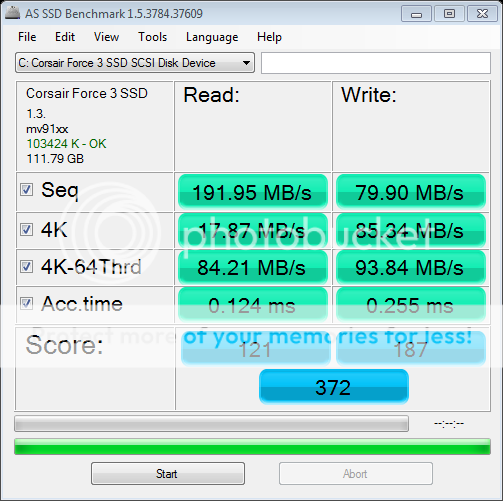
Hi, i am having problems with my SSD, it's a Corsair Force 3 120gb.

The speeds seem to be much slower than the stated specs of the device.

I've done a couple of benchmarks to show some results.
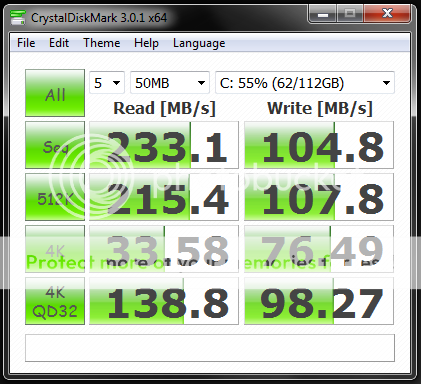
diskscore.png

as-ssd-benchCorsairForce32502201211-12-45.png


I'm running windows 7 HP x64, Gigabyte G1 guerilla MB.

It's in AHCI mode already, i only have OS and a few applications, plus BF3 installed on the SSD, i hava a second drive for storage, a WD 1TB.

Both drives are on SATA3 ports, and all drivers have been reinstalled and are up to date.

I just don't understand what i am missing. thank you for your patience in reading this, and if you could offer some advice where to start, that'd be great.

Cheers Rich.

 
Forgot to add, when switching on the PC, after the post screen, it takes around 20-25 secs to get to desktop, and is useable straight away.
 
Corsair Force 3 120gb.Gigabyte G1 guerilla MB.
You're using the Marvell 88SE9182 chip , some say not so good, but your speeds are about right, maybe a tweak here and there might help increase speeds?. Have you tried the ssd on the first sata2 port?. Although your corsair ssd is capable of faster 6gb/s speeds the motherboard is limited to the marvell controller here.
 
If the speeds seem ok then that's ok, just wondered about the stated specs on the box, and then what it says in benchmarks above.

Not tried it on sata2 port as i thought it would be faster on the sata 3 ports.....would that be right?

Thanks.
 
These are the speeds I get with my Vertex 3:
vertex3.jpg

This is under regular usage conditions; nothing was done for benchmarking.

I tend to ignore the rated speeds as they tend to be hugely exaggerated, but instead look at reviews that compare a wide selection of drives. Have you got Intel Rapid Storage Technology installed? You can get the latest version from the Intel website. Have you installed the latest firmware update for your drive (if there is one)? Sometimes they offer considerable performance increases.
 
I tend to ignore the rated speeds as they tend to be hugely exaggerated, but instead look at reviews that compare a wide selection of drives. Have you got Intel Rapid Storage Technology installed? You can get the latest version from the Intel website. Have you installed the latest firmware update for your drive (if there is one)? Sometimes they offer considerable performance increases.

No point. His board doesn't have native SATA 3 ports. They're being controlled by the Marvell controller, which honestly is a load of crap.

To OP, that seems about right with what some people get with the controller but it varies a lot between everyone. Some gets near 400mb/s, some get slower than SATA 2 speeds.

You could try updating the Marvell drivers and see if that helps?

EDIT: Is AHCI on for both Intel and Marvell controllers in BIOS?
 
Last edited:
No point. His board doesn't have native SATA 3 ports. They're being controlled by the Marvell controller, which honestly is a load of crap.

To OP, that seems about right with what some people get with the controller but it varies a lot between everyone. Some gets near 400mb/s, some get slower than SATA 2 speeds.
Ah, I'd forgotten that prior to Sandybridge the onboard SATA3 on most motherboards was crap.
 
the later marvell controller isnt crap,but the first version is

it doesnt looklike your 4k aligned either from those screenshots

oh and dont use any marvell drivers,uninstall them and use what microsoft installs it will be better
 
thanks for the help guys, not sure if i should leave as is, incase i make it worse.

will choose a better MB next time with native Sata3.

cheers.
 
Back
Top Bottom