• Competitor rules

    Please remember that any mention of competitors, hinting at competitors or offering to provide details of competitors will result in an account suspension. The full rules can be found under the 'Terms and Rules' link in the bottom right corner of your screen. Just don't mention competitors in any way, shape or form and you'll be OK.

**THE NVIDIA DRIVERS THREAD**

Can't get your link to work...i wonder if we'll finally get the supers... I imagine not, but i have a 9070xt sat on my cupboard at home, and once I know what NV (and AMD) are up to I can decide whether to keep it or not


Yea the forums is messing it up but I pasted the link directly in the box instead.
 
Last edited:
While I've not played it in awhile now, apparently 4.5 significantly improves image stability and quality in Oblivion Remastered.
 
New driver and Nvidia App update is up, Adds DLSS 4.5 -

Article -
Studio - https://www.nvidia.com/en-us/geforce/drivers/results/260371/

Game Ready - https://www.nvidia.com/en-us/geforce/drivers/results/260437/

Thanks man, will download the studio driver..

Hotfix next week? :D
 
Had a couple of stutters and some odd graphical issues in Battlefield 6... Maybe just a one off with the new drivers. Will test more later :)
 
I'm still on 581.29 from September... Worth updating to these now or are they still a little wobbly? 581 has been perfect for me.
 
I just DLSS Swapper now, had problems with FG in some games using NCP.

Yep same

Changelog (v1.2.3.0)​

  • Added preset L and M (by @beeradmoore in #810)
  • Improved persistence of main window position/size/state (by @andyeder in #793)
  • Added XeSS DX11 support (by @beeradmoore in #807)
  • Fixed BattleNet covers loading (by @beeradmoore in #796)
  • Reduced number of build warnings (by @beeradmoore in #802)
  • Moved manifest.json to be in dlss-swapper repository to see if it helps with loading issues.
  • (for v1.2.3.1

Works better than NVAPP as even though I've selected use latest it still uses an old version... DLSS Swapper works straight off

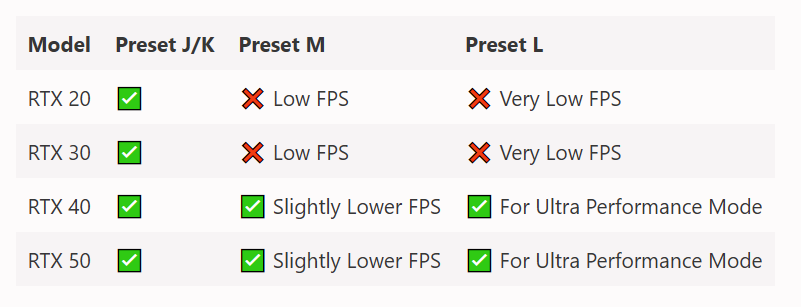
Preset M is the new global default if you set to override without specifying any letter or mode.
If you force Balanced/Quality/DLAA mode via NVIDIA App or Profile Inspector, the game will use Preset K.
If you force Performance, the game will use Preset M.
If you force Ultra Performance, the game will use Preset L.
 
Last edited:
Had a couple of stutters and some odd graphical issues in Battlefield 6... Maybe just a one off with the new drivers. Will test more later :)

DLSS 4.5 (310.5) sometimes seems to induce a stutter where I think it is ignoring frames to preserve graphics quality :( same isn't happening with DLSS 4 (310.2.x).

I've not played around enough to see what is what yet though.
 
Last edited:
Found this which might suggest why Preset M hits me with 20 fps less

image.png
 
Back
Top Bottom