Windows 7 SSD Settings

Microsoft seem to recommend using the SSD for the paging file. I've just left mine at the default settings on my 160G Intel G2.

Slightly concerned that I installed Win7 in AHCI mode and that the allignment might not be optimal. Is there any easy way to check as I don't really want to redo the install in the near future now that I have Win7 Ultimate RTM installed?

Cheers

It was fine when I checked it using fsutil, the defaults are reasonable. It's all the hyperfetch and so tweaks that don't get done.

 
just wanna double check, the firmware for intel SSD's still isnt out yet is it? (since they pulled the dodgy one).
 
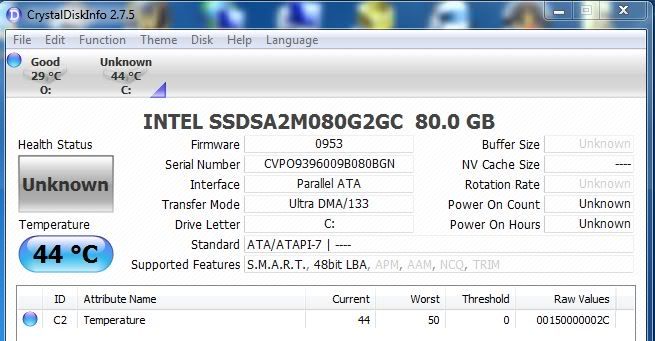
is there any way to tell if TRIM is enabled and working in a win7 setup? maybe in the services directory

Type in

C:>fsutil behavior query DisableDeleteNotify

in a CMD window (need to run as admin)

If returns 0 then is enabled in OS

Then run CrystalDiscInfo - this will have TRIM highlighted under "supported features". This shows TRIM is enabled in SSD firmware.

Not sure how to show when TRIM commands are actually executed.
 
Bingo :D

2123.jpg
 
thanks snakefood. seems they missed the end of November deadline... still no new firmware tool out yet. And my HD health is shot... :( (i tried that stupid CC Cleaner wipe free sectors 3 times :(. DO NOT do it ever)

 
have you installed intel storage manager? if yes , then uninstall . WIndows 7 default driver is the only one working atm , intel's new driver out soon will support trim .
 
Back
Top Bottom