

You are using an out of date browser. It may not display this or other websites correctly.
You should upgrade or use an alternative browser.
You should upgrade or use an alternative browser.
Crucial RealSSD C300 256GB - What am I doing wrong?
- Thread starter rocketman
- Start date
More options
Thread starter's posts


It should be faster, mine are these:

I did install the Marvell SATA 3 drivers for my controller

Your board also has a Marvell controller, have you done the same?
My controller is also set to AHCI.
The driver is here:
http://www.gigabyte.com.tw/Support/...?ProductID=3234&ost=windows+7+64bit#anchor_os
EDIT: Is it plugged into a SATA 3 socket?
I did install the Marvell SATA 3 drivers for my controller
Your board also has a Marvell controller, have you done the same?
My controller is also set to AHCI.
The driver is here:
http://www.gigabyte.com.tw/Support/...?ProductID=3234&ost=windows+7+64bit#anchor_os
EDIT: Is it plugged into a SATA 3 socket?
Last edited:
It should be faster, mine are these:
I did install the Marvell SATA 3 drivers for my controller
Your board also has a Marvell controller, have you done the same?
My controller is also set to AHCI.
The driver is here:
http://www.gigabyte.com.tw/Support/...?ProductID=3234&ost=windows+7+64bit#anchor_os
EDIT: Is it plugged into a SATA 3 socket?
I've already installed this, but the drive isn't being controlled by it. Yes it is plugged in to a SATA 3 socket

Last edited:
I've already installed this, but the drive isn't being controlled by it. Yes it is plugged in to a SATA 3 socket
So what is it being controlled by?



Rocketman I believe the pciide from as ssd bench means you are running in ide mode not ahci.
I think this makes no difference, at least it didn't with my Crucial 64gb ssd and I have seen few people having no ahci enabled in bios and they had full speeds with their drives.
It does look as though the C300 is being recognised by the OS as a SATA2 device. Did you do a new install of windows on this SSD?
No, its a drive-to-drive clone of my crucial m225 256gb. I had hoped using Acronis TI would save the hassle of reinstalling


Soldato
- Joined
- 16 Jan 2003
- Posts
- 10,981
- Location
- Nottingham
It should be faster, mine are these:
I did install the Marvell SATA 3 drivers for my controller
http://img532.imageshack.us/img532/2158/marvell.jpg
Your board also has a Marvell controller, have you done the same?
My controller is also set to AHCI.
The driver is here:
http://www.gigabyte.com.tw/Support/...?ProductID=3234&ost=windows+7+64bit#anchor_os
EDIT: Is it plugged into a SATA 3 socket?
There's a newer driver available btw, also updates the config device driver.
http://www.station-drivers.com/tele...ru4.1.0.1601-all(www.station-drivers.com).exe
There's a newer driver available btw, also updates the config device driver.
http://www.station-drivers.com/tele...ru4.1.0.1601-all(www.station-drivers.com).exe
I've seen that before and it's an OEM driver set-up package.
Soldato
- Joined
- 16 Jan 2003
- Posts
- 10,981
- Location
- Nottingham
I've seen that before and it's an OEM driver set-up package.
You can just update the controller/config device manually though, done it on my Gigabyte mobo.
The driver adds a new policies tab so you can disable safely remove hardware icon and enable/disable the caching.

Last edited:
You can just update the controller/config device manually though, done it on my Gigabyte mobo.
The driver adds a new policies tab so you can disable safely remove hardware icon and enable/disable the caching.
Just done it, thanks.
No, its a drive-to-drive clone of my crucial m225 256gb. I had hoped using Acronis TI would save the hassle of reinstalling
Is it so much of a hassle to do a reinstall? Personally I would do a clean install with the C300 to see if it makes a difference. Just run the benchmark again before you start a couple of times to confirm that it is still the same as before.
Is it so much of a hassle to do a reinstall? Personally I would do a clean install with the C300 to see if it makes a difference. Just run the benchmark again before you start a couple of times to confirm that it is still the same as before.
I've done a reinstall, but I still can't get the drive to be controlled by the Marvell driver. The drive is definately plugged in to one of the SATA 3 ports, I've downloaded and installed the Marvell driver off Gigabyte website, and I've changed the GSATA setting in the BIOS to AHCI. I've re-run AS SSD Benchmark, and I'm still not getting over 200 for sequential read
The drive is listed under device manager as C300-CTFDDAC256MAG ATA Device if this helps, and I have Marvell 91xx Config Device listed under System devices, but it states that no driver files are loaded for this device?
Last edited:
The only two places where the C300 and controller show up are here are ‘disk drives’ and ‘storage controllers’:
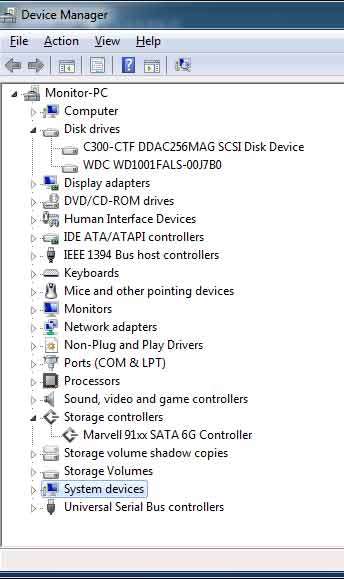
I'm on a ASUS P6X58D, have you tried your motherboard support forum?
Well that is my problem then, as it is not being reconised as a storage controller then