LG 38GL950G - 3840x1600/G-Sync/144Hz

i'm thinking that might be more than i can do. however the 38GN950P-B is available for £675. looks like it's g-sync compatible and freesync. or maybe i need to look at 4k now. i like the 3840 x 1600 res, it's NOT massively ultrawide so i dont need to keep moving my head like the really long monitors.
Excellent choice, had one of those for a while :cool:
 
N was a pretty big jump overall iirc, much more reponsive.

I'm interested in hearing why do you say that? GL seems to have better better specs overall on paper on fast glance and scores on average better here:


Only upside I see over the GL is the lack of fans, as I've understood. But that's also a minus, as it's due to lack of dedicated G-Sync unit.

And please note, regarding the GN: "Cons: Terrible edge-lit local dimming." Now that alone would make to skip the model.
 
Last edited:
Very sorry to hear that. I'm absolutely loving mine. I can't see a reason for monitor upgrade for years to come. I'd start by opening the backpanel and doing a visual inspection if any clear visual sign of fault would caught the eye, like fried up component. You might have to dissassemble the G-Sync unit and remove the heatsink. One of my guesses would be it, as the heatpaste eventually, actually just after a couple of years of usage dries out, which leads the G-Sync die to broil.
taken it to a computer store, showed them the youtubes of a bloke removing the IC and ovening it to reset the solder. They have an oven. If they can fix it, then it'll cost about £200, if not it's free.
 
taken it to a computer store, showed them the youtubes of a bloke removing the IC and ovening it to reset the solder. They have an oven. If they can fix it, then it'll cost about £200, if not it's free.

I'd say it's a good deal given the amount of required work. I sure wouldn't do it for that price, if not but only for myself. I do however have a vague impression that the oven fix might - in the worst case scenario - be shortlived. If you get a 6 month, or better yet a full year warranty for the fix, I'd go for it like cheesecake.
 
I'd say it's a good deal given the amount of required work. I sure wouldn't do it for that price, if not but only for myself. I do however have a vague impression that the oven fix might - in the worst case scenario - be shortlived. If you get a 6 month, or better yet a full year warranty for the fix, I'd go for it like cheesecake.
Assuming it gets fixed, i'm hoping it'll last until the gen3 oled ultra wides come out.
 
Weirdly I just took an update from 1405 to 1405 (?)
Do you need to have the display connected to PC by USB in order to update? I'm asking since the LG OSD software can control the display solely via Dp and I possibly also via HDMI. I'm not sure I've tried that since I changed cables recently.
 
Do you need to have the display connected to PC by USB in order to update? I'm asking since the LG OSD software can control the display solely via Dp and I possibly also via HDMI. I'm not sure I've tried that since I changed cables recently.

Apologies. Just realised my mistake. I replied to the Samsung thread not realising I was still subbed to this one.

Yes for an update it needed USB. Didn’t even know about the OSD control over DP!

The LG screen is so damn good. Wish it was OLED! Best screen I’ve had so far.
 
Last edited:
Apologies. Just realised my mistake. I replied to the Samsung thread not realising I was still subbed to this one.

Yes for an update it needed USB. Didn’t even know about the OSD control over DP!

The LG screen is so damn good. Wish it was OLED! Best screen I’ve had so far.

Sounds like that might explain why I don't have anything relating to the firmware upgrade option regarding my display visible in the LG OnScreen Control app, as I have no USB running between my system and the display. And yes, the controls do also work with HDMI.
 
i'm thinking that might be more than i can do. however the 38GN950P-B is available for £675. looks like it's g-sync compatible and freesync. or maybe i need to look at 4k now. i like the 3840 x 1600 res, it's NOT massively ultrawide so i dont need to keep moving my head like the really long monitors.

From my research, the 38WR85QC is the newer version of this with a built in KVM, and that's been going for as low as £599 recently, would that not make a better buy than the 950?
 
Does anyone know can you either somehow quick access contrast setting through the joystick or assign it to it? I can only find brightness by pressing either away or towards the display from the joystick, which is quite stupid design. I can't find a setting from the menu to assign contrast to quick access, but perhaps somewhere from the service menu? As I switched from desktop to my laptop and to use USB C to HDMI, the LG OnScreen Control software no longer works to adjust the brightness and contrast via software. Looks like it requires a solid Dp-Dp or HDMI-HDMI cable to work.
 
Does anyone know can you either somehow quick access contrast setting through the joystick or assign it to it? I can only find brightness by pressing either away or towards the display from the joystick, which is quite stupid design. I can't find a setting from the menu to assign contrast to quick access, but perhaps somewhere from the service menu? As I switched from desktop to my laptop and to use USB C to HDMI, the LG OnScreen Control software no longer works to adjust the brightness and contrast via software. Looks like it requires a solid Dp-Dp or HDMI-HDMI cable to work.

I wrote LG about this. I also brought up the pain in the butt that you don't have an option for any saved profiles in the OnScreen Control software. I'm dauntingly aware the display actually has only single one usable and saveable profile that includes all the basic settings, but naturally there is no reason why the Windows app couldn't have the option to save settings to couple of quick access profiles, instead of having to go through all the sliders every time you for example swap between night- and daytime settings.
 
Last edited:
Letting interested parties know that the monitor has been working *flawlessly* ever since the Noctua fan mod. And it's remained dead silent in all scenarios.

I dug out a special USB hub upstream cable to connect the monitor to my PC to check any possible firmware updates. How do you perform the fw update check procedure? I have the latest LG OnScreen Control app (v9.35). On settings page it just has the slider for Auto Update.

Reviewing the thread backwards I see several mentiones of v1.2 being the latest firmware, whereas @AlexTNZ says here he has v1.41:

Where can you look up what version does the display have? I don't see anything near that number being listed on my service menu:

edit: I seem to have managed to find a way to both see the installed fw version and check for any updates. I downloaded the LG UltraGear Control Center - version 1.76 here:

That app lists your fw version and lets you perform a manual update check, which results in a message saying 1.20 being the latest version:

I'd be curious to know if there's any differences with the said v1.41 and 1.2, and if there are, how to obtain the update?
 
Last edited:
Hi All,

First and foremost I would like to say thank you to all who shared their experiences regarding the "work culture" - so to speak - of the fans in their screens. As some of you, I wasn't even aware aware of their existenece until I bought my screen. I was interested in other parameters but the fan's presence was never brought to my attention. As I bought used screen, audible fan shouldn't be a surprise keeping in mind couple of years mileage, but your reports about that issue happening just couple of weeks after purchase was a huge suprise especialy taking into account the price in 2020.

The biggest thanks are for @regular joe who put a lot of effort to make his screen silent and what is most important shared and documented everything. I'm just preparing to do the same so I couldn't expect better input.

I have to say that I've studied the entire thread (and few others on different forums) regarding this issue and have some comments/concerns regarding that modification.

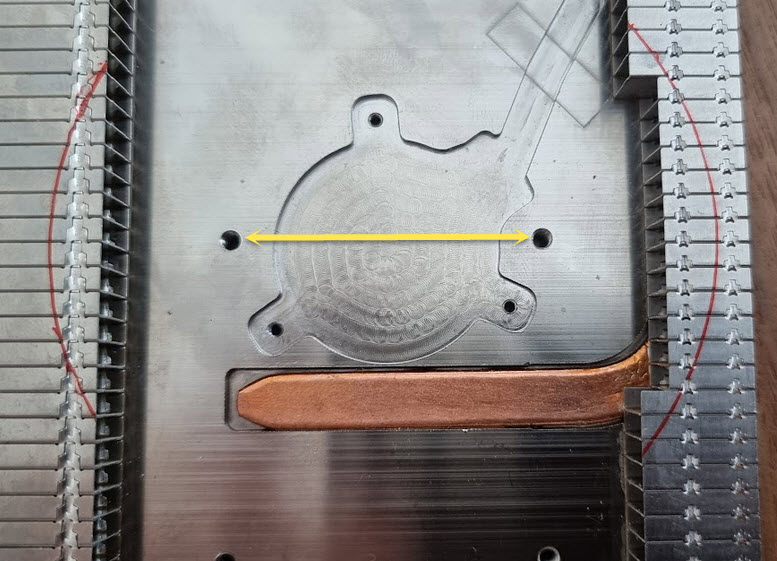
Since the offer of slim fans is limited I'm leaning towards the use of Arctic P8 SLIM 80x80x15. It has identical performance as the original one apart of being 12V. The biggest advantage over Noctua is that its impeller has diameter 73.5mm so I could avoid all that hassle with grinding the radiator. According to the pictures there is 78mm of available space so I'm positive. Additionally Arctic is bigger than original Delta by 7.7 which is good.

If I'm not wrong, Joe mounted the fan using that two bolts marked on the screenshot below. Just wondering if they won't be too big since there is not too much plastic on those arms holding the impeller. Will see.

new-fan-mounting-points.jpg

If that would work, then the mod looks pretty simple as taking the power from external USB looks will be a piece of cake. I'm wondering if it would be hard to find 12V internally. Anyway Joe's solution is acceptable.

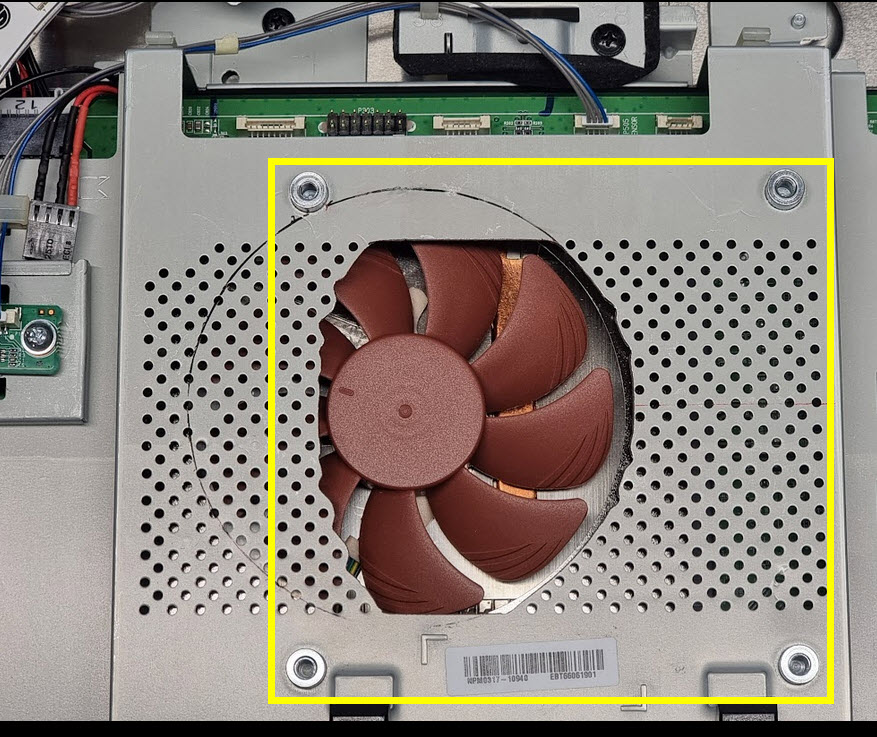
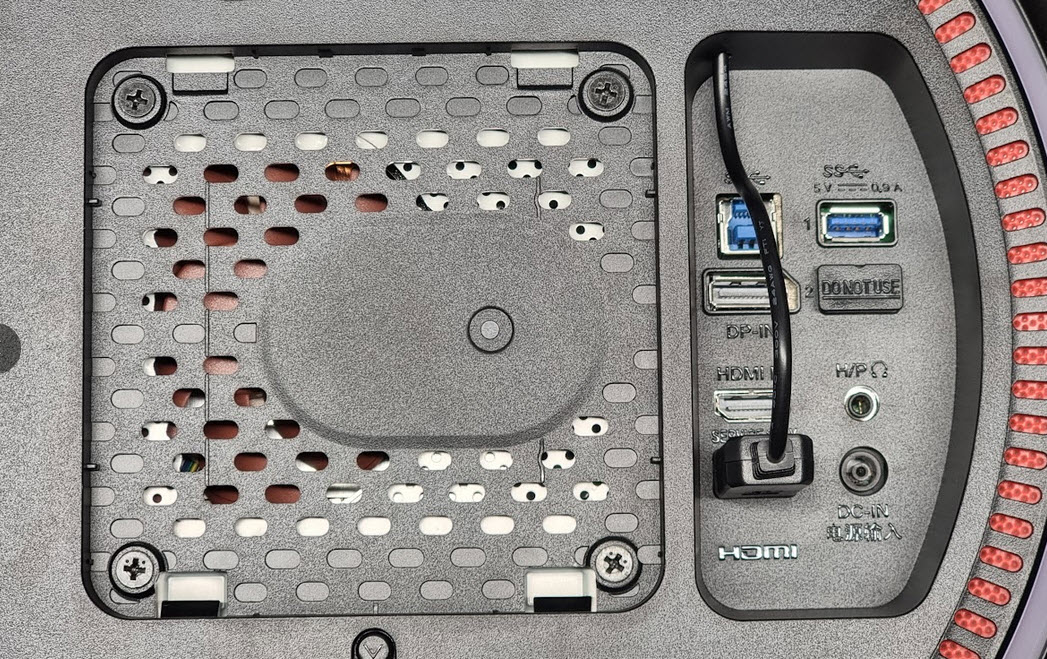
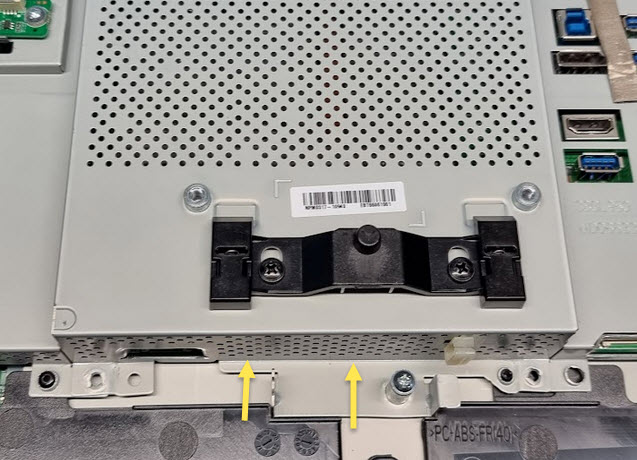
Now small concern. Thanks to all those great pictures, we can see that the fan pushes air into the black metal case which covers the radiator. The air has only way to go up since this is the only opened side of the black box. So far so god, but where from that air is taken from? That black cover is in turn covered by perforated "rear shield" and there is about 5-7mm of space (judging by the thickness of those pink pads) between black radiator cover and rear shield. Why this is important? If you look at the following two pictures, almost 80% of that perforated metal case will be covered by plastic back panel and covered by the VESA plate. This is clearly visible here and that 5-6mm of space betwen shields mentioned earlier is the only way the fan can suck the air from.

rear-shield-with-hole.jpg

back-cover-and-vesa-mount.jpg


I think, it means it doesn't make to much sense to cut out the hole in the rear shield case as it will not to improve air flow. All the air is taken from the internal space, specifically that covered by rear shield.

In my case the temprature reported in service menu is about 53°. When the ambient tempartrature is colder, I can even hear the fan stops and starts periodically so I assume the temp drops below 50°. I would say that's a good sign as I'm not hitting 70°+ like others :-) That's by the way another argument for Arctic that it should be sufficient.

Replacing the fan will the first step. Will observe the temp and the maybe I will think about other options like making bigger holes in lower part of the rear shield, will see.

bottom-rear-shield.jpg


PS. Sorry guys that my first post on OCUK is so long ;-)
 
@Prot great to hear someone else is also planning to do the mod ;). You are the first one I'm aware of beside myself!

"I think, it means it doesn't make to much sense to cut out the hole in the rear shield case as it will not to improve air flow. All the air is taken from the internal space, specifically that covered by rear shield."
->Yes and no, I think. Since the the airflow possibilities here are so limited I thought every bit of easing will help to achieve the goal, which was to reach inaudible status for the fan in normal working condition. If I remember correctly there's a little gap between that metal grill and the plastic back cover with VESA mount. Also, I'm now using AOC AM400B monitor arm and its VESA plate covers much less of the holes facing the fan.

That cheap 5V->12VDC USB step-up converter from Aliexpress started to break and have a poor contact with the USB service port on the rear of the monitor. My quick fix was to attach a mobile charger on the backside of the monitor with a piece of 3M Dual Lock tape and use it for now to power the fan as it has a very tight port and makes a secure contact with the adapter. One day I'll probably cut the end of the step-up converter off and exchange it to a new one and while at it also make an additional connector in between that cable to have an option to alternatively take power directly from a 12VDC wall adapter.


One other thing to bring to attention: By my experience Noctuas are the only fans that subjectively have zero bearing sounds. All the other fans I’ve tested can be heard when the fan speed is turned slow enough, so that the airflow sound in itself disappears. If you have keen hearing the Arctic fan might produce a distracting cyclic audible clicking sound when the airflow doesn’t cover it over, when ran at silent RPM’s. You might want to test it to make sure before comitting using it. That’s the reason I personally didn’t even consider anything other than Noctua fans for this project.
 
Last edited:
Thanks for additional comments. You are right. The plate in your arm has better design. Not sure if that was done intentionaly, but for sure it allows some air flow when the back cover has design like in case of our screens. Better than nothing. Even if I start without cutting rear shield I can use some spacers (2-3mm) delivered with my arm to make use of existing perforation.

Regarding powering the fan maybe it would be in general better to get that 12V directly from PC? Using another one, thin wire when we use arms shouldn't be any problem at all. Maybe even small socket could be mounted so the solution would be solid and clean.

I've seen some comments about fans making some clicking noise when working with low RPMs. I'm pretty sure Arctic appeared there. Actually I've got one 80x80x25 in my PC working at ~700 set by SpeedFan. Will try it and the new one. BTW, I'm not aware of any way to monitor RPMs of the built in fan so no idea what is the range of RPMs now in our screens.

BTW, I noticed something else. My screen doesn't keep settings for Gamer 1 Gamer 2 profiles. The other profiles have different settings, but not the first two, a bit odd.
 
Thanks for additional comments. You are right. The plate in your arm has better design. Not sure if that was done intentionaly, but for sure it allows some air flow when the back cover has design like in case of our screens. Better than nothing. Even if I start without cutting rear shield I can use some spacers (2-3mm) delivered with my arm to make use of existing perforation.

Regarding powering the fan maybe it would be in general better to get that 12V directly from PC? Using another one, thin wire when we use arms shouldn't be any problem at all. Maybe even small socket could be mounted so the solution would be solid and clean.

I've seen some comments about fans making some clicking noise when working with low RPMs. I'm pretty sure Arctic appeared there. Actually I've got one 80x80x25 in my PC working at ~700 set by SpeedFan. Will try it and the new one. BTW, I'm not aware of any way to monitor RPMs of the built in fan so no idea what is the range of RPMs now in our screens.

BTW, I noticed something else. My screen doesn't keep settings for Gamer 1 Gamer 2 profiles. The other profiles have different settings, but not the first two, a bit odd.

I'm not sure of any necessity to take the 12V from PC. Sounds like unnecessary long cable routing to me. I remember doing some checking with multimeter to find a constant 12VDC on the monitor motherboard to no avail. But since the USB service port is sitting there unutilized and 5V-to-12VDC adapters are an easy enough solution, I'm not sure why to look further. That way you also avoid the risk of soldering anything onto the motherboard.

The setting profiles on this monitor's firmware are downright garbage. Only the first Gamer 1 and 2 profiles have full settings available, thus making all the other ones unusable for many, including myself, right there, since they have odd custom color profiles and whatnot that can't be changed. And as if that wasn't stupid design enough the Gamer profiles share the same color profile setting, which makes one question why two different profiles? This means in practice the monitor has only one good fully usable profile. So perhaps this is exactly what you are referring to, as you change both Gamer profiles' color settings simultenously. I believe I wrote LG technical team about this suggesting a revision to the firmware, but have never received a reply. If you have time on your hands give them another nudge, and perhaps there's a slight chance they'll consider doing another firmware update for the model. You might want try the address I looked up from my email (lg_customercare at lgeusa.zendesk dot com).

Also, I'm not aware of any way to see the RPM of the monitor fans. The service menu only shows PWM power percentage. Unless the G-Sync die paste is badly dried up and/or the inside of the monitor severy clogged up because of dust buildup the fans should normally run very slow, which I reckon is around 300-400 RPM range.
 
Last edited:
Back
Top Bottom