• Competitor rules

    Please remember that any mention of competitors, hinting at competitors or offering to provide details of competitors will result in an account suspension. The full rules can be found under the 'Terms and Rules' link in the bottom right corner of your screen. Just don't mention competitors in any way, shape or form and you'll be OK.

313.95 Nvidia drivers

Far cry 3 on very high ( no msaa ) on my gtx 670 looks lovely and runs great except when the frame rate drops to 55fps then the game looks like it is running at 20fps not 55fps. Tried all sorts of stuff but cant get rid of it.

The only thing i found was that the gpu usage is only at 80 ish % so i put geometry on ultra and this made the usage go upto 95% but i get a lot of stutters. ( still at 52 to 55 fps ) but feels like 20fps.

so my impression is that 60fps or over with or without v-synch is smooth, but 58 fps or lower = screen jittering / lag, that is unplayable.

Power is at 70% in MSI afterburner vram is 900mb temp is 65c so card is not throttling or overheating. Just plain weird.

Using the 313.95 drivers . tried 306 drivers and 310's. all the same except these 313 drivers keep the fps at 60 or over 95% of the time.

Yes it's a strange one and defiantly a kepler issue as fermi can play at lower frame rates without issue, Some have said it's a synchronization issue with Havok engine, I can believe that, but have seen Kepler cards do a few strange things before.
I am sure Nvidia will sort it out, also I'm sure they force power profiles in their drivers to overcome the power managements deficiency's, however in this case and for your future reference the latest EVGA Precision has a little tool under the Voltage tab called K-volt (locks card at 100% power and clock)... sorry to tell you that does not fix Farcry 3 problem though :( Like You I've tried everything and generally figured out workarounds even for the earlier v-sync stutter issues but this one is beyond me.

 
What does the "smooth" setting under Vsync do?


It is a feature which was to be exposed in a later driver. It is designed to reduce micro-stutter. We will provide better detail at a later date.

- crazy mexican geforce forums. aka manuelg
 
CAREFUL PEOPLE

Real strange one, 313.95 drivers for WinXP64 cause loss of USB ports except anything connected at boot, like mouse.

Win7x64 and Win8 did not seem affected for "me"....seems 313.96 was not just an installer fix ;) I See also win 7 link now goes to correct "96" version.

Totally realize they are beta's but never had anything like that before.
 
Far cry 3 on very high ( no msaa ) on my gtx 670 looks lovely and runs great except when the frame rate drops to 55fps then the game looks like it is running at 20fps not 55fps. Tried all sorts of stuff but cant get rid of it.

The only thing i found was that the gpu usage is only at 80 ish % so i put geometry on ultra and this made the usage go upto 95% but i get a lot of stutters. ( still at 52 to 55 fps ) but feels like 20fps.

so my impression is that 60fps or over with or without v-synch is smooth, but 58 fps or lower = screen jittering / lag, that is unplayable.

Power is at 70% in MSI afterburner vram is 900mb temp is 65c so card is not throttling or overheating. Just plain weird.

Using the 313.95 drivers . tried 306 drivers and 310's. all the same except these 313 drivers keep the fps at 60 or over 95% of the time.

Yup, this is pretty much how it is for me, whether I'm running my 670's in SLI or not. These new drivers made zero difference for this, for me.

In SLI I'm at 60 most of teh time though with settings maxed out. I'm not very far into the game, the only place I've seen dips is the main village at the start (forget the name, the one with all the daft lights). Dips to about 50-55 fps here in parts, and it's a stuttering mess when it does.
 
JAKUS and Wunkley, I am sorry to say that i am glad its not just me, Read many forums and they all seem to be complaining about low fps stuttering and not high fps stuttering.

I was starting to think my monitor was not up for the job ( samsung 2443bw ).

I hope it is fixed though as even on ultra its still 40+ fps ( except for msaa which is only at x2 or x4 ).
 
JAKUS and Wunkley, I am sorry to say that i am glad its not just me, Read many forums and they all seem to be complaining about low fps stuttering and not high fps stuttering.

I was starting to think my monitor was not up for the job ( samsung 2443bw ).

I hope it is fixed though as even on ultra its still 40+ fps ( except for msaa which is only at x2 or x4 ).

As an Engineer I do feel and sense things many do not, it can be a total pain but it's the way I am, but you have to be a bit crass not to pick up this problem ! ( I do know for a fact some people don't even see things like TV frame judder though)

I assume there must be people not having this issue like our friend a few posts back, If any have enough understanding as to why it works for them it would be helpful to hear their thoughts :)
 
For those asking for an explanation for the Smooth VSYNC feature that was exposed accidently in our latest R313.95/R313.96 drivers, here it is:

When SLI is active and natural frame rates of games are below the refresh rate of your monitor, traditional vsync forces frame rates to quickly oscillate between the refresh rate and half the refresh rate (for example, between 60Hz and 30Hz). This variation is often perceived as stutter. Smooth Vsync improves this by locking into the sustainable frame rate of your game and only increasing the frame rate if the game performance moves sustainably above the refresh rate of your monitor. This does lower the average framerate of your game, but the experience in many cases is far better.

;) ....
 
install 96.... 95 had some series bugs

in dirt 3 now i have perfect 120 fps

in bf3 maxed out as always 70-100 fps always

msi 680 lightening see in my sig
 
Anyone tried these on Battlefield 3? I get drops down to 30-40 fps at the beginning of maps.

Exactly the same problem I experienced. Major jitter and lag at the start of maps.

I went back to the 310.90s and its perfect again!

Thank god Im not the only one... I was thinking maybe my computer wasnt up to the task anymore. :eek:
 
Last edited:
So select Smooth and you'll be likely locked to either 30fps or 60fps in most cases?

Yes, it's a strange way to do things. I have a 120hz monitor for a reason and I'll be damned if I'm to game at 60fps locked.

But so far Adaptive Vsync works really well with sli, so I'm not complaining.
 
Yes, it's a strange way to do things. I have a 120hz monitor for a reason and I'll be damned if I'm to game at 60fps locked.

But so far Adaptive Vsync works really well with sli, so I'm not complaining.

I see lots of people reporting issues with the 'smooth V-sync' and I expect it to be sorted on the next drivers.

Hopefully anyways :)
 
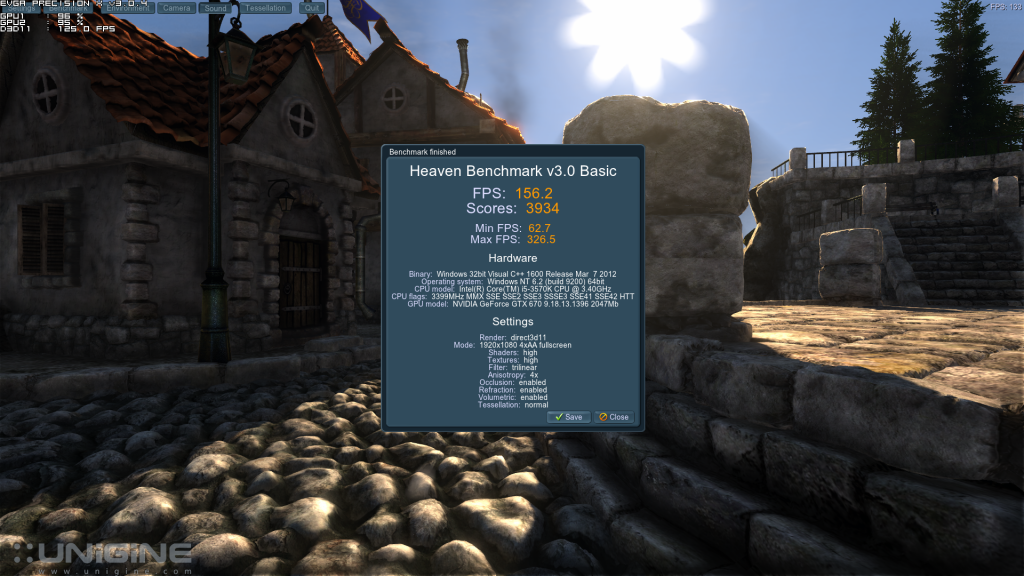
I thought I would have a go at doing some benching as I couldn't be bothered to play anything and it appears that Nvidia have blocked any kind of over volting :(

Grrrrrrrr, very annoying.
 
What do you mean?
My 670's at 1.2V are working as normal. :confused:

I use Artmoney to get as many volts as I like but it will not allow me to change volts :(

Not that bothered but I was a little bored and thought I would give Heaven a bashing with decent volts.
 
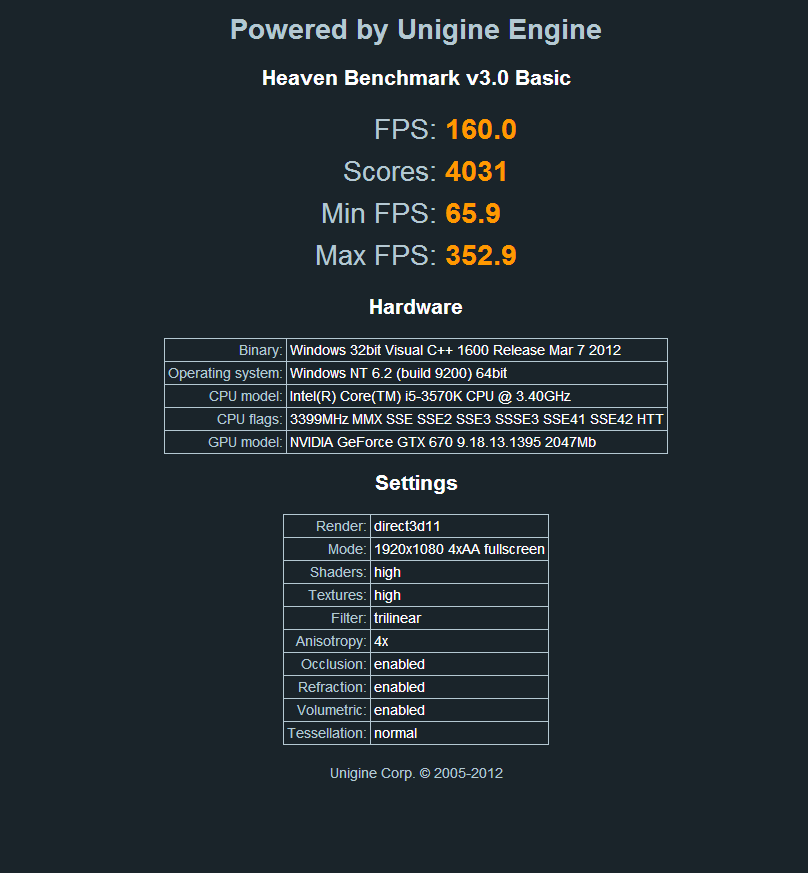
Does anyone have the 313.95 UK Drivers?

I installed 313.96 and they are worse than what I had but I can't find the link on NV anymore?

313.96

heaven_2013_02_10_22_10_54_817_zps4967b1af.png


313.95

Capture-42_zps0ea3b223.png
 
I have the 313.95 drivers but the only difference was the installer from the 313.96.

Not sure how I could upload them and it would take a while but I can if you want?
 
Back
Top Bottom