• Competitor rules

    Please remember that any mention of competitors, hinting at competitors or offering to provide details of competitors will result in an account suspension. The full rules can be found under the 'Terms and Rules' link in the bottom right corner of your screen. Just don't mention competitors in any way, shape or form and you'll be OK.

7950 idle/load tempertures ?

  • Thread starter Thread starter Deleted member 61728
  • Start date Start date
Damn. 15 days since I bought mine :(

In normal games it hits around 70-75 and in Futuremark it tops out at around 80. Fan is quiete loud too.

That's hotter than my card running in crossfire being heatsoaked from the bottom card.

Have you tried re-applying the TIM. MSI seem to have issues applying the TIM so it works.

 
That's hotter than my card running in crossfire being heatsoaked from the bottom card.

Have you tried re-applying the TIM. MSI seem to have issues applying the TIM so it works.

I might try that when I get home. i have Arctic Silver 5 lying around somewhere. Will this void my warranty?
 
I might try that when I get home. i have Arctic Silver 5 lying around somewhere. Will this void my warranty?

I'm not sure as my cards are XFX but I don't think the MSI cards have warranty stickers so you should be ok as long as you don't break it.
 
Mmmm yeah I think it's 14 working days... I think. The DSR is 7 working days and they've just doubled it. No harm in asking if you want to send it back.
 
Well, these are my idle temps after about 10 mins of browsing the forum

gputemps-1.jpg


load temps after 5 mins of furmark

gpuloadtemps-2.jpg
 
Last edited:
Just rechecked my temps, had me worried everyone having bad temps.

27c-30c idle fan on auto at 30% 300core clock/150 memory clock

65c while playing bf3 for an hour+ fan on auto 47% max speed recorded overclocked 1000/1400

So i guess i got a good one, ordered mine Friday like most of you and fitted it Monday.
 
Hmm, my card is idling at 500MHz core, so maybe that's a factor. I'll install the latest betas (not sure which version of the 12.11 I'm on atm) and see if that fixes the issue. I'm running dual monitors if that makes a difference. I'll post some logs for you guys to look at tonight. Don't want to send it off if it's just a software issue pushing my temps up. Done that before and thrown money away for fault-not-found problems.

That is normal clocks if you are running multiple monitors, so you will see increased temps as a result.

I normally just "windows key+ p" if I am only using a single display to cycle through the display modes.
 
Ah ha!

Fixed my Problem of my memory clock remaining at 1575 at idle.

Before I get slated I am not used to AMD and especially not eyefinity but creating 2 panels as one as opposed to an extended desktop which I normally did has my card running 300 core and 150 memory.

I am over the moon and my temps are sitting at 30 degrees as opposed to 40!.
 
devrij, don't run furmark please. Run a bench of heaven 3.0 with 4xAA and tessellation on medium and see what your Max temps are please.
 
i recently bought mine. Happy with it so far. One thing I noticed is that it will idle at around 30-35 and the moment I play say a Youtube video it will jump to around 50-55 and the fan will ramp up and become quiete loud. Is this normal behavior?

Yes. Flash uses gpu acceleration so if you are viewing a video on youtube (or using a media player with acceleration turned on) your clocks will jump to 500/1375 mhz (if I recall correctly) which will increase temps and thus increase the fanspeed if necessary.

EDIT: although you can turn off hardware acceleration on flash by right clicking and selecting settings.
 
Last edited:
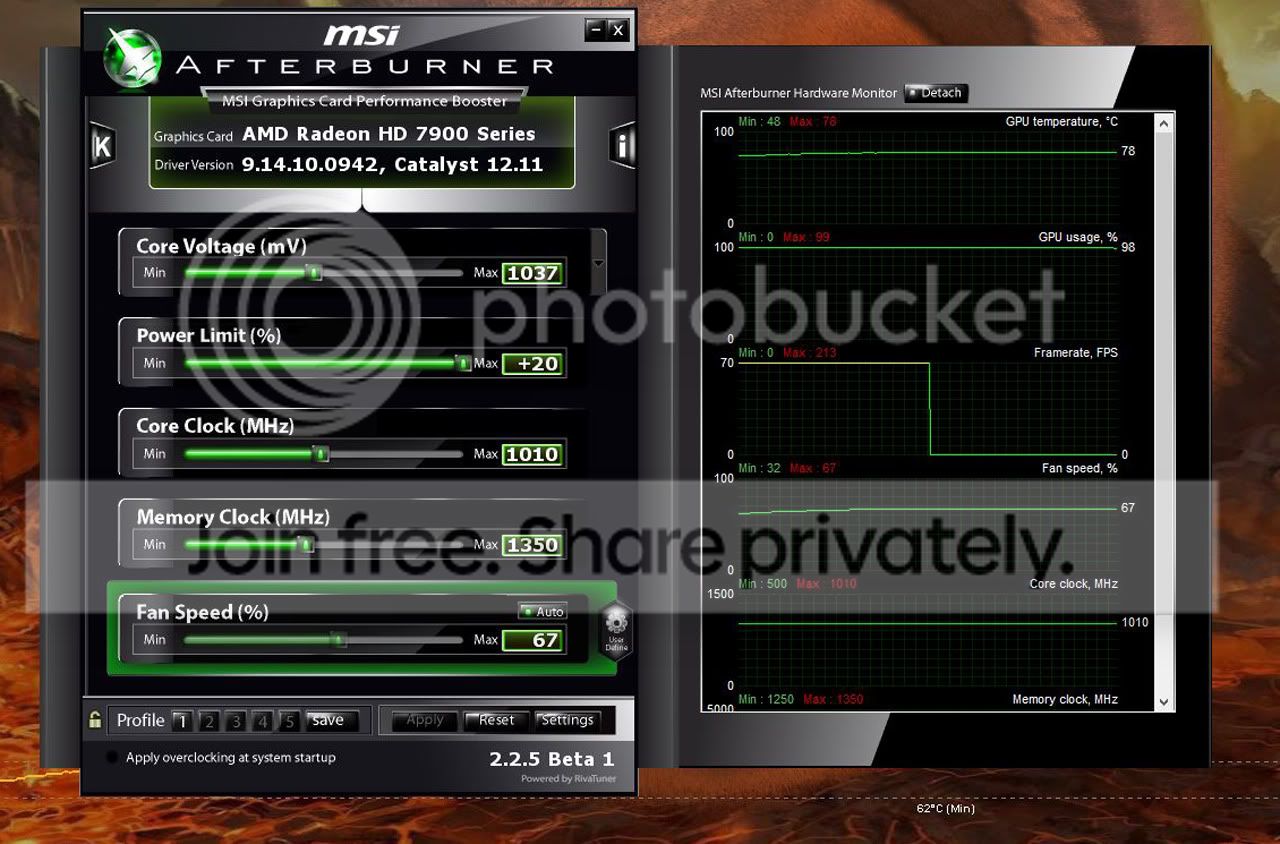
I just OCed the card to 1000/1400 56% fan, 70C on heavy heaven benchmark.
The score went from 2300 to 2800 :D I love this card!
Driver`s 12.11 beta 7
 
devrij, don't run furmark please. Run a bench of heaven 3.0 with 4xAA and tessellation on medium and see what your Max temps are please.

Will do. After applying the idle clocks workaround to get my core to 300MHz and memory to 150MHz (set a profile in CCC, PITA, but I wanted to test), my temps were sitting around 40C at 23%, which isn't too bad. I thought my load temps were alright (bit toasty when overclocked though). Running 1080p 4xAA moderate tesselation on Heaven 3.0 now, will report back.

E: seems to have settled at 68C at 56% fan speed, which is pretty low.

So perhaps it's just a dual monitor/driver issue?
 
Last edited:
Yep, but my case air flow is poor since my aim was quiet system.
I will buy bequiet silentwing`s.
My card sits at 34-35C on 30% stock since the card is more than. I need at the moment!
 
Last edited:
Yep, but my case air flow is poor since my aim was quiet system.
I will buy bequiet silentwing`s.
My card sits at 34-35C on 30%.

Hmm, so maybe this bad batch is actually just a select set of people with high res monitors and windows 8 running the 12.10 or later drivers? Beta 7 didn't fix **** for me btw.
 
Hmm, so maybe this bad batch is actually just a select set of people with high res monitors and windows 8 running the 12.10 or later drivers? Beta 7 didn't fix **** for me btw.

I didnt have problem with the card when i got out of a box with 12.11 beta 4 drivers. I have the new batch card, deliverd on friday.
I love the card so far every game maxed out and I get up to 120fps! LOVE IT! :D
Ofc stock theres no need to OC at the moment, my res 1920x1080
 
Back
Top Bottom