

-
Notice regarding image hosts and attachments. See here.
-
Competitor rules
Please remember that any mention of competitors, hinting at competitors or offering to provide details of competitors will result in an account suspension. The full rules can be found under the 'Terms and Rules' link in the bottom right corner of your screen. Just don't mention competitors in any way, shape or form and you'll be OK.
You are using an out of date browser. It may not display this or other websites correctly.
You should upgrade or use an alternative browser.
You should upgrade or use an alternative browser.
8800gtx driver issues
- Thread starter yantorsen
- Start date
More options
Thread starter's posts

The problem could be anywhere. If it was me, i'd find out the volts your memory, cpu, north/south bridge should be running at and set them instead of auto. Some boards don't put enough power to some components when its on auto.
Also you could try loosening your memory timings to something like 5-5-5-15 .
Also you could try loosening your memory timings to something like 5-5-5-15 .


nope, no deep scratches. and how do i check my ram voltages? just on the bios?
Have you tried seating the RAM in different slots to what its in now??
Stelly
1. Run memtest for 40 passes (that'll take hours - but do it to ensure your RAM is not broken).
2. Change the hard drive cable
3. Move the hard drive to another port on the motherboard... if you are using the Intel ports then move to the purple ports - but for installings sake and for simplicity go into the BIOS and change the SATA ports to "IDE" mode.
4. Reinstall Windows.
PAGE_FAULT_IN_NONE_PAGED_AREA normally points at either RAM or a hard drive issue, whether that be the hard drive itself or the controller, or cable, hence the steps above to remove a few options out of what it could be. The "Reinstall Windows" is to rule out a dodgy Windows install.
2. Change the hard drive cable
3. Move the hard drive to another port on the motherboard... if you are using the Intel ports then move to the purple ports - but for installings sake and for simplicity go into the BIOS and change the SATA ports to "IDE" mode.
4. Reinstall Windows.
PAGE_FAULT_IN_NONE_PAGED_AREA normally points at either RAM or a hard drive issue, whether that be the hard drive itself or the controller, or cable, hence the steps above to remove a few options out of what it could be. The "Reinstall Windows" is to rule out a dodgy Windows install.
I dont think its a HDD problem... I think RAM or CPU, what are the CPU temps?
Stelly
cpu temp acording to BIOS are 29 degrees idle (havn't got anything to work that can put it under load)
cpu temp acording to BIOS are 29 degrees idle (havn't got anything to work that can put it under load)
Sounds ok then, I would definately try changing the slots your RAM is in
Even try one RAM stick at a time to see if one is faulty
Stelly

Soldato
- Joined
- 11 Jan 2007
- Posts
- 9,184
- Location
- *̡̡ı ̡̡͡|̲̲̲͡͡͡ ̲▫̲͡ ̲̲̲͡͡π̲̲͡͡ ̲̲͡▫̲̲͡͡ ̲|̡̡
I had lots of issues with Vista when I first installed, similar to yours. I found the issues were all caused by one thing, dodgy memory, even though Vista passed it as did memtest. Removing and swapping ram sticks resolved the issue.
that blue screen yantorsen is very very similar to what I got the first time i installed Vista, with the volts far too low for my Ram, Auto was sending 1.8 and the RAM i had needed atleast 2V
In the Bios, (although I dont know the exact layout of the DS3 p35's as I have a Abit IP35 Pro) where it says auto, you should be able to press enter and set it manually, the same with your CPU one etc.
edit: I've just checked on the corsair site for your RAM and the specified voltage is 1.9v, so if the motherboards default is 1.8 (which it was on my IP35 Pro) then you aren't suppyling enough voltage to your RAM, thus causing multiple errors.
So, first step;
1) Go into Bios
2) Change your RAM voltage to 1.9
3) Change boot priority to CD
4) Re-install Vista
5) Change boot priority back to HDD
see how you go then, hopefully that should cure your blue screen/random crashes, as I did exactly the same thing, i was thinking oh great, nearly £1k worth of parts I've got to troubleshoot!
Good luck!
In the Bios, (although I dont know the exact layout of the DS3 p35's as I have a Abit IP35 Pro) where it says auto, you should be able to press enter and set it manually, the same with your CPU one etc.
edit: I've just checked on the corsair site for your RAM and the specified voltage is 1.9v, so if the motherboards default is 1.8 (which it was on my IP35 Pro) then you aren't suppyling enough voltage to your RAM, thus causing multiple errors.
So, first step;
1) Go into Bios
2) Change your RAM voltage to 1.9
3) Change boot priority to CD
4) Re-install Vista
5) Change boot priority back to HDD
see how you go then, hopefully that should cure your blue screen/random crashes, as I did exactly the same thing, i was thinking oh great, nearly £1k worth of parts I've got to troubleshoot!
Good luck!
Last edited:
right guys, thanks for all you're help.
when i go into bios the bit where it says the volts are on Auto is "ghosted" out, thus not allowing me to change the voltages. Any idea how to change this? could it be "locked".
I'm going to have a play around with the memory probably tomorow night, as I have band practice in 45minutes, untl later.
Thanks again, I will keep you updated on what happens.
when i go into bios the bit where it says the volts are on Auto is "ghosted" out, thus not allowing me to change the voltages. Any idea how to change this? could it be "locked".
I'm going to have a play around with the memory probably tomorow night, as I have band practice in 45minutes, untl later.
Thanks again, I will keep you updated on what happens.
right, well i'll have a better look. But i couldn't find anything in the mobo's manual about it.
I rang up the place i got it from today and they said it could be the graphics card causing problems still, can't remember what his reason was. And he also seemed to think it was the probly the RAM, he also said that if I find anythings faulty I can return it within 7 days of recieving it (last thursday). So I've got a few days to mess around with things.
I rang up the place i got it from today and they said it could be the graphics card causing problems still, can't remember what his reason was. And he also seemed to think it was the probly the RAM, he also said that if I find anythings faulty I can return it within 7 days of recieving it (last thursday). So I've got a few days to mess around with things.
Have you got the system voltage control set to manual?
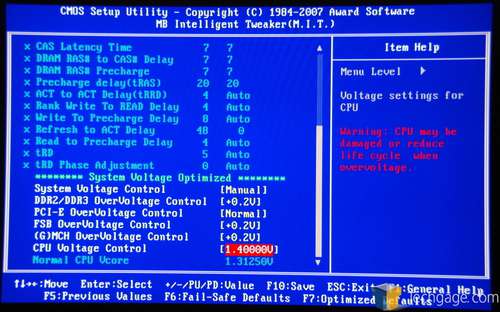
ooh I hadn't even seen that option, I'm stupid, well like I said, I'm gona have to have a look tomorrow night now, but i'll try the volts thing.
Do you know what volts I should be running my memory at? or where I can find out?
Yantorsen
ooh I hadn't even seen that option, I'm stupid, well like I said, I'm gona have to have a look tomorrow night now, but i'll try the volts thing.
Do you know what volts I should be running my memory at? or where I can find out?
Yantorsen
check my post a bit further up (post #53), I downloaded the file for your RAM off corsair website, and they state 1.9V @ 4-4-4-12
check my post a bit further up (post #53), I downloaded the file for your RAM off corsair website, and they state 1.9V @ 4-4-4-12
ah yeah, cheers mate, think I've got enough now to be going with, and I'm goin out now. So i'll tell u what happens tomorow night
