

-
Notice regarding image hosts and attachments. See here.
-
Competitor rules
Please remember that any mention of competitors, hinting at competitors or offering to provide details of competitors will result in an account suspension. The full rules can be found under the 'Terms and Rules' link in the bottom right corner of your screen. Just don't mention competitors in any way, shape or form and you'll be OK.
You are using an out of date browser. It may not display this or other websites correctly.
You should upgrade or use an alternative browser.
You should upgrade or use an alternative browser.
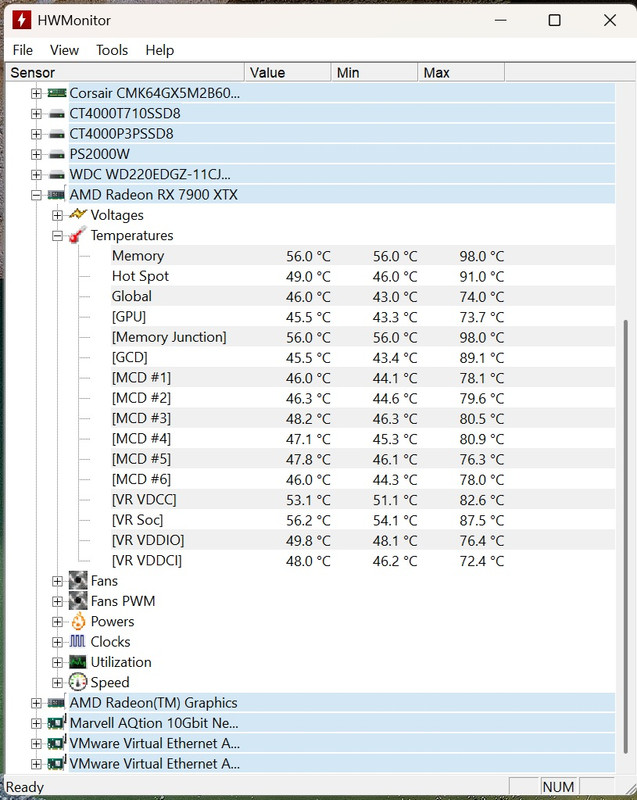
Do these GPU temps look ok while gaming?
- Thread starter nlel1975
- Start date
More options
Thread starter's posts

Soldato
- Joined
- 2 Aug 2016
- Posts
- 6,019
- Location
-
They look fine to me, assuming you’re on air and the card was under heavy load.
Yeah VR gaming at 4K resolution.They look fine to me, assuming you’re on air and the card was under heavy load.
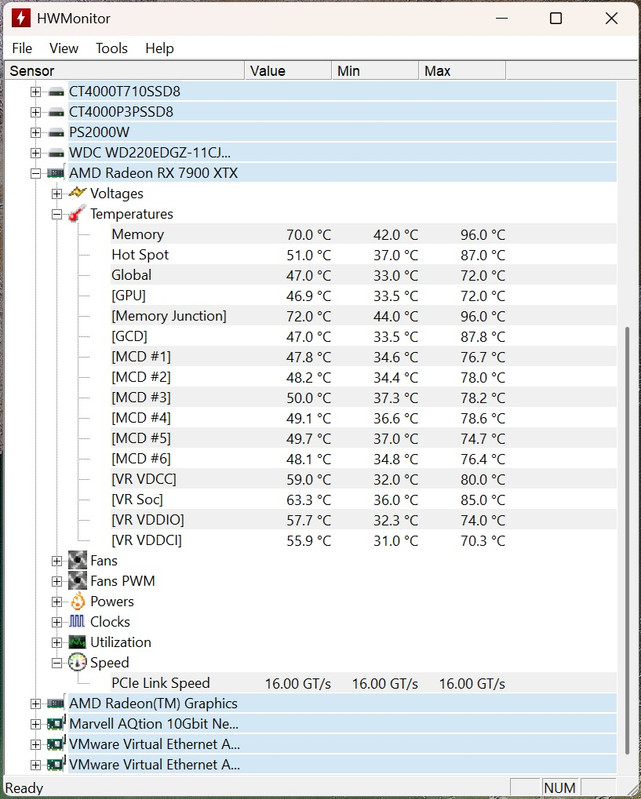

105c is the tjmax. I would be extremely worried if it went above that full stop.105C
98/96c is acceptable, but it isn't great though
Fair enough.Its the MSI Trio version. From googling you should only be worried if it consistently goes above 105C.
If you're feeling adventurous you could drop in some fresh thermal pads - here are the specs.

Soldato
- Joined
- 26 Apr 2004
- Posts
- 10,457
- Location
- Milton Keynes
My old RTX 3080 had similar issues, if you pushed the VRAM on it with any real load or intensity, it'd easily hit over 100 degrees, and could get close to the 110 max recommended temp; some of that GDDR6 just runs very, very warm; and I believe that's part of the reason many 9070XTs swapped from Hynix to Samsung (even if it was slightly less performant, believe the Hynix operated slightly tighter timings out the box) as the newer Samsung VRAM ran much cooler out the box (often ~20 degrees or so), and in many cases I believe it overclocked better too.
Last edited:
Well I came back to my PC this afternoon at 12:02 pm after having it set to auto shutdown at 10:54 am and it was stuck shutting down. Held the power button to switch it off and tried to boot it.
It wouldn’t load windows just got stuck with the spinning circle. So I somehow managed to get it into a recovery mode where I did a system restore from 10/06/26 which worked.
It’s back to the way it was in the adrenaline software before I undervolted it. I guess the undervolt wasn’t stable. Won’t be trying that again and it didn’t make much difference anyway.
It wouldn’t load windows just got stuck with the spinning circle. So I somehow managed to get it into a recovery mode where I did a system restore from 10/06/26 which worked.
It’s back to the way it was in the adrenaline software before I undervolted it. I guess the undervolt wasn’t stable. Won’t be trying that again and it didn’t make much difference anyway.

Soldato
- Joined
- 11 Jan 2007
- Posts
- 9,184
- Location
- *̡̡ı ̡̡͡|̲̲̲͡͡͡ ̲▫̲͡ ̲̲̲͡͡π̲̲͡͡ ̲̲͡▫̲̲͡͡ ̲|̡̡
That does seem very warm. Mine runs at most, around 60C under full load. It might need a repaste. Not something I would fancy doing.
Agreed, mine was 80+ until I put some Honeywell PTM on the die and now also around 60c.That does seem very warm. Mine runs at most, around 60C under full load. It might need a repaste. Not something I would fancy doing.
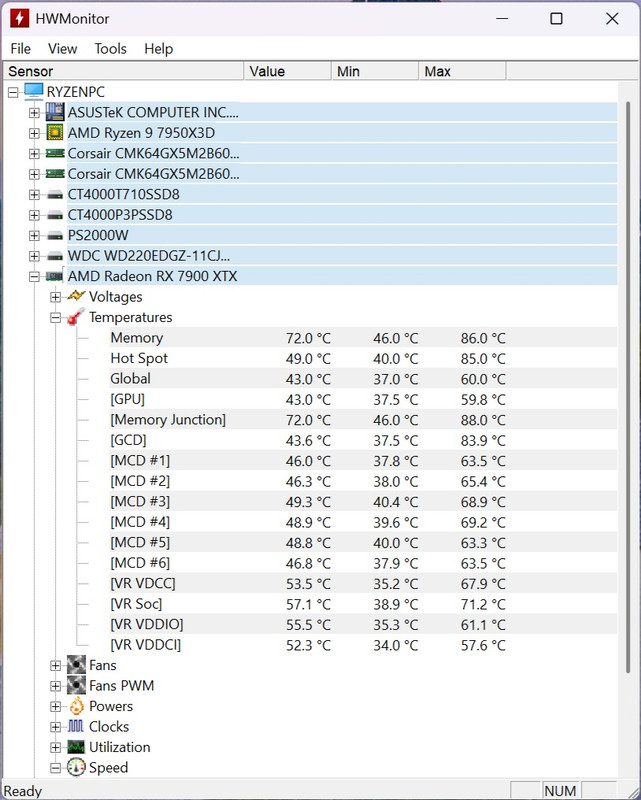
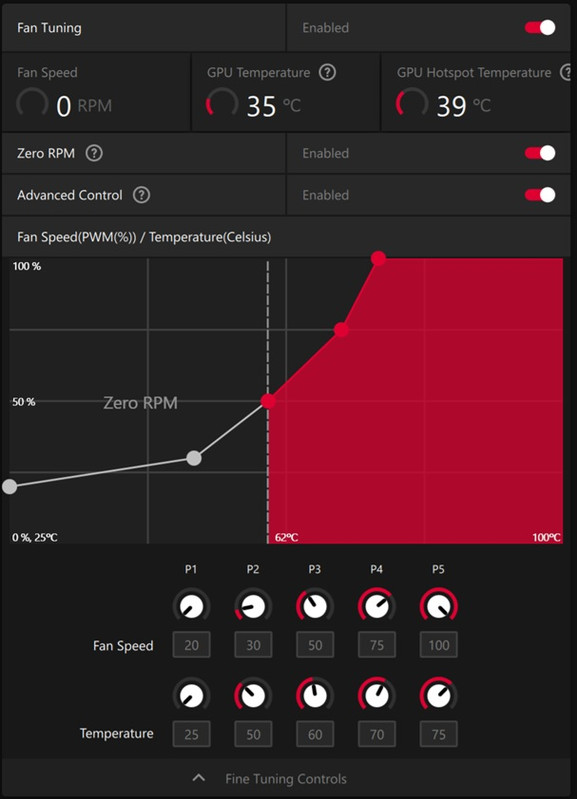
Well I set a custom fan curve...
Now have these temps...
A full 10c off the memory.
in a nutshell, you're basically just bruteforcing ram cooling by ramping up the fans via gpu core temp
it works, but i assume at the expense of noise
Doesn’t bother me I can’t hear any noise when wearing my VR headset, the game noise comes through the headset.it works, but i assume at the expense of noise

Associate
- Joined
- 7 Oct 2008
- Posts
- 956
- Location
- Birmingham
Pretty good improvement that. What case do you have out of interest?