


• Competitor rules

    Please remember that any mention of competitors, hinting at competitors or offering to provide details of competitors will result in an account suspension. The full rules can be found under the 'Terms and Rules' link in the bottom right corner of your screen. Just don't mention competitors in any way, shape or form and you'll be OK.

FAO rabc1690

In this one go to "advanced Voltage Settings"


35i15qr.jpg


Is it set on Auto? its looks it might be... did you already run Prime95? if so what CPU speed and what temperatures did you get?
 
its set to auto at 4.1 temps im not sure but wasnt above 42 as hwmonitor doesnt do a good job of monitoring the temps
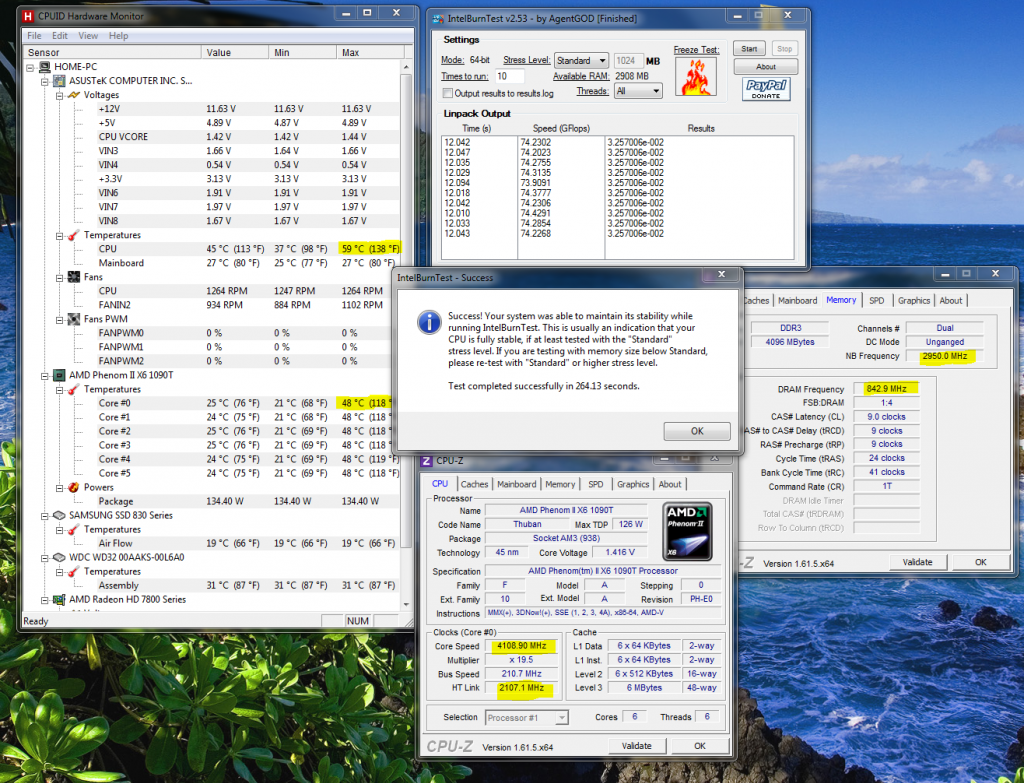

42c is good, when in HWMonitor, i have highlighted in yellow what you need to look at, ignore everything else in the picture... its from something else, i'm just using it as an example. :)

ibt.png


BRB, need to go do a couple of things...
 
in hw monitor mine only shows up as TMPIN0 and temps are mental anything from about 25 up to 132c

Try Coretemp

core_zpsc6dd9d59.png


The Max Temp we are looking for is 55c.

If you can get Coretemp to run i need you to Prime95 for 10 Minutes, and no less, if Coretemp reads 55c at any point stop the test.

let me know what temp you ended up with and what the speed is, if all is well we can go back into the BIOS and start overclocking properly :)
 
Last edited:
right ten min run at stock settings gives a temp of 35-37c in core temp, the 4 x were jumping between 3797 and 4192 which im assuming was the turbo feature working ( think i have to disable it to oc ) occasionally dropping to 3397 for a split sec
 
right ten min run at stock settings gives a temp of 35-37c in core temp, the 4 x were jumping between 3797 and 4192 which im assuming was the turbo feature working ( think i have to disable it to oc ) occasionally dropping to 3397 for a split sec


Yeah, that is the Turbo thing... which is working well, but we need to disable that in the BIOS, if you know how...

Your Temps are good.

In BIOS.

1 Disable Turbo.
2 Go to advanced Voltage Settings and set vCore to manual and then 1.45v, (Can't see what it looks like in there so if you get stuck i need a screen shot of it)
3 Go to vCore Load Line Calibration and set it one down from the highest level (again, i can't see that bit)
4 Set your CPU Multiplier to 44x '4.4Ghz' (i think you already know how to do that)
Save it and boot

Your current vCore is 1.5v, its on auto and i think its to high for 4.4Ghz, if your temps are good at 4.4Ghz we can take it up for 4.6Ghz.

Open CPU-Z to make sure the clock speed is set.

Run Prime95 for 10 Minutes again, as before watch Coretemp for temps 55c or less.

Now, it may not be stable, it may error, it may Freeze, it may even BSOD..... if it does we just need to make other adjustments :)
 
in the pic above what setting do i use for vcore loadline calibration? i set it to standard

also in the cpu vcore i cant change it from auto, i press enter nothing happens, i type in 1.45 and press enter it returns to auto

 

Not a lot of options... go for medium. we may need to go for extreme, i was rather hoping there would be something in between.

You can also open CPU-Z and keep you eye on the vCore, do that and let me know what its doing :)
 
in the pic above what setting do i use for vcore loadline calibration? i set it to standard

also in the cpu vcore i cant change it from auto, i press enter nothing happens, i type in 1.45 and press enter it returns to auto

yes... set it for high.

also in the cpu vcore i cant change it from auto, i press enter nothing happens, i type in 1.45 and press enter it returns to auto


HHmm? there might be another setting somewhere where you need to set the BIOS some sort of full overclocking mode.

I don't know Gigabyte Motherboards, i have not used them for many many years.

let me think...
 
Back
Top Bottom