• Competitor rules

    Please remember that any mention of competitors, hinting at competitors or offering to provide details of competitors will result in an account suspension. The full rules can be found under the 'Terms and Rules' link in the bottom right corner of your screen. Just don't mention competitors in any way, shape or form and you'll be OK.

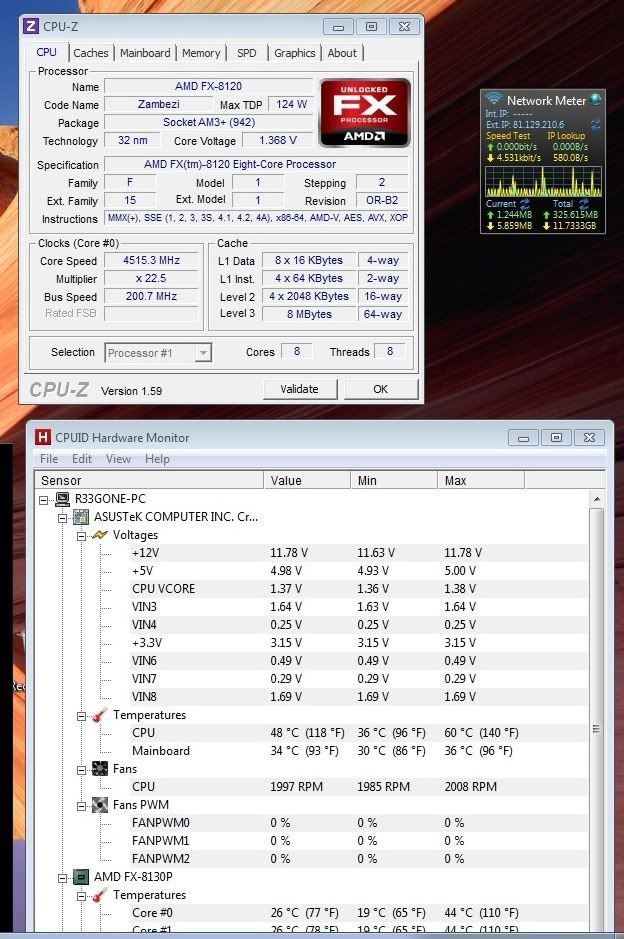
FX 8120

well i was using trifire 6950 + 6990

Fair point and i respect your opinion and attitude as you have been there.

Except you do.

Really coz i don't see it
BF3ULTRAFearnoevil.jpg


Like i said i see no bottleneck, i also said this in the other thread in reply to you

It's acceptable, but it's not worth the purchase unless you're coming from like an Anthlon II X2 and have a board that'd take it and can get it cheap.

+1

and i upgraded from a 1090t which was clocked @ 4ghz
the bulldozer is faster but not by much :(

so don't get me wrong....its not the greatest CPU out there but for you say its crap makes we wonder where you end and intel begin

 
You're running at 4.8GHZ, that makes some sense, although I'm very surprised, what resolution are you running?
I had a Phenom II 1055T at 4.375GHZ bottleneck two 6870's, you can understand my scepticism.
 
You're running at 4.8GHZ, that makes some sense, although I'm very surprised, what resolution are you running?
I had a Phenom II 1055T at 4.375GHZ bottleneck two 6870's, you can understand my scepticism.

i can yes. im running a 1920*1080
TBH it has been a lot of trail and error with the overclock but i think i have found the sweat spot :D
 
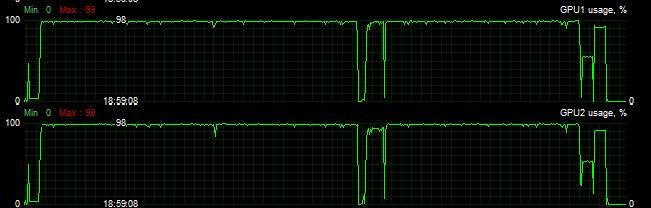
Well here is my GPU usage on BF3 playing the single player mission "Fear No Evil" at 1080p with everything on ultra:

6854707322_f1ca81427b_o.jpg


Is this a bottleneck?


bf3p.png


BF3 single player at 1080p with everything on ultra

mines less bottlenecking than yours and thats with 3 gpus. with 2 gpus it stays at 100%

this game will bottleneck using sli/cf at 1080p with a 8150/8120

Just a minor observation, do you guys have vsync enabled? If so it might not be a bottleneck, rather the cards have done all the work they need to do. 3 cards will not all run at 100% if for example they only need to run at 70% to hit the 60fps vsync wall. A bottleneck is usually seen where say, you are only getting 40 from a possible 60fps and the cards are only sitting at 70%.

And I also couldn't comment on the whole BD situation, many are happy with them, many are not.
 
Last edited:
Bulldozer is not a terrible chip, it is just a massive let down as to what was expected after such a long wait. What we got was no better than the previous generation of AMD chips and was quite a way short of what intel has to offer.

This is why it gets slated ;)
 
Just a minor observation, do you guys have vsync enabled? If so it might not be a bottleneck, rather the cards have done all the work they need to do. 3 cards will not all run at 100% if for example they only need to run at 70% to hit the 60fps vsync wall. A bottleneck is usually seen where say, you are only getting 40 from a possible 60fps and the cards are only sitting at 70%.

And I also couldn't comment on the whole BD situation, many are happy with them, many are not.
no vsync not on...

as i said when i run on 2 gpus it goes to 100% or run 3 gpus at a higher res than 1080p
 
Lordgrayone would you be able to shine some light on overclocking your FX8120 so high? I can get my FX8150 to 4.0Ghz without having to change the cpu voltage to add stability. My cpu will to boot into windows without bluescreen or freezing with 4.6ghz and 1.5v but i get 2-4 cores dropping out in Prime95 due to warnings. Any ideas on what steps to take to stop these cores dropping out? or should i just label my chip as an overclocking dud?
 
I would guess it's your motherboard, Asus are far superior to Gigabyte for overclocking on the AMD platform in my experience. I bet you'd have more success with a Sabertooth.
 
Lordgrayone would you be able to shine some light on overclocking your FX8120 so high? I can get my FX8150 to 4.0Ghz without having to change the cpu voltage to add stability. My cpu will to boot into windows without bluescreen or freezing with 4.6ghz and 1.5v but i get 2-4 cores dropping out in Prime95 due to warnings. Any ideas on what steps to take to stop these cores dropping out? or should i just label my chip as an overclocking dud?

Happy to help if i can, as mmj_uk said it could be your motherboard, i take it you are just O/C via the multi?? and are you doing the OC via the bios?
you should not need 1.5V for 4.6 and i found at those volts the core temps would jump up instantly when loaded causing a crash/shutdown
i`ll check my settings in bios and post up in a sec

EDIT : my settings in bios are 1.456v all cool and quiet ECT are off
Best thing i can suggest is work you way up slowly with volts/multi
as far as i can remember 4.5 did not require much more volts than stock, certainly less than 1.4v for sure
 
Last edited:
Happy to help if i can, as mmj_uk said it could be your motherboard, i take it you are just O/C via the multi?? and are you doing the OC via the bios?
you should not need 1.5V for 4.6 and i found at those volts the core temps would jump up instantly when loaded causing a crash/shutdown
i`ll check my settings in bios and post up in a sec

EDIT : my settings in bios are 1.456v all cool and quiet ECT are off
Best thing i can suggest is work you way up slowly with volts/multi
as far as i can remember 4.5 did not require much more volts than stock, certainly less than 1.4v for sure

core temps are not the one you should be monitoring, its the cpu temp (tmpin0 or tmpin1) you should be monitoring.

also he may have a very poor chip that doesn't oc very well and needs high voltage... each chip is different in overclocking terms
 
Last edited:
core temps are not the one you should be monitoring, its the cpu temp (tmpin0 or tmpin1) you should be monitoring.

also he may have a very poor chip that doesn't oc very well and needs high voltage... each chip is different in overclocking terms

now you got me wondering....which program do you use for monitoring?
 
Back
Top Bottom