HDD Caching vs SSD Caching

Associate
Joined
17 Aug 2011
Posts
120
Location
Surrey
OCUK_Banner_001.jpg


Lets begin at the beginning

I built my very first PC back in September last year, back then the second generation Intel chips had been released P67 and H67 boards were common place and everyone was getting excited for the new AMD Bulldozer chips. When I spec’d my system the Z68 boards were brand new and quite expensive so I followed other peoples suggestions and decided to go with a P67 board.

At the time I also decided that going with a SSD powered boot drive wasn’t going to be cost effective for me, so I went with the traditional HDD option instead. I decided that the speed boost wasn’t worth the cost outlay (the same decision I’m sure most people came up with). Then as time went on I realised that I should have stuck it out and waited for the Z68 boards to be released, so that I could take advantage of Intel Smart Response Technology and SSD Caching.

Being the owner of a P67 board (and therefore unable to use SRT) SSD caching was a mere dream...

Enter OCZ Technologies

I first heard about the OCZ Synapse SSD on Youtube, Linus made an unboxing video about it and as always helped you learn something new along the way. The Synapse is purely intended to be used as a cache drive for people who don’t have the luxury or owning a Z68 board. It works in conjunction with your current hard drive and uses OCZ’s own Dataplex software to work out all the complicated caching algorithms. It sounded too good to be true, it would solve all my problems and make my computer faster with out having to re-install windows.

I read some reviews on the net and it seemed as though the Synapse would be a good addition to my rig, of course there were a few niggles such as the drives actually only having half the advertised gigabytes (due to OCZ overprovisioning half the drive to extend the lifespan of the SSD). The only other issue that I found was a few people had experienced a long wait (upto 8 hours) while the Synapse drive rebuilds the cache after Windows has shutdown unexpectedly.

Testing, testing and more testing

I eventually decided to take the plunge and ordered myself a 64GB OCZ Synapse Caching SSD. While I waited for the drive to be delivered I thought I might as well run some tests so I could tell how much of a performance boost I was getting.

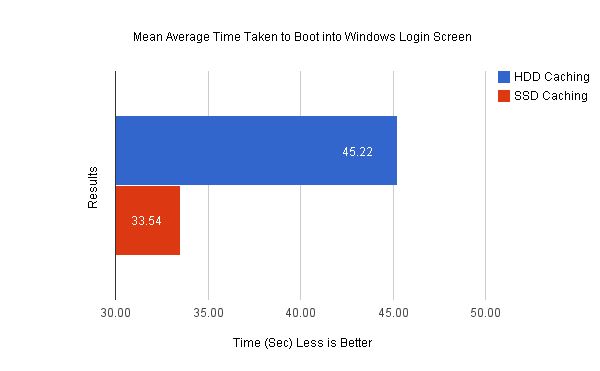
So I thought I would run three separate tests, the first one being a timed test. I would start the computer from cold and time how long it took for my PC to get to the Windows login screen, I would do this five times and then take the average times with SSD caching and without it and compare them.

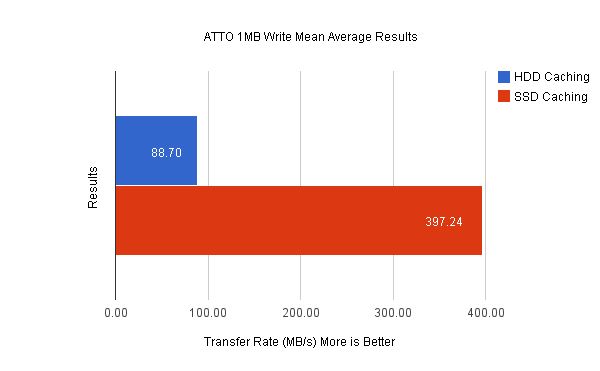
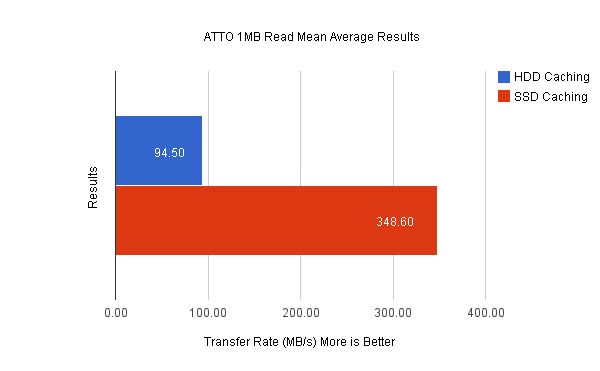
The next test was carried out using the ATTO benchmark, I would run a 1MB read and write test and compare the mean average MB/s transfer speeds with and without SSD caching.

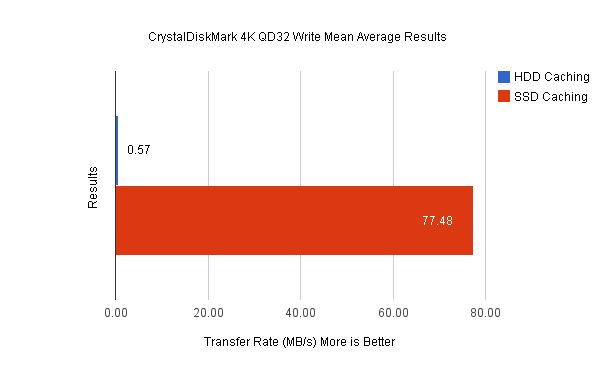
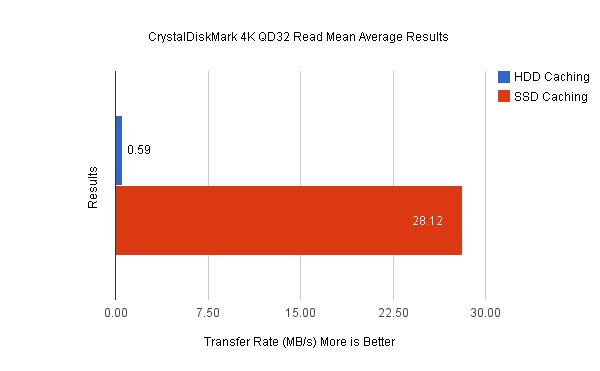
Finally I would carry out a 4K QD32 read and write test using CrystalDiskMark and compare the average MB/s transfer rates, again both with and without SSD caching. At the end of all this testing I would have a good idea of the performance gains the OCZ Synapse Caching SSD was giving me.

At last the results are in

Just before I show you guys the results I thought I better show the spec list of the system these results were taken from:

CPU - Intel Core i5 2500K Clocked at 4.5GHz
CPU Cooler - Corsair A50
Motherboard - ASRock P67 Extreme 4 GEN 3
RAM - 8GB Kingston HyperX Genesis Grey 1600MHz
PSU - OCZ 700W ModXStream-Pro
GPU - MSI N560GTX-Ti Twin Frozr II Clocked at 1.0GHz (core clock)
Optical - Sony Optiarc AD-5280S 24x DVD±RW SATA
HDD - Seagate 7200RPM 1TB SATA3
SSD - OCZ 64GB Synapse Cache SSD

After a lot of typing its finally time to reveal the results, so I’ll let the graphs do the talking:

Cold Booting into Windows Login Screen
Chart_Boot_Time.jpg


ATTO Benchmarking Read/Write 1MB Test
chart_ATTO_Read.jpg


chart_ATTO_Write.jpg


CrystalDiskMark Read/Write 4K QD32 Test
chart_CrystalDiskMark_Read.jpg


chart_CrystalDiskMark_Write.jpg


Conclusion

As you can see from my results above adding the OCZ Synapse Caching SSD to your system will utterly destroy a HDD in terms of transfer speed. Windows boot up time is also greatly improved, with the Synapse enabled I managed to shave 11.68 seconds off my boot times. The ATTO benchmark was the most telling however, with SSD Caching my average 1MB write transfer rate increased by 308.54MB/s that is mind blowing! I expected the Synapse to give me a performance boost, but not to that degree.

So it looks as though OCZ's SSD caching solution is a pretty awesome option for people who don't have access to SRT. It greatly improves both read and write transfer speeds, opens programs noticeable faster and doesn't cost the earth. Interestingly I have also experience the aforementioned long wait after my system blue screened, however I was forced to wait about 15 minutes while the Synapse rebuilt its cache as opposed to the 8 hours some people reported. I'm not sure if that was a issue with the older versions of the Dataplex software but I'm running build 1.1.0.9 and as I said I didn't have to wait too long.

So to summarize, if you want to speed up your rig to almost SSD speeds and are running a P67, H67, X79 and have a copy of Windows 7 you could do a lot worse than the OCZ Synapse Caching SSD.

I hope you guys find at lease some of this post useful and interesting. I took a lot of time to make my graphs legible and clear but if you think they need to be improved please let me know and I'll do my best to correct them.

Learn more about the OCZ Synapse HERE and HERE

Thanks for reading.

 
Thank you for the time and effort you've put into this.

It certainly seems that the OCZ Synapse does what it says on the tin and it looks like a viable option for those without the ability to use SRT.

I hate to nit pick after your efforts but just a couple of quick points.

In your title image it should say HDD not HHD and I suppose the title should really be something like HDD vs HDD with SSD Caching.
 
OK sounds very interesting but i do have one issue with it all. in order to get the benefits and near SSD speeds you have to buy an ssd just for caching at a similar price to a normal SSD. or have i missed the point here somewhere?
 
The idea is that for the cost of a large mechanical drive and a small SSD you get a large mechanical drive that perform to near SSD speeds for some of its operation. Effectively what the Hybrid drives do but you buy the bits yourself.
 
OK sounds very interesting but i do have one issue with it all. in order to get the benefits and near SSD speeds you have to buy an ssd just for caching at a similar price to a normal SSD. or have i missed the point here somewhere?

Yes and no, you can't fit 300gb of games on a 128gb ssd, if you got a 128gb ssd, and a 60gb ssd for caching and a 1tb drive, then you have OS and a couple games on the ssd, and other games and software on the hdd and get improved performance in that software as well.

However benchmark wise, windows boot is a useful measure, to a degree, but how much is 11 seconds one off really.

Benchmarks are fairly useless, real world apps are more useful for something like caching because a very small program can be loaded into the ssd cache almost immediately and make the whole thing almost worthless. With 300gb of games the actual nature of cache becomes more important, learning what you use and how often, and improving performance in stuff on the fly. If you load up 200gb of different games every few days the cache COULD start to be a lot less useful as its constantly replaced and you're always accessing a game that has been "uncached" by recent usage.

I wonder what the effect of downloading large amounts of data are as I've been seriously thinking about a cache drive but also currently download lots of stuff to a HDD rather than on a ssd to both, reduce writes and clutter on the ssd and save as much space as possible on it. Would downloading a few games essentially clear all the cache, how does it work long term.
 
Thank you for the time and effort you've put into this.

It certainly seems that the OCZ Synapse does what it says on the tin and it looks like a viable option for those without the ability to use SRT.

I hate to nit pick after your efforts but just a couple of quick points.

In your title image it should say HDD not HHD and I suppose the title should really be something like HDD vs HDD with SSD Caching.

Thanks for pointing that out! Can't believe I let a typo get through! I was going to have a more accurate title but it seemed kind of tongue in cheek.
 
OK sounds very interesting but i do have one issue with it all. in order to get the benefits and near SSD speeds you have to buy an ssd just for caching at a similar price to a normal SSD. or have i missed the point here somewhere?

The overall benefits of a caching SSD are that you can have the large capacity storage of a HDD but with the speeds of an SSD. I suppose that if money is no object you could just buy a Revo drive, that way you would get large capacity and SSD speeds in one neat package. But for the average Joe without a Z68 motherboard SSD caching is the closest your going to get.
 
maybe id better go read up a bit about caching because my currant understanding is that it copies the most used files onto the SSD to speed them up?

but surely it cant do that for more files than it has capacity for so how is it better than just using a SSD normally in the first place?
 
It will swap your files in as it needs to, rarely is anything bigger than the caching section. Even game resources are chunked and you really notice it on load times. First time loads for items not used in a while are mechanical speeds, which is why I use a slightly different setup. I'm using ISRT with a single 128GB SSD. 100GB of which is my OS/progs volume. The other 20GB I use as a cache for a 1TB mechnical drive full of games. It gives me the best of both worlds.

Good article.
 
Last edited:
It will swap your files in as it needs to, rarely is anything bigger than the caching section. Even game resources are chunked and you really notice it on load times. First time loads for items not used in a while are mechanical speeds, which is why I use a slightly different setup. I'm using ISRT with a single 128GB SSD. 100GB of which is my OS/progs volume. The other 20GB I use as a cache for a 1TB mechnical drive full of games. It gives me the best of both worlds.

Good article.

how did you manage that when caching uses raid 0? isnt it impossible?
 
Just a clarification -You don't need a Synapse to take advantage on Intel's hardware caching (SRT), any SSD will do. Equally, you can use a Synapse on any Chipset because it has a software caching solution.
 
Just a clarification -You don't need a Synapse to take advantage on Intel's hardware caching (SRT), any SSD will do. Equally, you can use a Synapse on any Chipset because it has a software caching solution.

This is exactly right, sorry if this wasn't clear in my original posting. If you have a SRT supported motherboard then any SSD can be used for caching. If you DO NOT have a SRT supported motherboard the Synapse is one of the options available to you. :) (festive smilies still? Really...)
 
Think I'm going to pair one of these up with my 300gb Velociraptor boot drive. Undecided between the 64gb or 128gb version though.
 
Back
Top Bottom