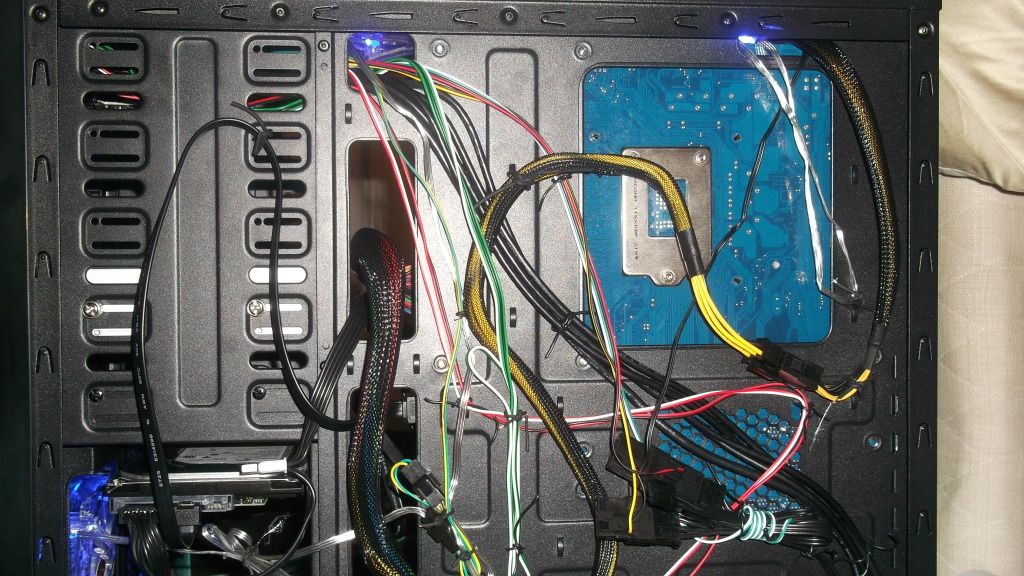
Long Awaited Build

We were all out of bacon ;)
Cheers for the comments though guys.
I wonder if amazon sells cheap cable ties.

You will find they were used to tie the cables together on the kit you bought, the case should have come with a couple of zip straps. The cable ties you might already have in the kitchen.....ask your mum if she has any sandwich bags.....they come with a strip of cables ;)

Hmmmm I will have to investigate :P

How it is on the CM Elite 430 is when you take the front case off, the 3.5inch bays are open and all the 5.25inch ones are shut with solid metal plates you can snap off. And the bits that are clipped to the case have dust filters in them.

I have the top one broken out for my Blu-Ray drive and then I broke out the one below so I could get my SSD adapter on (should have done this first from the inside) and then I screwed that plate back on

Maybe I will take them all off and see, if I don't like the way you would see the light through them then I can screw them back :) Might look cool :p

As I said bud I'm not familiar with your case. I don't hate it, it's also open to mods to improve it. If there is a dust filter on the backing plate then this goes to show air is expected to be drawn in.

The Z9 has the "dust filter" on the back of the bay cover. If yours is on the backing plate that is a bit pants. I'd maybe consider using a hairdryer to heat it to "soften" the glue......makes it easier to peel it away with a blade. This method works great on stickers, worth a shot on the dustfilters if you wanted to transfer them to the drive bay cover instead.

During the day the view isn't as transparent. The effect is much better in the dark obviously. Keep in mind I have 3 LED 120mm exhaust fans around my gelid cooler making the lighting more pronounced.

Have you considered cutting your case to allow for some cable management......that's a common mod I saw on the coolermaster 430 when i was looking for a decent cheap case.

 
Hono you will be glad to know I am re-doing the cable management using wire from old radios :p

I have one question about the power cables though, the molex ones for HDD's and everything. Can I plug a DVD-RW, fan, fan controller and HDD all onto one? Or will the devices draw too much power for the cable?

With my cooler master PSU I have a cable than can run 3/4 devices from it.
 
I know it's a faff but it is worth the effort. Getting the P4 power cable behind the mobo will make a big difference to the look and help the airflow.

Bitfenix are sending me the hydra pro fan controller and spectre pro fans for review. I'll use the Z9 plus case and i'll have to take pics, so you will be able to see the inside of my case to help you out ;)

You can use every single connector on the cable that's not a problem, I doubt you'll need to and you'll notice you don't need all the cables plugged into the modular PSU either. The fan controller on the back of the mobo is powered by molex, you can connect the molex fan onto this aswell if you want to. If you refer back to andys early pics you see he has done this.
 
I dont think I need to use the P4 cable, I take it its only for the motherboard's header?

I'll be interested in knowing how those items turn out. Im quite interested in the fans but the controller also looks quite interesting, how many fans can it control at once though?

And sorry but what fan controller on the motherboard??
 
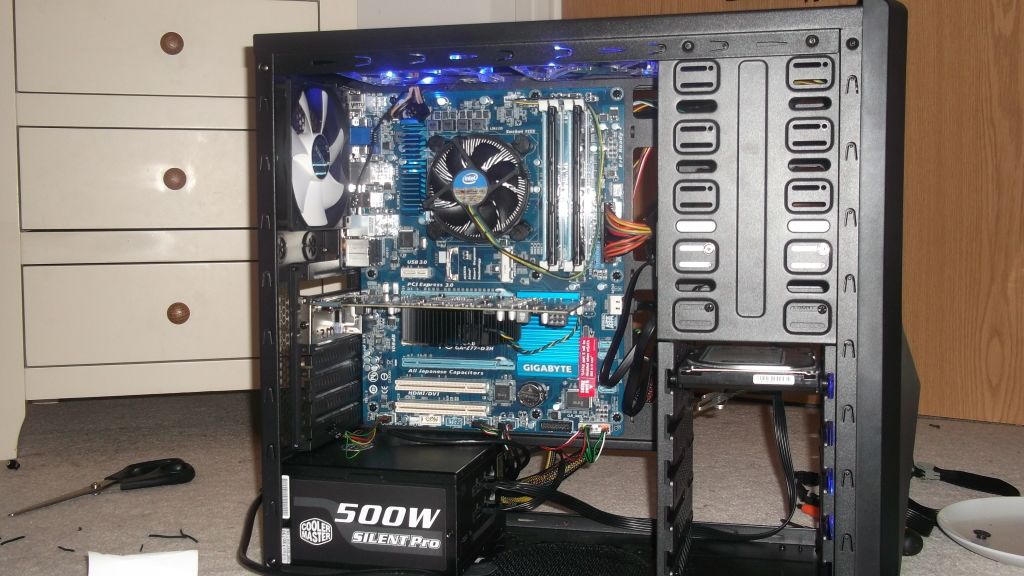
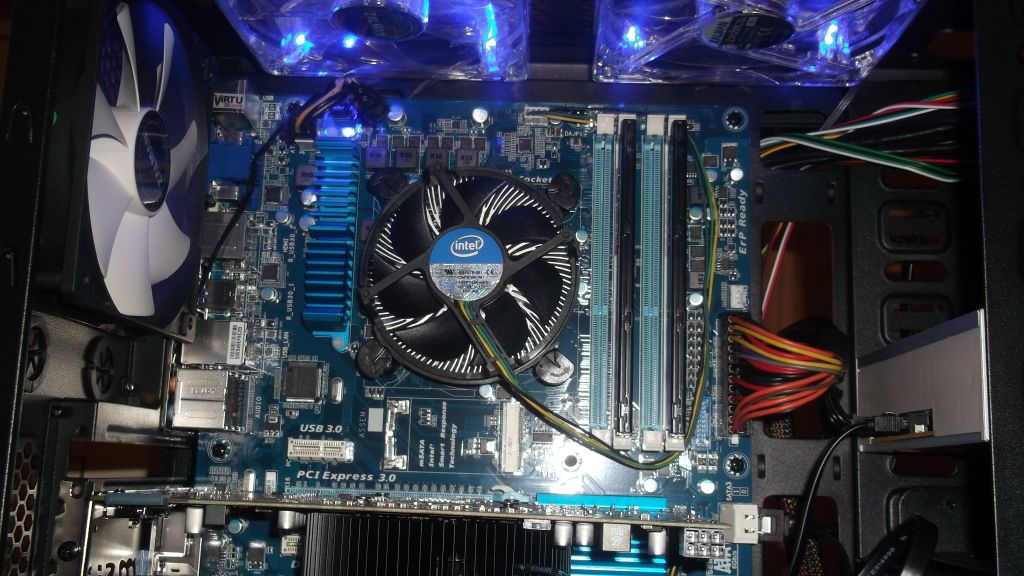
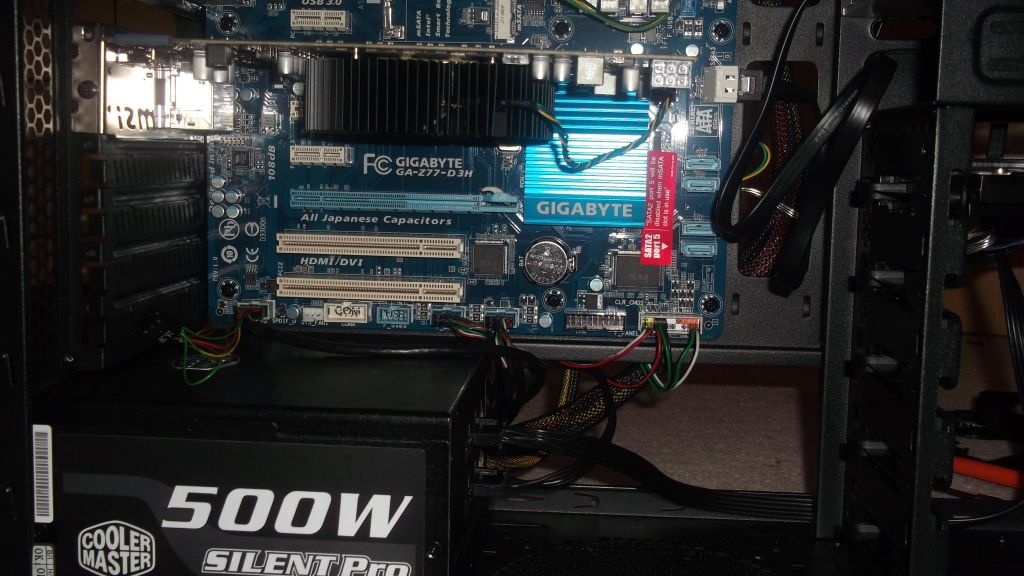
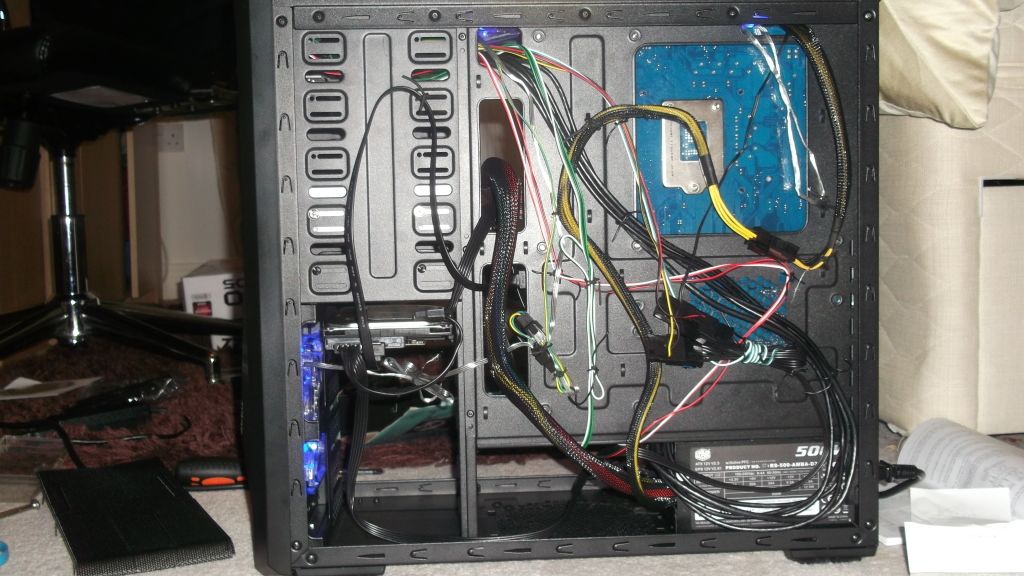
Few more pics everyone :)
I took apart all the cables and re-did them.
Also to stop Hono nagging ;) :p I changed the positioning of the fans and removed the metal cages on the front. The fans are now:
1 - front (LED and controlled)
2 - top (LED and one controlled)
1 -rear

The front and first top fan are on a pull setup and other two are pulling the air out of the case.

PS. There were a lot of cables to manage and two of them were very bulky!


DSCF07671.jpg


DSCF07691.jpg


DSCF07711.jpg


DSCF07731.jpg


DSCF07751.jpg
 
That's much better and you know it lol

Not sure about the top fans though. I have both as exhaust, andy had both as intakes i think. See how it goes :)
 
Last edited:
Looks like one of your top fans is round the wrong way, both should be pushing the warm air up and out the case since heat rises.

Other than that looks tidy enough now you've redone your wires. :p
 
As I said bud I'm not familiar with your case. I don't hate it, it's also open to mods to improve it. If there is a dust filter on the backing plate then this goes to show air is expected to be drawn in.

The Z9 has the "dust filter" on the back of the bay cover. If yours is on the backing plate that is a bit pants. I'd maybe consider using a hairdryer to heat it to "soften" the glue......makes it easier to peel it away with a blade. This method works great on stickers, worth a shot on the dustfilters if you wanted to transfer them to the drive bay cover instead.

During the day the view isn't as transparent. The effect is much better in the dark obviously. Keep in mind I have 3 LED 120mm exhaust fans around my gelid cooler making the lighting more pronounced.

Have you considered cutting your case to allow for some cable management......that's a common mod I saw on the coolermaster 430 when i was looking for a decent cheap case.


Yeah I think I may have made a mistake with the case when I purchased it by buying a budget one, but at the same time I have it all looking pretty tidy and I like the look of the case a lot. The only thing it lacks really is cable management holes.

Aha sorry, my explanation must have been a bit rubbish lol, the dust filter is on the back of the bay cover, not the backing plate. I can also remove them to clean them by just pulling them out of the clips on the bay covers.

I see what you're saying too about if there's filters there, they expect you to remove the metal backing plate and let the air flow through. I think I will do this as it makes sense :) And like you say might look cool at night :p I have two LED strips in my case so should get a similar effect to your LED fans

I don't really want to cut the case although I have seen people do similar things on youtube and it looks good
 
So far temps have dropped 3 degrees on that setup so I think I may leave it that way, averaging a nice 18 degrees on the fan controller too.

Also with the fans, ones pulling ones pushing which is why they are reversed in the pic.

Im starting to regret building the pc myself, something is wrong and its either the motherboard, hard drive or OS :mad:

I think its the mobo because its now refusing any alterations other than changing the boot drives, the driver disc wont load either, and quick flash isnt working.... :mad:
 
3 degrees better than what? The stock setup on the case? If your setup is better than twin exhaust or intake at the top of the case, I would be surprised. Still if it's cooler that's a bonus :)

Where is the sata cable from the DVD drive plugged in? I can't see it connected on the mobo......this is where you plug it in and the driver disc magically works ;)

I wouldn't be surprised if the mobo was damaged. You didn't read the instructions/advice given properly and you were randomly plugging things into the mobo headers and powering on the system from what i could tell from your posts :(

You also tried overclocking the CPU straight away. The digital temp display basically shows the temp inside the case (there is a cable with the temp sensor on the end).....this won't be the CPU temps and you need to download software to check your core temps and run tests to make sure the overclock is stable.

I want to say try doing a CMOS reset (return the mobo to factory settings) but the way you hurry things it makes me hesitant to suggest altering the BIOS and overclocking, especially on the stock heatsink :(
 
Last edited:
Its plugged into a SATA 3 port which is just beside the SATA 3 port with the HDD plugged in. Its quite hard to see in the photos.

Sorta true about plugging random things in, I only did that with one cable luckily.

I tried to overclock it to 3.6 yes since I thought that wouldnt really damage anything and would be a good basis to start on. I also check the core temps via the BIOS and it shows nothing above 40 on the stock fan.

Its quite tempting to do a CMOS reset, I will read up on thoroughly before doing so though! I think the OS or HDD has a problem since apparently the OS is corrupted yet when I boot the PC from the same program on USB stick it works fine.

EDIT: Sorry yes 3 degrees better than stock.
 
Last edited:
No I can't see it in the pics :( Put the HDD and the optical drive into the blue sataII ports. Leave the grey sataIII spare incase you add a SSD later.....you might have noticed you can mount one on the back of the mobo tray ;)

The easiest way to do a CMOS reset is to power the PSU off with it's switch on the back. Then pop out the round battery on the mobo, leave it out for a min then put it back in, flick the PSU switch back on. Then you can restart the rig......you'll need to go back into the BIOS again and check the boot settings. Leave it at stock, we can get to overclocking later.
 
Ok I have just replaced the battery, One question though. In the manual it says the battery should have the positive + side face upwards. Does this mean the + should be at the top half of the battery or the + should be facing away from the motherboard (on top, visible)?
 
Still nothing... I cant even get onto the OS anymore. I redownloaded the Windows 8 onto the USB drive and plugged it into the PC using the motherboard sockets. Changed the boot sequence to use the USB drive first. Downloaded it into the HDD again but half way through it says there is an error and I cant download any further.

Whenever I boot it back up it just goes into a "System Repair" cycle.

The HDD was a OcUK B grade item however I though all B-grade items worked perfectly?
 
Ok might have to RMA back the HDD as I am more than positive this is the problem, it could be the Mobo but the way its looking the mobo's USB ports are working fine, I can access BIOS and all the SATA devices through it.
 
Ok might have to RMA back the HDD as I am more than positive this is the problem, it could be the Mobo but the way its looking the mobo's USB ports are working fine, I can access BIOS and all the SATA devices through it.

Or the download of the OS is corrupted, or the memory stick might be duff. Why can't you just burn the OS iso to disk and install it the old fashioned way?.....I don't mean to sound harsh but you are making things more complicated for yourself, not wise if you are a "noob" at building a PC.

You can download ultimatebootcd and burn it to disk. That is full of diagnostic kit to test RAM,HDDs,stress the CPU etc. You have to pay to send stuff back and you will be charged if they test it and it's fine.
 
We dont have any blank discs in our house...
I have a few gaming ones I could potentially use, how easy is it to remove everything from a disc like that?

Also I have scanned both the OS and USB for viruses, malware etc, and the OS comes direct from Windows not a seperate download site.
 
Back
Top Bottom