• Notice regarding image hosts and attachments. See here.

*** Official Ubiquiti Discussion Thread ***

I was interested in the Zyxel stuff but their switch lineup is incredibly poor, and I made about three attempts to talk to them about becoming a customer and they never responded, so balls to them.
Agreed. Switches are very limited. I always found there wasn’t quite what I needed. My account manager is pretty good, always responds when I ask something but equally doesn’t pester me. Got invited to one of their MSP events last October, was worth the day.

The problem is that most bids I compete with are UniFi or Meraki and the conversation of why Zyxel takes the focus rather than why us.

If you were interested in Zyxel I’ll happily pass your email on to my AM and tell him jump on it?

 
Thanks for the offer, it's less of a factor now that their switch lineup doesn't really suit our needs and I don't want to get into the position where we have two different companies involved in switching and then another for Wi-Fi when the Unifi range looks like it might be able to cover all those requirements in the next year.

On a more general point I also have my own "have an easy life" policy where I won't fight with companies to be able to buy something.
 
Seems fine although I expect one will probably do the job in practice.

You might want to consider staging the AP’s to give better coverage outside. For example installing the downstairs AP in the back of the family room and the upstairs AP towards the front of the house.

U7 Pro XG is the go to for ceiling mounted.
Morning All!

So we finally moved into the property on the 16th of this month

EE FTTP is due to be installed on the 17th of next month! Just wanting to plan out where I put all my Unifi kit and where the BT master socket will be located, do people tend to locate it all in their office/loft my wife hates cables with a passion so trying to keep them hidden as best I can!
 
Loft for me.

FTTP conduit comes to the house on the front corner (lounge) and the ONT is located there on the other side of the wall.

I drilled straight back out and ran 2x CAT6 up behind the gutter down pipe to the loft. One runs from the ONT to my router and the other runs back from my POE switch to the AV stuff in the same location. Ive then got drops down to my office, APs, cameras and detached garage.
 
Morning All!

So we finally moved into the property on the 16th of this month

EE FTTP is due to be installed on the 17th of next month! Just wanting to plan out where I put all my Unifi kit and where the BT master socket will be located, do people tend to locate it all in their office/loft my wife hates cables with a passion so trying to keep them hidden as best I can!
My cabinet is high up in the garage.
FTTP comes in at the front via an air brick, goes under the crawl space to the cupboard under the stairs where the ONT is, then an ethernet run to the garage back under the crawl space and through a 52mm home I drilled through the wall for all the cables.
 
I've had slow throughput on PPPoE, really since installing my UCG Max on this connection- tried various things, some MTU tweaking helped but never been able to get my full 1gbps throughput. Previously I was happy with this as it was via Virgin Media as the modem and just the UCG handling everything else. There's such a mish-mash of people who have this issue and people who have managed to get full throughput. I've disabled all IPS/IDS etc. I get expected speeds running a little mini-router running OpenBSD and pppoe (4) on there so it's not looking like it's an ONT issue either.

I've not had the best of luck with Unifi kit, multiple replacements of my U7 Pro, and even a few issues with my UCG, so it could just still be bad hardware. Not sure I have the energy to go through another RMA process though. Anyone have any other thoughts? Seriously considering sticking with OpenBSD as the router and grabbing a cheap AP as my needs are very minimal anyway.
 
So I have a u7 pro xgs and Ucg max. Are there any go to guides for optimising?

Also, how does teleport function? If enabled should I be able to browse local pi addresses at home similar to Twingate?
 
So I have a u7 pro xgs and Ucg max. Are there any go to guides for optimising?

Also, how does teleport function? If enabled should I be able to browse local pi addresses at home similar to Twingate?
As for optimisation I think they are pretty spot on out of the box unless you have a specific problem. Teleport is great for a tunnel home but I have never used Twingate
 
So I have a u7 pro xgs and Ucg max. Are there any go to guides for optimising?

Also, how does teleport function? If enabled should I be able to browse local pi addresses at home similar to Twingate?
Teleport is a VPN, the firewall has a VPN Zone, and the default behaviour (at least on mine) is that the VPN zone has full access to all other zones, so basically, yes, it will give you access to everything on your network..

If you want to change that, then just go to the Zone area of the Firewall and modify the rules according to whatever access you want..
 
EE have brought my FTTP install forward to this Tuesday…. Thank god but the BT box was cut when the builders ripped out a wooden cupboard will see if they can add another :(
 
Not happy.

Just before 1pm this afternoon my U7 Pro Max has gone offline.

I've only been using Ubiquiti kit since July when I got the AP and UCG-Fiber to replace my old ISP Fritzbox.

I've tried up-plugging and swapping out Lan cables, I've tried the reset pin, I've even tried using a standalone Ubiquiti PoE+ adapter and a different port on the UCG-Fiber, and nothing.

Fan spins (so it's getting power?) but the LED light doesn't come on and the UCG-Fiber doesn't find anything.
 
Not happy.

Just before 1pm this afternoon my U7 Pro Max has gone offline.

I've only been using Ubiquiti kit since July when I got the AP and UCG-Fiber to replace my old ISP Fritzbox.

I've tried up-plugging and swapping out Lan cables, I've tried the reset pin, I've even tried using a standalone Ubiquiti PoE+ adapter and a different port on the UCG-Fiber, and nothing.

Fan spins (so it's getting power?) but the LED light doesn't come on and the UCG-Fiber doesn't find anything.

Ah, that's not sounding good. Can you see how much power it's drawing? Does the switch port on the UCG look normal, ie, it shows the speed of the connected device or does it just show PoE draw?
 
Ah, that's not sounding good. Can you see how much power it's drawing? Does the switch port on the UCG look normal, ie, it shows the speed of the connected device or does it just show PoE draw?
I had the AP connected directly to the UCG-Fiber's PoE port. Where would I see the power draw from the dashboard?

When I swapped it over to use the PoE+ 2.5G adaptor I would get the same fan spin but nothing else.
 
RMA time.
Support ticket logged with the e-tailer who I bought it from last year. Checked the email and I bought both the AP and UCG-Fiber at the beginning of March last year, and they were only in stock/shipped at the beginning of July.

Also to confirm, I did also try restarting the UCG-Fiber and re-connecting the AP to the same PoE port without success.
 
Last edited:
I had the AP connected directly to the UCG-Fiber's PoE port. Where would I see the power draw from the dashboard?

When I swapped it over to use the PoE+ 2.5G adaptor I would get the same fan spin but nothing else.

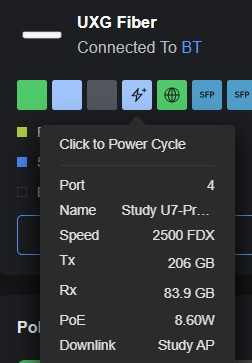
UniFi Devices-> UCG -> Hover over the switch port.

qq1nLiu.jpg


It does sound pretty dead though.

Oh, might want to remove the competitor name from your post above this.
 
UniFi Devices-> UCG -> Hover over the switch port.

It does sound pretty dead though.

Oh, might want to remove the competitor name from your post above this.
Plugged things back in and it's fluctuating from about 6-9w. Fan sounds like it's running full speed (I don't recall how it sounded when things were working, but I don't think it was as loud).

Edited out the e-tailer :) (wasn't thinking).
 
Support ticket logged with the e-tailer who I bought it from last year. Checked the email and I bought both the AP and UCG-Fiber at the beginning of March last year, and they were only in stock/shipped at the beginning of July.

Also to confirm, I did also try restarting the UCG-Fiber and re-connecting the AP to the same PoE port without success.

Just do a support ticket with Ubiquiti directly, they are super fast and you can have a replacement device in 24 hours.
 
I’ve always had excellent support from Unify support directly. My latest ticket was me asking if I could purchase a replacement part for their rack as I’d misplaced it. 2 days later it arrived, free!
 
Back
Top Bottom