Question about SSD

Associate
Joined
23 Dec 2008
Posts
642
I have just bought a Vertex 2 OCZ SSD 60GB SATA2.
Installed Vista 64 bit as I have got now 8GB DDR2 RAM.

When I copied 500MB data from a USB external Seagate drive the speed was like 29MB/s?? I thought it would be faster according to the spec of the SSD drive it says Read up to 285MB/s and Write up tp 275MB/s??? Have I done something wrong?

 
You're limited by the read speed of the external drive connected by USB.

If it's USB 2.0 then 29MB/s read speed is about as much as you'll get.

It doesn't matter how fast the SSD can write data if it's only being fed the data at 29MB/s.

USB 3.0 or eSATA would give a much higher read speed for the external drive.
 
Last edited:
Was the external USB Hard Drive a USB 2.0 or USB 3.0 drive?
USB 2.0 typically has read rates around 30–42 MB/s (according to Wikipedia at least).
So it wont matter how fast your SSD can write if what you're copying from can only read at 30–42 MB/s as that's the best you can get.
 
Just now I copied a 3.73GB file on the SSD to itself.
The burst speed was a good 200MB/s but near the end of the process, it dropped to about 60MB/s...??
How do I test out the read/write speed? And how does a system benefit from a SSD then??
 
Just now I copied a 3.73GB file on the SSD to itself.
The burst speed was a good 200MB/s but near the end of the process, it dropped to about 60MB/s...??
How do I test out the read/write speed? And how does a system benefit from a SSD then??

The big benefit would be read speeds of around 285MB/s as opposed to 'normal' HDDs which I believe are closer to 80MB/s.
I think it's safe to say that generally people read from an SSD (or probably HDD too come to think of it) more often than they write to it.
 
Reading from and writing to the same disk is always going to slow it down no matter what the type of disk.

Test it with something like ATTO Disk Benchmark.
The thing is I dont see an obvious advantage.
Like when I open up a folder, I still have to wait for Windows to "draw" those icons representing sub folders.

This ATTO, will it overwrite everything on the SSD?

How is "fastness" of a SSD accessed?
 
The big benefit would be read speeds of around 285MB/s as opposed to 'normal' HDDs which I believe are closer to 80MB/s.
I think it's safe to say that generally people read from an SSD (or probably HDD too come to think of it) more often than they write to it.

That's not untrue. Actually when I fired up my favourite flight sim program, it's faster, the firing up process I mean. But when it came down to loading the game, it isn't that much different.

I read an article from Anandtech or Tomshardware it actually discussed how we better off with a SSD ... said there is not much difference when it comes to games.

By the way now that I have a fast graphics card, Q660 @3.6 and a SSD, what bottlenecks are there in my system?
 
Surveyor
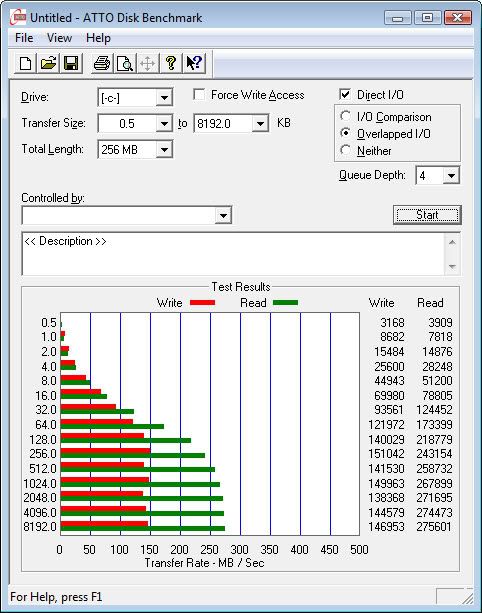
this is the result:
SSDBenchmark.jpg
 
Surveyor
this is the result:

skip

Looks a bit slow for that drive.

Did you set the BIOS to AHCI mode before you installed Windows?

AHCI mode gives the best performance for SSD's.

If you didn't use AHCI mode then you can fix this.

You need to change SATA Mode from IDE to AHCI in the BIOS.

But you can't just do that otherwise your system won't boot.

You need to apply the fix here first.

So first make the changes in the link, restart the PC and go straight into the BIOS, change the SATA mode to AHCI, save the changes and the PC will start again and you'll be using AHCI mode.

Then try the benchmark again.
 
Last edited:
Looks a bit slow for that drive.

Did you set the BIOS to AHCI mode before you installed Windows?

AHCI mode gives the best performance for SSD's.

If you didn't use AHCI mode then you can fix this.

You need to change SATA Mode from IDE to AHCI in the BIOS.

But you can't just do that otherwise your system won't boot.

You need to apply the fix here first.

So first make the changes in the link, restart the PC and go straight into the BIOS, change the SATA mode to AHCI, save the changes and the PC will start again and you'll be using AHCI mode.

Then try the benchmark again.

Thanks a million!! I'll be reporting back.
 
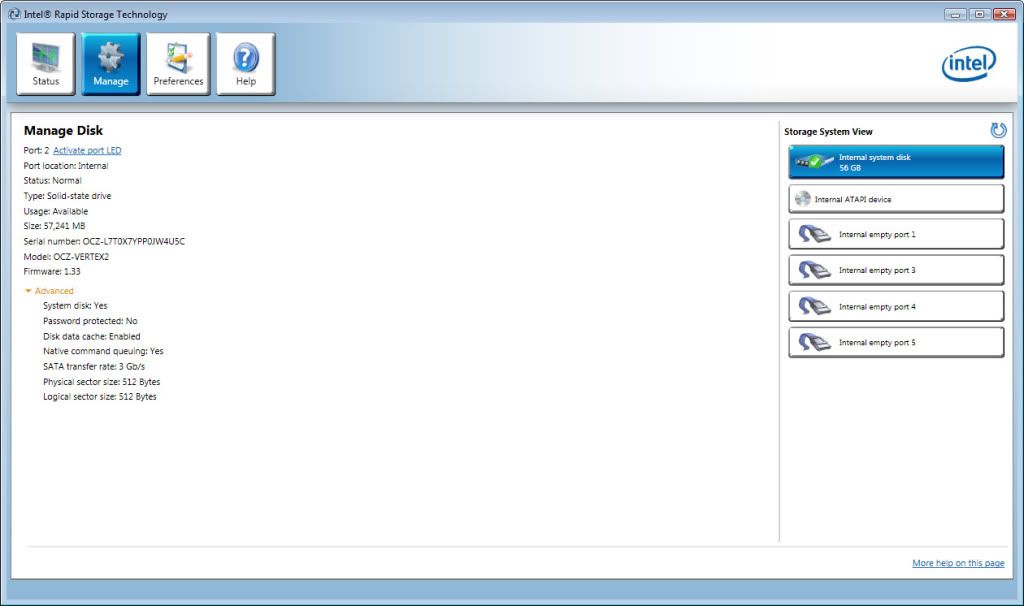
ACHIEnabled.jpg


Folks,

It is faster AHCI apparently. When Vista boots, that light green bar that goes from left to right actually runs 3 times and it jumps to the logon screen which is faster than before many times.

I also tried that 3.73GB copy from USB, this time the speed is 34MB/s, not much but at least a several MB improvement.

What else I need to do to squeeze as much as possible?
 
Isn't that the Write speed is not quite the spec printed on the box! It says 275MB/s.

Well I wouldn't mind to reinstall the whole thing again. I didn't specify AHCI when before. By the way, if I set the AHCI in BIOS, will the DVD still operate? I mean the DVD is a SATA-1 device. Stupid question really but I just want to confirm.
 
Back
Top Bottom