• Notice regarding image hosts and attachments. See here.

Random 3D printing chatter

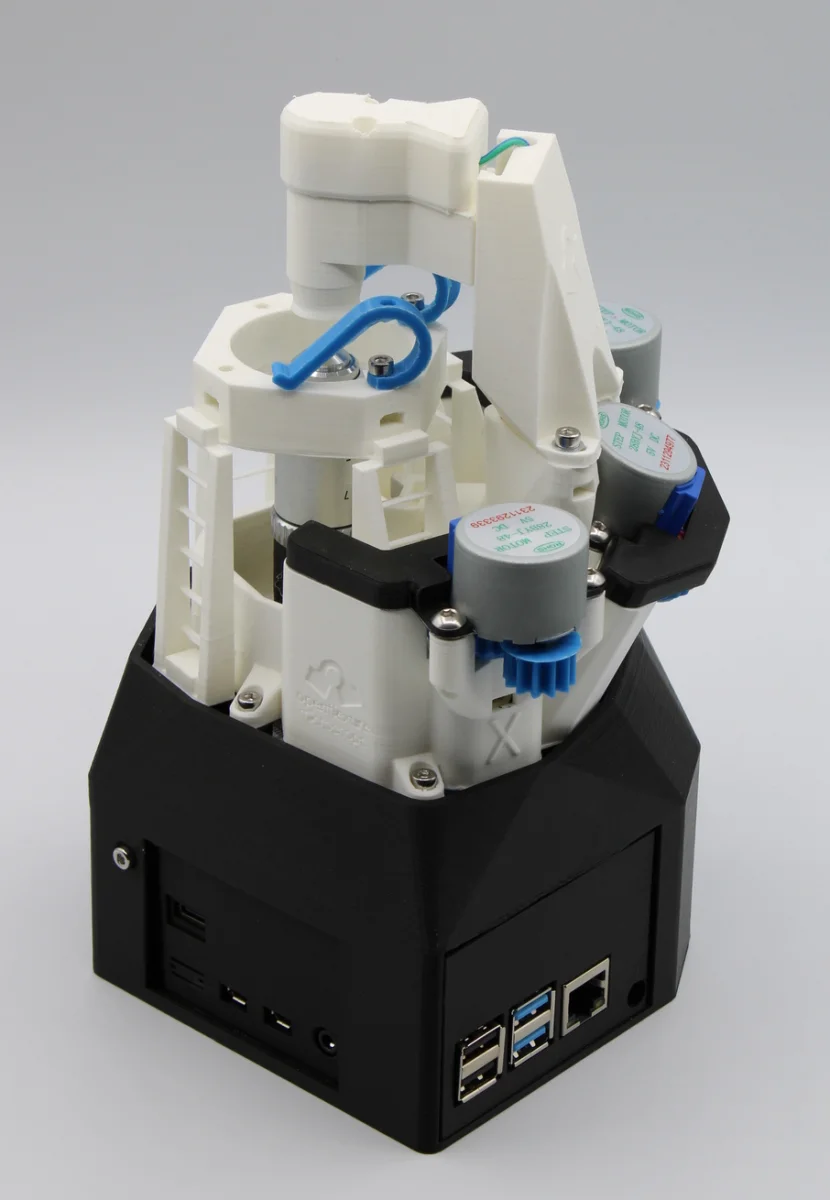
So I've started volunteering.. with a charity makes 3D printed microscopes for third world countries that uses off the shelf parts - including using Raspberry Pi to control the movements, focusing and imaging with either a RP Camera V2 or a 12MP Camera HQ:

1788620998722.webp


The plans are all free and open source, so if you have kids or schools wanting a microscope, you could use your 3D printer.

I've been helping out on the digital side.
 
Last edited:

So I've started volunteering.. with a charity makes 3D printed microscopes for third world countries that uses off the shelf parts - including using Raspberry Pi to control the movements, focusing and imaging with either a RP Camera V2 or a 12MP Camera HQ:


1788620998722.webp


The plans are all free and open source, so if you have kids or schools wanting a microscope, you could use your 3D printer.

I've been helping out on the digital side.
I have no real need for one, but want to build one, looks like a fantastic project!
 
That tinmorry PETG-GF that Cenedd put me onto is absolutely brilliant, and with the tinmorry print settings seems to always turn out with a nice result. My only regret is I'm coming to the end of the two rolls I bought and I keep saving it for priority stuff which actually reduces the number of things I've printed recently. Is that a thing, saving(hoarding) your filament for something special?
 
Last edited:
@Rilot what's your thoughts on the Creality Pika as a introduction to scanning?
Reports seem good but bear in mind that it's not stand alone (even though Creality make it look like it is). You still need a host device to do the scan. The screen is a mirror of what your PC is doing.
It seems to get good results for sure. I haven't got one yet but might in the future.
 
Reports seem good but bear in mind that it's not stand alone (even though Creality make it look like it is). You still need a host device to do the scan. The screen is a mirror of what your PC is doing.
It seems to get good results for sure. I haven't got one yet but might in the future.
Thanks, yes worked that one out from the reviews hopefully my S25 Ultra will have enough poke to work with it, generally though the few things I have planned where I would use it would be at my desk plugged into the computer so shouldn't cause too much issues, think I may sit on it and see what prices black Friday brings can't seem to find any discount codes currently that work with the Pika.
 
AI is telling me that my Bambu Lab Engineering Plate can be used without glue/hairspray while printing in PETG with good adhesion and easy release. Is that correct?

I normally use the Bambu Lab texture plate with hairspray as I had issues with PETG welding itself to the plate without adhesive.

Would the Engineering plate play nice with PLA too?
 
AI is telling me that my Bambu Lab Engineering Plate can be used without glue/hairspray while printing in PETG with good adhesion and easy release. Is that correct?

I normally use the Bambu Lab texture plate with hairspray as I had issues with PETG welding itself to the plate without adhesive.

Would the Engineering plate play nice with PLA too?
I have never used Hairspray/glue or anything else in 10 years of printing PETG on any build plate

I really like the Cryogrip Glacier plates on my P1S
 
AI is telling me that my Bambu Lab Engineering Plate can be used without glue/hairspray while printing in PETG with good adhesion and easy release. Is that correct?

I normally use the Bambu Lab texture plate with hairspray as I had issues with PETG welding itself to the plate without adhesive.

Would the Engineering plate play nice with PLA too?
I’ve printed a lot of PETG models on my Bambu textured plate and never used any glue or hairspray. I actually printed a ESP32 case this morning in PETG. Let the prints cool and they should come off quite easily
 
Glue, for those doing really long prints who don't want to risk it, or, haven't tweaked their printer well enough..
 
Hi Peeps.

I'm new to the World of 3D printing and enjoying using MakerWorld to print out other peoples designs. The furthest I've ventured off the safe path is printing some minifigures for DnD sessions with the kids. Some print ok on my Bambu A1 but some I struggle to release from the auto Tree supports. How should I go about improving the supports to make releasing the figures more easily. Is it something I can do manually in Bambu Studio App or do I need an alternative program to do a better job of slicing them.

Any help gratefully received.
 
Hi Peeps.

I'm new to the World of 3D printing and enjoying using MakerWorld to print out other peoples designs. The furthest I've ventured off the safe path is printing some minifigures for DnD sessions with the kids. Some print ok on my Bambu A1 but some I struggle to release from the auto Tree supports. How should I go about improving the supports to make releasing the figures more easily. Is it something I can do manually in Bambu Studio App or do I need an alternative program to do a better job of slicing them.

Any help gratefully received.
I have found twisting tree supports horizontally off works the best
 
If you have an AMS you can print a layer of PETG* (or a specific support material) between the support and the model.

The slicer can sort this out automatically.


*PETG and PLA don’t stick to each other.
 
You want option 3 pla model, pla support, PETG interface (or the opposite if printing PETG)


Edit: do also note the comment at the end of the article.
 
Last edited:
Back
Top Bottom