


Associate
- Joined
- 9 Jan 2012
- Posts
- 226
ps: i did post in the support part but no reply yet and I know a lot of people read this hard of the forum 
Hello I brought a computer a few days ago, and I added two hard drives to the build. When I got it up and running it only seemed like there was one hard drive - The SSD. The 1 TB HD I had added wasn't showing.
5UB tried to help me, he said to "right click my computer, then select manage. Then Select “Disk Management”, located in the left panel.
Your new hard disk will be shown in the right hand panel as “Unallocated” and in black. Right-click on the left hand side of your new hard disk, where its disk number is located, and Select “Initialise.”
I tried this but there wasn't a Unallocated panel.
This is the screen I get on it ...
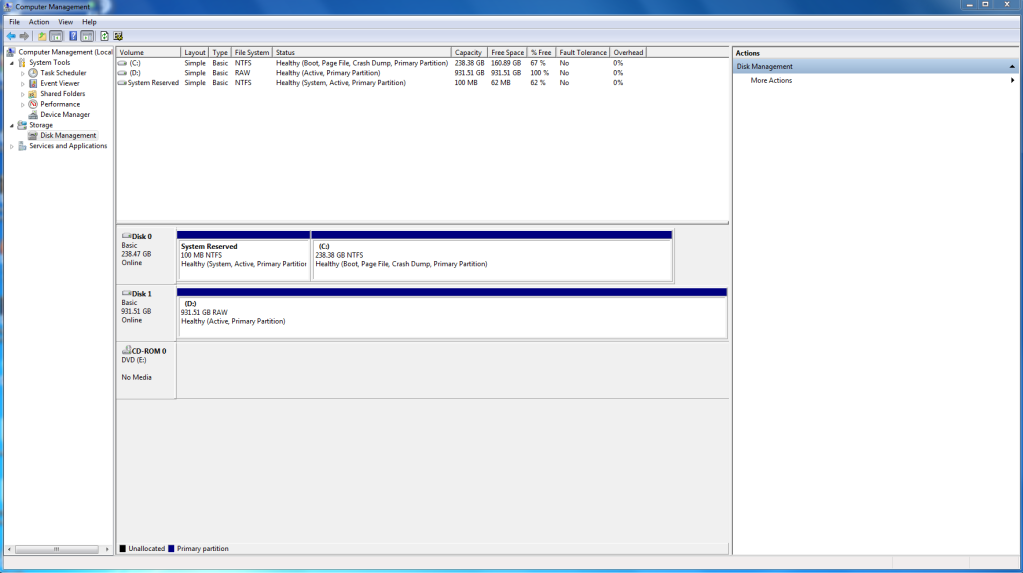
Any help ...?
Hello I brought a computer a few days ago, and I added two hard drives to the build. When I got it up and running it only seemed like there was one hard drive - The SSD. The 1 TB HD I had added wasn't showing.
5UB tried to help me, he said to "right click my computer, then select manage. Then Select “Disk Management”, located in the left panel.
Your new hard disk will be shown in the right hand panel as “Unallocated” and in black. Right-click on the left hand side of your new hard disk, where its disk number is located, and Select “Initialise.”
I tried this but there wasn't a Unallocated panel.
This is the screen I get on it ...
Any help ...?




 Thanks!