


second Hard Drive help

Associate
Joined
9 Jan 2012
Posts
226
ps: i did post in the support part but no reply yet and I know a lot of people read this hard of the forum :)


Hello I brought a computer a few days ago, and I added two hard drives to the build. When I got it up and running it only seemed like there was one hard drive - The SSD. The 1 TB HD I had added wasn't showing.

5UB tried to help me, he said to "right click my computer, then select manage. Then Select “Disk Management”, located in the left panel.

Your new hard disk will be shown in the right hand panel as “Unallocated” and in black. Right-click on the left hand side of your new hard disk, where its disk number is located, and Select “Initialise.”

I tried this but there wasn't a Unallocated panel.

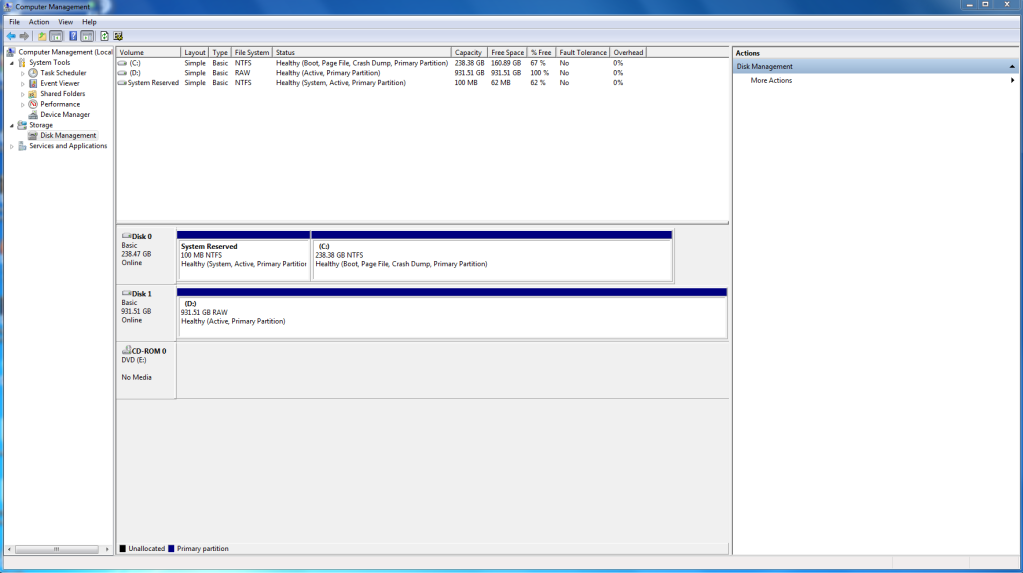
This is the screen I get on it ...


Capture-3.png


Any help ...?
 
Does the HDD have a power and SATA data cable in it?

I can see from that picture above that the SSD and a 1TB HDD is showing fine, so its just a second one you cant get working?
 
Does the HDD have a power and SATA data cable in it?

I can see from that picture above that the SSD and a 1TB HDD is showing fine, so its just a second one you cant get working?

Apparently I have to Initialise it to get it showing up on my computer but I followed the steps given by one of the devs and it didn't show the same for me, hence my picture ^^
 
So does it have a data and power cable connected to it or not?

Because even if it did, it should have a nice dark grey box in your picture, suggesting its not plugged in.
 
Can you feel if the HDD is spinning/slight vibration?

Try another SATA port on the board.
 
MMMMmmmmmmmmmmmm

I take it you put a SSD + a 1TB HDD in your computer?

The SSD is the boot drive (ie with Win 7 on) ? and the 1 TB is the data storage drive ?

If so ....this is what is showing in disk management

Just confirm this?

EDIT

just to save time.... if I can't get back tonight

right click on disk 1 - the bit with the blue bar above it (in your screen shot)

select format

format as NTFS

assign a label.... such as "Data"

and your 1 TB drive should now appear when you click "Computer" (Win 7)

:)
 
Last edited:
Hello I brought a computer a few days ago, and I added two hard drives to the build. When I got it up and running it only seemed like there was one hard drive - The SSD. The 1 TB HD I had added wasn't showing.

Just to be certain are you supposed to have an SSD and 2 HDD's or an SSD plus 1 HDD?

The drives showing in Disk Management are a 256GB SSD and a 1TB HDD.

SSD/HDD manufacturers use an SI measurement of GB which is 10^9 bytes.

Windows uses a binary system which is 2^30 bytes. Technically this is a Gibibyte.

1TB using the SI measurement is ~935.51 GB using the Windows binary system which you can see in Disk Management.

Just right click on this (the D drive) and format it to NTFS.
 
MMMMmmmmmmmmmmmm

I take it you put a SSD + a 1TB HDD in your computer?

The SSD is the boot drive (ie with Win 7 on) ? and the 1 TB is the data storage drive ?

If so ....this is what is showing in disk management

Just confirm this?

EDIT

just to save time.... if I can't get back tonight

right click on disk 1 - the bit with the blue bar above it (in your screen shot)

select format

format as NTFS

assign a label.... such as "Data"

and your 1 TB drive should now appear when you click "Computer" (Win 7)

:)

Thanks, this was the answer, I did think it was the format thing but just wanted to make sure :D Thanks!
 
No it was two. I have one, - SSD 250 or something, then a 1 TB. I just call the SSD a HD for ease.

Ease for you, confusion for others.

As you can gather from my earlier post I wasn't sure if you had an SSD and 2 HDD's or an SSD plus 1 HDD.

If you'd said an SSD and a HDD then stulid would likely have sorted your problem with his first post.
 
Back
Top Bottom




