should be faster (SSD)

Associate
Joined
30 Aug 2003
Posts
1,418
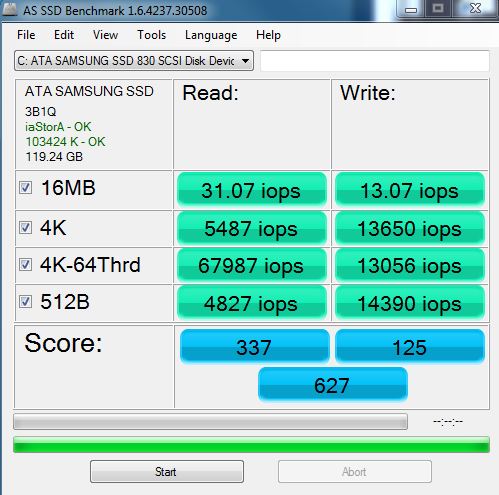
last year i bought a samsung 830 128mb SSD, and got these speeds on my sata 2 board
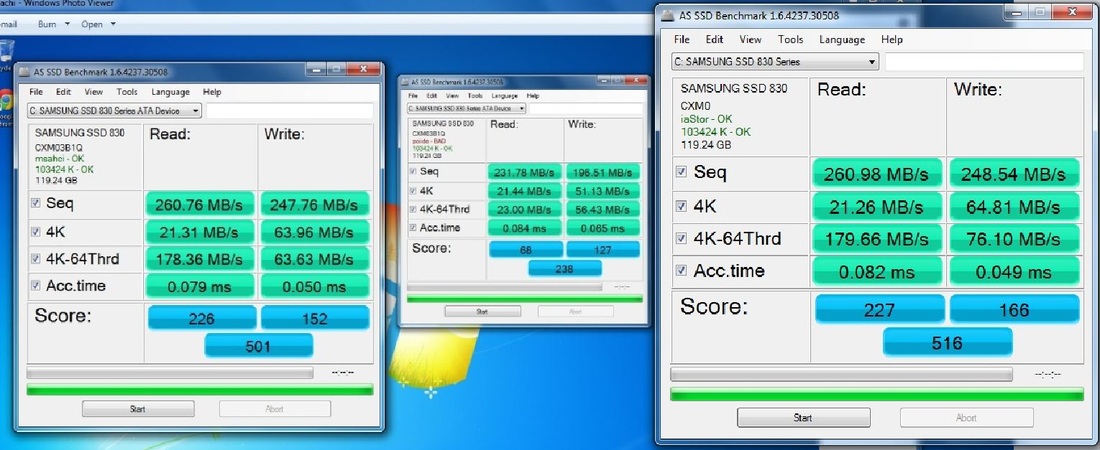
2723755_orig.jpg


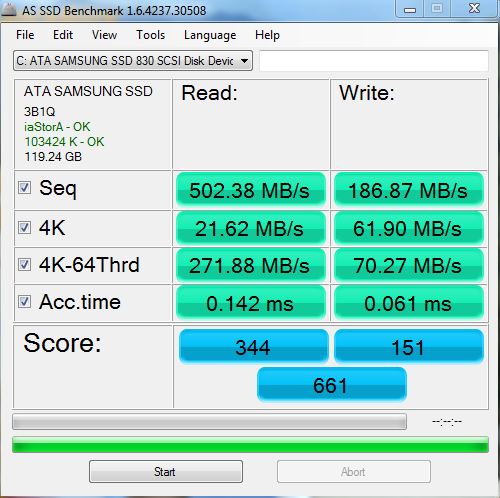
i now have a gigabyte z77x ud3 motherboard with sata 3
but get these speeds

5053087_orig.jpg


7735863_orig.jpg


how do i get my write speeds up?
 
Is it the benchmarks you interested in or real speed? Benchmarks are not that important to me.
 
Same MB as the one I own.

Have you tried different versions of the Intel Sata drivers ?

do you have a link to it? (i have downloaded the from gigabyte version 11.6.0.1030)

Is it the benchmarks you interested in or real speed? Benchmarks are not that important to me.

real speed is good, but surely if the write speed is down in benchmarks, wont this effect the real speed as well?
 
Is it the benchmarks you interested in or real speed? Benchmarks are not that important to me.

I agree that benchmarks are often not important in the "real world".

However, I think it's not a bad idea to "benchmark" a new piece of hardware or system setup to make sure that it is working properly, and providing the performance, or close to the performance that it is supposedly capable of.

It would appear the the write speeds on this SSD are a fair bit lower than what is expected. It may indicate a problem, even though it may not be noticeable in everyday use.
 
installed latest intel rapid storage drivers? and running latest motherboard bios? those will help improve speeds
 
you need latest mb bios aswell if you havn't already updated it

and latest firmware for your ssd,im seeing two different fw versions in those screenshots
 
Not a bad idea to have the latest MB BIOS, but I don't think any of the BIOS updates improved the performance of the Intel Sata ports (I think one update did address an issue with the Marvel ports).

Be careful with the beta BIOS (F19e), it caused me some grief until I worked out how to stop it from preventing my system to boot.

I`ve just tested the RST driver that I recommended, and it does work and gives close to the specified 250Mb/s sequential write on my 840 250GB.
 
that's the fw of the ssd,so theres a newer one out imo

magician tool will check/download/install the fw for you

id stick to latest non beta bios for now but upto you
 
i have bios version f16 (only shows F17f as being beta, http://uk.gigabyte.com/products/product-page.aspx?pid=4144#bios )

the versions you see in the screen shots are not drive bios, i have not changed it since new as it had the latest at the time, so i can only assume its the software version.

I am using the intel sata port

Be careful. You stated that you have a "gigabyte z77x ud3".

I have the same board. Well, it's a z77x ud3h to be precise.

It's not the same as a Z77X-D3H, well not the same list of BIOS downloads, anyway.

http://uk.gigabyte.com/products/product-page.aspx?pid=4153#bios
 
If you haven't already.....

Install Samsung Magician (download the latest version, 4.1? from Samsung).

Set OS Optimisation to "Maximum Performance".

Enable Over Provisioning.

BTW, your SSD isn't nearly full by any chance ?
 
there is 33gb free

That should not cause a problem.

Have you tried Samsung Magician ? As wazza advised, you can use it to check for and install any firmware updates.

Apart from the things I previosuly mentioned, it also has a Performance Optimisation facility, which, I assume, forces garbage collection to take place on the SSD. This should be happening anyway if you have AHCI and TRIM enabled (Windows 7/8 should enable TRIM if you have AHCI and Intel drivers, which it appears you do have). I'd run the optimisation tool anyway, just to be sure.
 
yes, i have been using samsung Magician since i got the drive, there are no firmware updates for it.
Performance Optimization had already been used
it says my current OS (win 7 64bit ultimate) does not offer native trim support for ssd drives, but can use Magician to Optimize as needed.
 
Back
Top Bottom