


Soldato
- Joined
- 19 Feb 2007
- Posts
- 15,867
- Location
- Sol
The biggest frustration for me is losing the shader cache in all my UE games. What a terrible game engine.
Agreed, would be nice if we could save shader caches for such scenarios.
Please remember that any mention of competitors, hinting at competitors or offering to provide details of competitors will result in an account suspension. The full rules can be found under the 'Terms and Rules' link in the bottom right corner of your screen. Just don't mention competitors in any way, shape or form and you'll be OK.
The biggest frustration for me is losing the shader cache in all my UE games. What a terrible game engine.
Agreed, would be nice if we could save shader caches for such scenarios.
 devblogs.microsoft.com
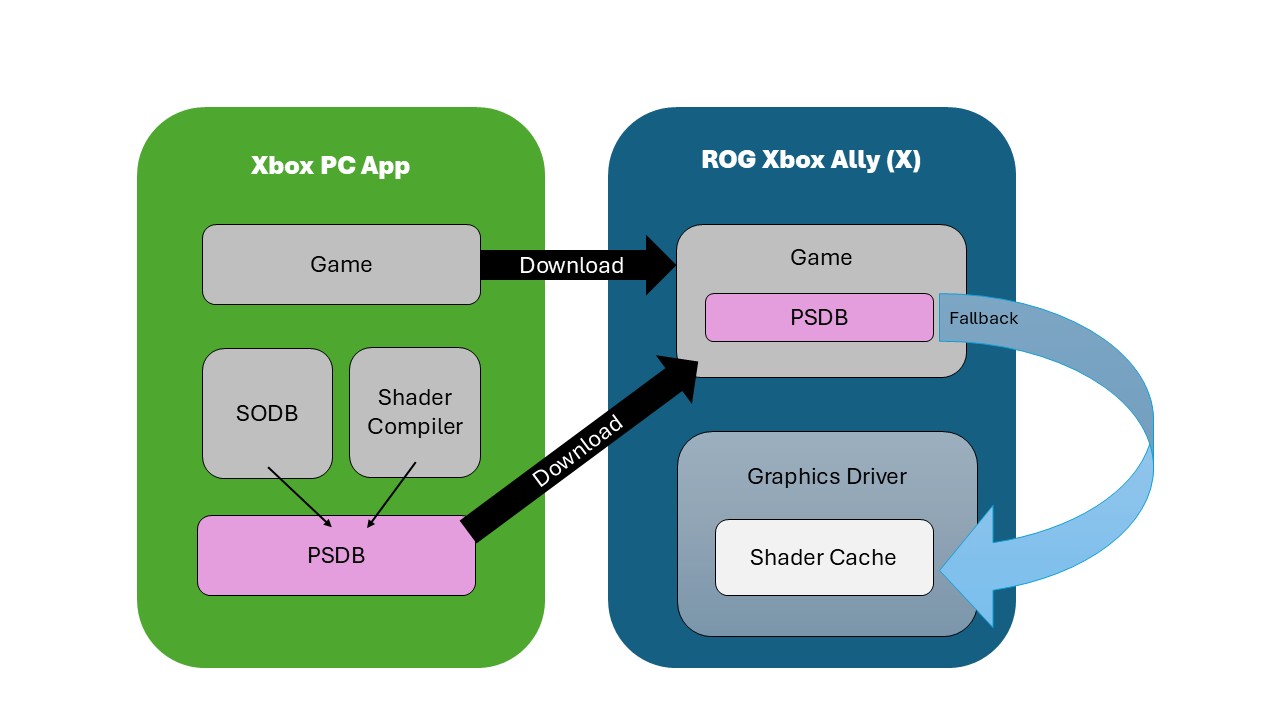
We have partnered with teams across Xbox and at AMD to precompile this data and distribute it at download time for key titles via the Xbox PC app This approach not only gets you into your games faster, but it also prevents most instances of stutter that cause performance issues.
Introducing Advanced Shader Delivery - DirectX Developer Blog
This year at gamescom, Microsoft is highlighting new gaming features coming for Windows, particularly for handheld devices. We want to highlight one of
Not quite saving shader cache but AMD/MS are launching Advanced Shader Delivery on W11 soon:
Hoping it gets opened up to full windows integration soon after, perhaps it'll get hacked/moded into Windows.Will be nice when it happens but I don't think we'll see it on devices outside the handheld space anytime soon.
I thought steam already did this, but only for Vulkan and Steam deck.Hoping it gets opened up to full windows integration soon after, perhaps it'll get hacked/moded into Windows.
Hopefully jolts Steam into action too.
Release Highlights
Game Ready for Indiana Jones and the Great Circle: The Order of Giants
This new Game Ready Driver provides the best gaming experience for the latest new games supporting DLSS 4 technology including Indiana Jones and the Great Circle: The Order of Giant and Wuthering Waves.
Fixed Gaming Bugs
- Marvel's Avengers - The Definitive Edition: Game crashes to desktop on startup [5350712]
Fixed General Bugs
- Certain monitors may display a random flicker when hot plugged over HDMI [5280259]
New driver is up, 581.15.
Download - https://www.nvidia.com/en-gb/geforce/drivers/results/253172/
Article - https://www.nvidia.com/en-us/geforc...le-order-of-giants-geforce-game-ready-driver/
That random flicker bug could be something I have been experiencing on my RTX 3050.
What do they mean by 'hot plugged'?
Do they mean plugging in the monitor whilst the pc is on?

no issues my side (3060)Looks like the latest driver has broken the onscreen overlay pressing alt+r does nothing to turn on/off looks like I'm going to have to rollback to the previous, anyone else confirm?
Looks like the latest driver has broken the onscreen overlay pressing alt+r does nothing to turn on/off looks like I'm going to have to rollback to the previous, anyone else confirm?

I've had a few issues with the overlay in recent drivers. It just seems pretty unreliable now, and sometimes resets completely, so I have to reconfigure it. Thankfully, that's been my only issue, so it could be a lot worse. MSI AB is still my preferred choice anyway.Huh thats odd it suddenly started working again I went through a number of options in the menu and ticked/unticked a number of boxes maybe that unstuck something. Definitely occurred after the driver update it was fine before.
Huh thats odd it suddenly started working again I went through a number of options in the menu and ticked/unticked a number of boxes maybe that unstuck something. Definitely occurred after the driver update it was fine before.
Nvidia GeForce 581.29 WHQL GPU Driver Release Notes
This new Game Ready Driver provides the best gaming experience for the latest new games supporting DLSS 4 technology including Borderlands 4 and Dying Light: The Beast.
Applications
The September NVIDIA Studio Driver provides optimal support for the latest new creative applications and updates including support for Microsoft TRELLIS NIM, providing optimized performance on RTX GPUs.
Fixed Application Bugs
- Cyberpunk 2077: Crash when using Photo Mode to take a screenshot with path tracing enabled [5076545]
- Marvel Rivals: Negative performance impact when using some 581.xx drivers [5444816]
- Forza Motorsport: Game crashes if using Smooth Motion while bringing up NVIDIA App overlay statistics [5412757]
- Gray Zone Warfare: Game stability issues [5371781]
- ARK: Survival Ascended: Game stability issues [5441616]
- Marvel’s Avengers – The Definitive Edition: Game crashes to desktop on startup [5350712]
Fixed General Bugs
- Potential memory leak when using NVENC hardware encoding [5442678]
- Power cycling monitor can result in monitor flickering when NVIDIA App is installed [5434811]
- NVIDIA App game filter issues after driver update [5429651]
- Certain monitors may display a random flicker when hot plugged over HDMI [5280259]
Open Issues in Version 581.29 WHQL
- Counter-Strike 2: Text may appear slightly distorted when in-game resolution is lower
than the native resolution of the display [5278913]- Adobe Premiere Pro: Some system configurations can freeze during export using
hardware encoding [5431822]- Like a Dragon: Infinite Wealth: Light flickering after driver update on some system
configurations [5432356]



